Skills Section Resume: What to List and How to Pass ATS
Your skills section has one job: put the right hard skills in front of a recruiter and an automated screening system fast. According to Resume Optimizer Pro, resumes that match a moderate number of direct keywords to a job posting score higher in automated screening. Aim for that range. A strong opening looks like this: Python | SQL | Tableau | A/B Testing | Google Analytics | Agile | Jira | Data Visualization. Eight specific tools, zero filler. That is the standard to hit.
Key Takeaways
A targeted skills section with a moderate number of hard skills, matched to the job description’s exact wording, is a very effective edit you can make before submitting any application.
| Point | Details |
|---|---|
| List 8–12 hard skills | Resumes matching 8–12 direct keywords to a posting score higher in automated screening. |
| Tailor to every posting | Reorder and reword your skills section for each application using the job description’s exact terms. |
| Prove soft skills in bullets | Never list a soft skill without a supporting experience bullet that shows a measurable result. |
| Format for ATS | Use plain text, grouped categories, and no graphics or proficiency bars. |
| Easy-cv automates the match | Easy-cv’s AI and Job Matcher suggest relevant keywords and flag gaps before you submit. |
Table of Contents
- What actually belongs in your skills section
- Where to place your skills section and how to format it
- How to tailor your skills section to each job posting
- How to back every skill with proof
- Building a skills section with little or no experience
- Common mistakes that cost you interviews
- Copy-ready skills sections by role
- Your pre-submit checklist and copy-ready templates
- The skills section is the highest-ROI edit on your resume
- Build your tailored skills section with Easy-cv
- Sources
What actually belongs in your skills section
Hard skills belong in a dedicated skills section; soft skills should be proven with specific accomplishments in your experience bullets, not listed as adjectives. The distinction matters because ATS systems scan for technical keywords, not personality traits.
Hard skills to list:
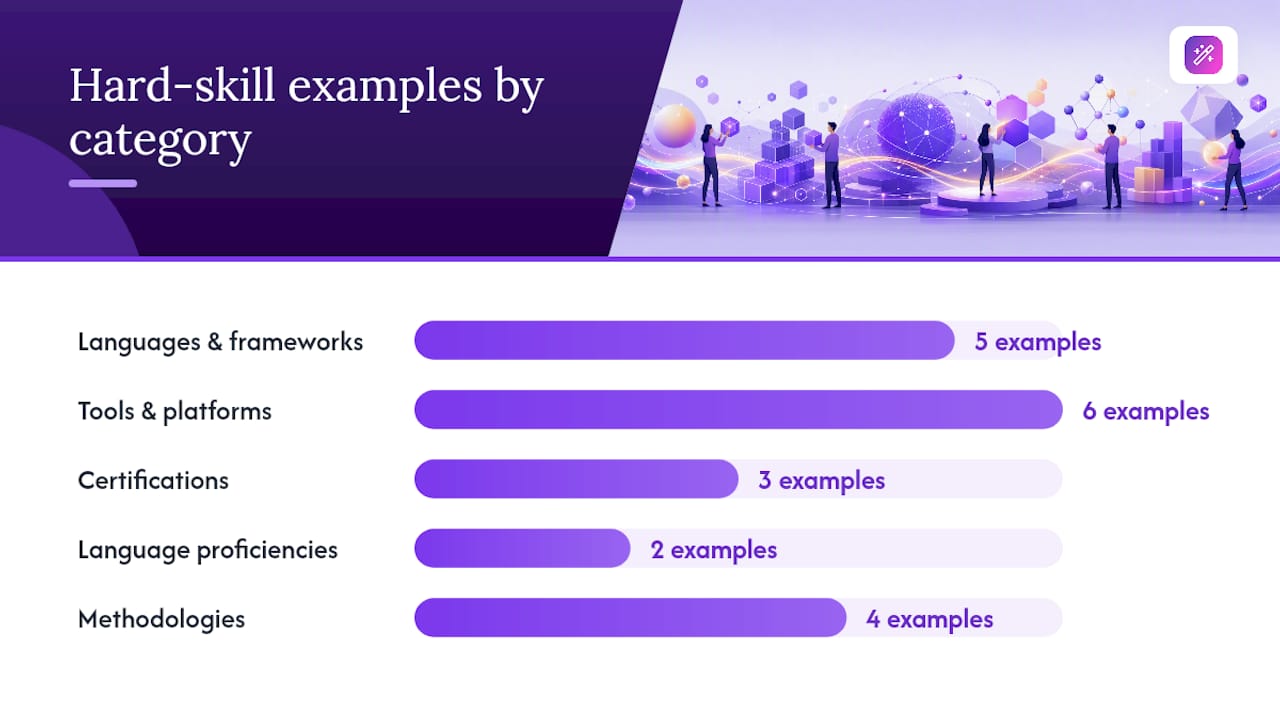
- Programming languages and frameworks: Python, JavaScript, React, SQL, Java
- Tools and platforms: Salesforce, HubSpot, Jira, Figma, Adobe Illustrator, Google Analytics
- Certifications: PMP, AWS Certified Solutions Architect, Google Analytics 4 Certification
- Language proficiencies: Spanish (professional working), Mandarin (conversational)
- Methodologies: Agile, Scrum, Six Sigma, GAAP
Be specific with your entries. “Excel (PivotTables, VLOOKUP)” tells a recruiter something. “Microsoft Office” tells them nothing they can act on. Mirroring the job posting’s exact terms is the single most reliable way to pass keyword filters. If the posting says “PostgreSQL,” write “PostgreSQL,” not “SQL databases.”
Soft skills — communication, leadership, problem-solving — belong in your experience bullets as demonstrated results, not in the skills list. The one exception: if a soft skill is explicitly listed as a requirement in the job description, you can include it in the skills section and then prove it in a bullet below.
For language proficiencies, use a recognized scale. The ILR scale (Elementary through Native) or CEFR levels (A1 through C2) give a recruiter an objective reference point. “Fluent in Spanish” is vague; “Spanish (ILR Level 3 / Professional Working Proficiency)” is not.
Pro Tip: List certifications with their issuing body and year: “AWS Certified Solutions Architect — Associate (Amazon, 2025).” That format is both ATS-readable and immediately credible to a human reviewer.
Where to place your skills section and how to format it
Placement depends on your experience level. Early-career candidates and anyone in a technical role should put the skills section near the top, right after the summary or objective statement. Experienced professionals in non-technical fields can place it after the experience section, where it reads as a supporting reference rather than the lead.
Three formatting patterns work well:
Categorized groups (best for technical roles with many tools):
Languages: Python, SQL, R
Tools: Tableau, Power BI, Excel
Platforms: AWS, GCP, Azure
Single-line horizontal list (clean, ATS-safe, good for hybrid roles):
Skills: Project Management | Agile | Jira | Stakeholder Communication | Risk Assessment | Budgeting
Sidebar column (works in two-column templates, but only if your ATS export is tested):
SKILLS
──────────
Python
SQL
Tableau
Agile
Jira
Avoid star ratings, progress bars, and icon-based proficiency graphics. ATS parsers read text, not visual elements. A five-star “Excel” rating is invisible to the software and meaningless to a recruiter who wants to know whether you can build a financial model. For layout guidance that pairs well with your skills section, see how to write a professional resume that gets noticed.
Pro Tip: If you use a two-column template, paste the plain-text version of your resume into a basic text editor before submitting. If the columns collapse into a jumbled mess, your ATS submission will too.
How to tailor your skills section to each job posting
Tailoring is not optional. It is the highest-return edit you can make before hitting submit. Here is a repeatable workflow:
- Copy the job description into a document. Highlight every skill, tool, methodology, and qualification mentioned, including those buried in the “preferred” section.
- Map highlighted terms to your actual skills. Only include what you can honestly defend in an interview. Cross off anything you have never used.
- Rank by frequency and placement. A skill mentioned three times in the posting matters more than one mentioned once. Skills in the job title or first paragraph outrank those in the “nice to have” list.
- Reorder your skills section. Put the highest-priority matches first. Order matters for both human and ATS readability — recruiters skim top-left first.
- Use the posting’s exact phrasing. Two quick examples:
| Job Description Says | Write on Resume |
|---|---|
| “Experience with Salesforce CRM” | Salesforce CRM |
| “Proficiency in data visualization tools” | Tableau, Power BI (Data Visualization) |
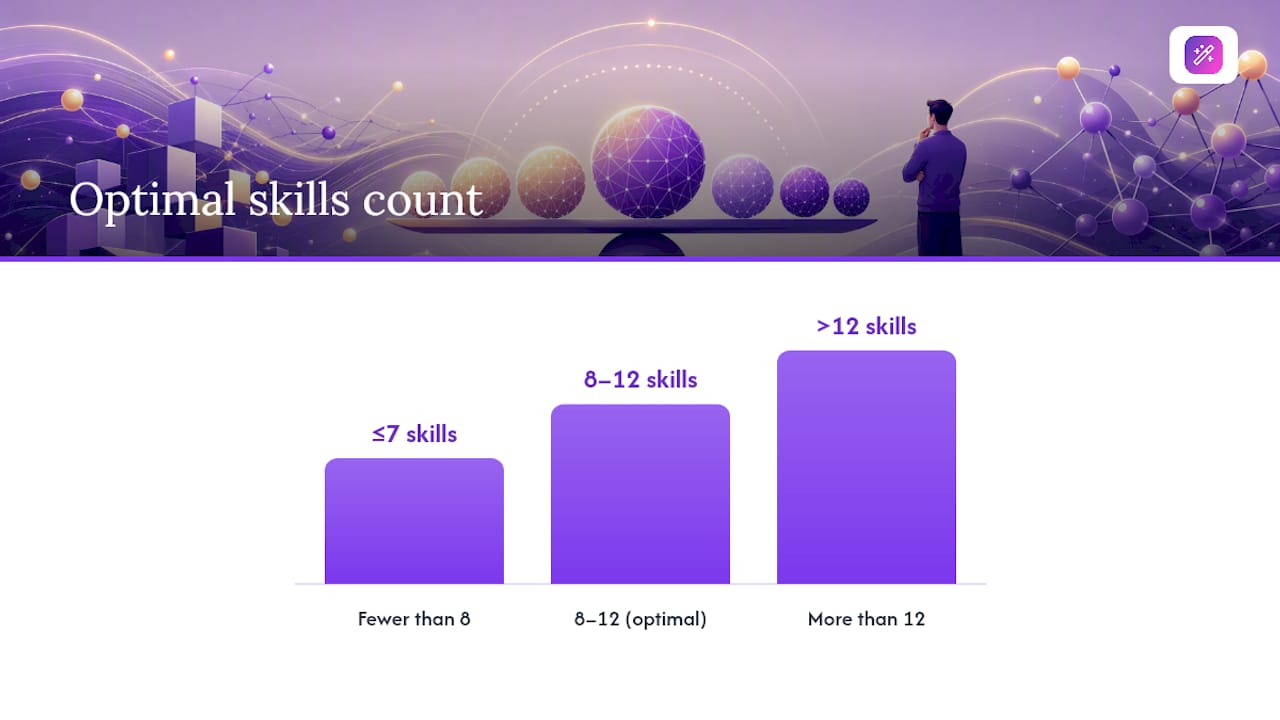
Keep the total to a moderate number of skills. Fewer than 8 leaves keyword gaps; more than 12 starts to look like padding and dilutes the signal. Group related items together: “Data Analysis: SQL, Python, Tableau” reads faster than a flat alphabetical list.
Pro Tip: Use the exact term from the posting, even when you know a synonym. If the JD says “Agile methodology” and you write “Scrum,” a keyword-matching ATS may not connect them.
For a deeper look at the matching process, tailoring your resume to a job description walks through the full workflow step by step.
How to back every skill with proof
A skill listed without evidence is a claim. A skill backed by a result is a credential. The pattern is simple: list the skill in the skills section, then prove it in an experience bullet using context, action, and result.
Three sample bullets that turn soft-skill claims into verifiable achievements:
- Communication: Presented quarterly performance data to a 40-person cross-functional team, reducing project misalignment incidents by 30% over two quarters.
- Leadership: Managed a four-person QA team through a product launch, delivering on schedule with zero critical post-launch defects.
- Problem-solving: Identified a billing error in the invoicing workflow that had overcharged clients for six months; corrected the process and recovered $18,000 in credits.
Notice that none of those bullets use the word “communication,” “leadership,” or “problem-solving.” The achievement demonstrates the skill. That is the point.
For coursework, GitHub projects, or portfolio items: include them when they are the primary evidence for a skill. A link to a GitHub repository that shows working Python code is stronger than “Python (beginner)” with nothing behind it. Adding quantifiable achievements to your bullets is the fastest way to make soft-skill claims defensible.
Building a skills section with little or no experience
No work history does not mean no skills. Relevant coursework, volunteer work, and projects count as evidence — treat them the same way you would treat a job.
For a first job resume or a no experience resume, a functional or combination layout puts your skills section at the top, before the experience section. That structure works when your skills are stronger than your job titles.
Converting coursework and projects into skills evidence:
- Completed a capstone project in Python data analysis (pandas, matplotlib) — link to GitHub
- Volunteer social media coordinator for a nonprofit: managed Instagram and Facebook, grew combined following by 400 over six months
- Relevant coursework: Financial Accounting, Business Statistics, Supply Chain Management (GPA 3.8)
For proficiency levels, prefer evidence over self-rating. “Proficient in Python” means nothing without context. “Python (3 projects, 2,000+ lines of code, GitHub: [link])” means something. If you are genuinely early in learning a tool, write “Familiar with X” rather than claiming proficiency you cannot demonstrate.
Pro Tip: Certifications from Google, Coursera, LinkedIn Learning, or HubSpot Academy are free or low-cost and carry real weight on an entry-level resume. A Google Data Analytics Certificate or HubSpot Content Marketing Certification signals initiative and gives you a hard skill to list with a credential behind it.
Understanding how to list language skills and proficiency levels can also strengthen an entry-level application, especially for roles that list bilingual ability as a preference.
Common mistakes that cost you interviews
- Generic soft-skill lists. “Team player, detail-oriented, strong communicator” — recruiters skip these on sight. Replace adjectives with measurable examples in your bullets. Quick fix: delete every soft skill from the list that has no supporting bullet.
- Keyword stuffing. Listing 20+ skills to cover every possible search term makes the section unreadable and signals desperation. Quick fix: cut to 8–12, prioritized by the specific posting.
- Outdated tools. “Microsoft FrontPage” or “Lotus Notes” signals that your skills have not kept pace. Quick fix: audit your list annually and replace deprecated tools with current equivalents.
- Proficiency bars and star ratings. ATS systems cannot read graphics. A four-star “Excel” rating is invisible to the parser. Quick fix: replace all visual ratings with plain text and a parenthetical note if needed.
- Listing skills you cannot defend. If “Kubernetes” is on your resume and you cannot explain a pod, expect a rough interview. Quick fix: move anything you only “touched once” to a “Familiar with” subsection or remove it.
- Inconsistent terminology. Using “JS” in one place and “JavaScript” in another can split keyword matches. Quick fix: pick one term per tool and use it everywhere.
For more on why soft skills need proof to land, the evidence is clear: unsubstantiated adjectives are the first thing a recruiter skips.
Copy-ready skills sections by role
These are starting points. Tailor every list to the specific posting before you submit. Understanding why sector-specific resumes matter will help you decide which skills to prioritize for your industry.
Software Engineer (Entry Level) Python | JavaScript | React | Git | REST APIs | SQL | Agile | Unit Testing
Software Engineer (Mid-Level) Python | Go | Kubernetes | Docker | AWS | CI/CD | PostgreSQL | System Design | Code Review | Agile
Data Analyst SQL | Python (pandas, NumPy) | Tableau | Power BI | Excel (PivotTables, VLOOKUP) | Statistical Analysis | A/B Testing | Google Analytics
Marketing Manager HubSpot | Google Analytics 4 | SEO/SEM | Content Strategy | Paid Social (Meta Ads, LinkedIn Ads) | Email Marketing | Copywriting | A/B Testing | Salesforce
Project Manager PMP | Agile | Scrum | Jira | MS Project | Risk Management | Stakeholder Communication | Budget Management | Change Management
Customer Support Specialist Zendesk | Salesforce Service Cloud | Intercom | Conflict Resolution | SLA Management | CRM | Technical Troubleshooting | Live Chat Support
Career Changer (Operations to Data) SQL | Excel (Advanced) | Tableau | Process Improvement | Six Sigma (Green Belt) | Data Cleaning | Stakeholder Reporting | Google Sheets
Your pre-submit checklist and copy-ready templates
Before you submit any application, run through this list:
- Skills section contains 8–12 items total.
- Every skill uses the exact terminology from the job description.
- Skills are grouped by category (Languages, Tools, Methodologies).
- No proficiency bars, star ratings, or graphics.
- Every soft skill listed has a supporting bullet in the experience section.
- No skill appears that you cannot discuss for two minutes in an interview.
- The most relevant skills appear first in each group.
- Certifications include issuing body and year.
Template 1 — Technical role:
Technical Skills
Languages: Python, SQL, R
Frameworks: Django, FastAPI, React
Tools: Docker, Kubernetes, Git, Jira
Cloud: AWS (EC2, S3, Lambda)
Template 2 — Hybrid/marketing role:
Skills
Marketing Platforms: HubSpot, Marketo, Mailchimp
Analytics: Google Analytics 4, Looker, Excel
Advertising: Meta Ads, Google Ads, LinkedIn Campaign Manager
Methodologies: Agile, A/B Testing, SEO/SEM
Template 3 — Entry-level/no experience:
Skills
Technical: Python (Coursera certificate, 2025), Excel, Google Sheets
Tools: Canva, WordPress, Slack, Trello
Languages: Spanish (ILR Level 2), English (Native)
Certifications: Google Data Analytics Certificate (2025)
Experience bullet template 1 (quantified result):
Experience bullet template 2 (project-based): Analyzed 18 months of sales data in Python and Tableau, identifying a regional pricing gap that informed a pricing strategy revision adopted company-wide.
Pro Tip: Before submitting, paste your resume text into Easy-cv’s Job Matcher to see how your skills align with the posting’s keywords. It flags gaps you can close in minutes, not hours.
The skills section is the highest-ROI edit on your resume
Most job seekers spend their revision time rewriting their summary or polishing their job titles. The skills section gets five minutes and a copy-paste. That is backwards.
A recruiter scanning a resume for the first time spends most of their attention in two places: the top third of the page and the skills section. A tailored, specific skills list does more work per word than any other part of the document. Five minutes matching your skills to a job description, reordering by relevance, and swapping in the posting’s exact terminology is the kind of edit that moves a resume from the “maybe” pile to the “interview” pile.
The mistake I see most often is treating the skills section as a static block, copied from one application to the next. Every posting is a different filter. The skills section should change every time you apply.
Build your tailored skills section with Easy-cv
Matching your skills to a job description manually takes time you could spend applying. Easy-cv cuts that process down significantly.

The platform’s AI writing assistant analyzes a job posting and suggests the exact hard-skill keywords to include in your skills section, ranked by relevance. Prebuilt, ATS-friendly templates handle formatting automatically, so you never have to worry about whether a two-column layout will survive a parser. The Job Matcher scores each role against your current resume and highlights the skill gaps worth closing before you apply. For career changers or anyone applying across markets, Easy-cv supports CV creation and translation in 30+ languages, so your skills section reads correctly whether the role is in Chicago or abroad.
Start with a free account at Easy-cv and build a tailored, interview-ready skills section in under 15 minutes.
Sources
- How to Feature Key Skills on Your Resume
- Writing a Resume With No Experience
- Resume Skills Section: What to List and What to Cut (2026) | TailorCV Blog
- Resume Skills Section Examples for 2026: What to Write and Where | Resume Optimizer Pro
- How to Write the Skills Section of Your Resume (Without Filling It With Rubbish) - Lilach Bullock