Resume Relevant Experience: A Job Seeker's Practical Guide

Relevant experience is any past work, project, or activity that directly demonstrates the skills and knowledge a specific job requires. That definition matters because hiring managers and applicant tracking systems (ATS) are not scanning your full history — they are scanning for evidence that you can do this job. Three things to do right now: first, pull up the job description and highlight every skill and responsibility mentioned; second, move your strongest matching evidence to the top of each work entry; third, rewrite one bullet using the action→context→result pattern (“Led X for Y, resulting in Z”). Those three moves alone will improve your match rate before you change anything else.
Table of Contents
- What counts as relevant experience on a resume
- How to map a job description to your own experience
- Where to look for relevant experience beyond your day job
- Where and how to place relevant experience on your resume
- How to write bullets that prove your experience
- How to handle the skills section and ATS keywords
- Tactics for career changers, returning workers, and first-time jobseekers
- ATS and keyword strategy for your experience section
- Concrete example entries and copy-ready templates
- Common red flags and how to fix them
- How recruiters and ATS actually read the experience section
- Key Takeaways
- The part of resume advice nobody talks about
- Easy-cv makes surfacing relevant experience faster
- Useful sources and further reading
What counts as relevant experience on a resume
Relevant experience is not limited to jobs with identical titles or the same industry. It covers any role, project, or activity where you used skills the target employer needs. A customer service rep applying for a sales role has relevant experience — the listening, objection-handling, and CRM work transfer directly.
Use this checklist to test any past role or activity:
- Does it require a skill listed in the job description?
- Does it show a measurable outcome (revenue, time saved, users served, grade earned)?
- Would a recruiter recognize the context without a long explanation?
- Can you defend it in an interview if asked to go deeper?
If you answer yes to at least two of those, include it.
Include vs. skip — quick examples:
| Include | Skip |
|---|---|
| Freelance project with client budget management | Summer job with no transferable tasks and no outcomes |
| Capstone course where you built a working data dashboard | High school coursework when you have 5+ years of professional history |
| Volunteer role where you led a 10-person team | A one-day event where you handed out flyers |
| Internship where you ran paid social campaigns | Unrelated hobby with no measurable professional outcome |
The rule is skills and outcomes, not titles and industries.
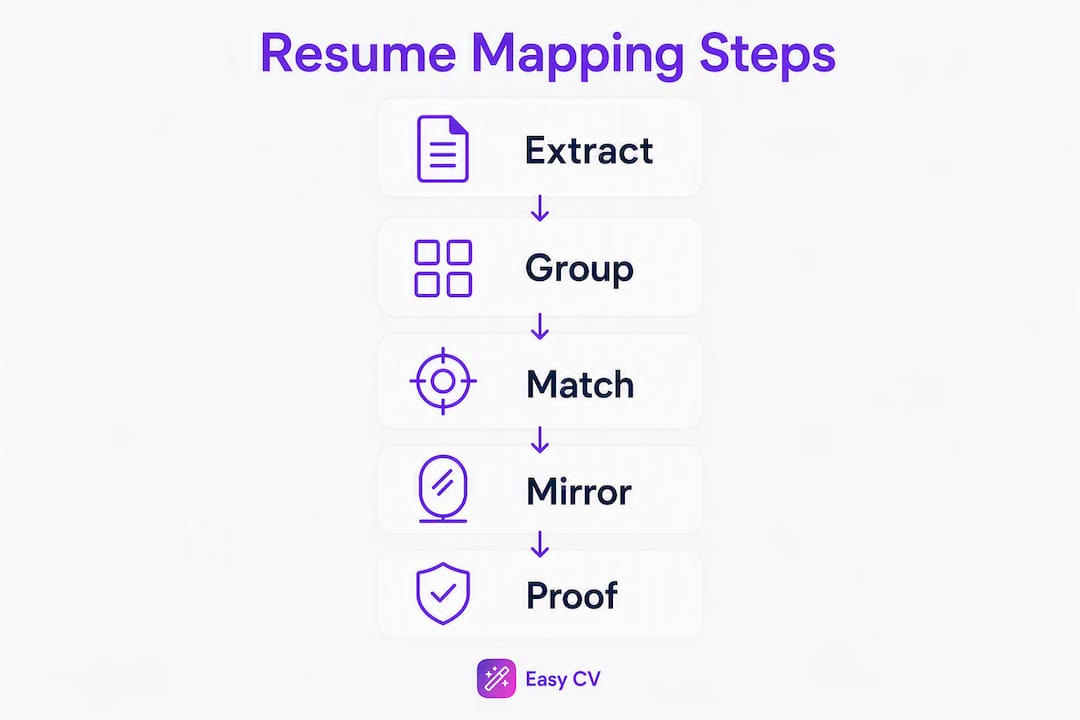
How to map a job description to your own experience
This is the step most job seekers skip, and it is the one that matters most. A repeatable mapping process takes about 20 minutes and makes every bullet you write more targeted.

Step 1: Extract. Copy the job description into a document. Highlight every required skill, tool, and responsibility. Pay attention to the verbs: “analyze,” “manage,” “coordinate,” “build.” Those are the competencies the hiring team cares about.
Step 2: Group. Cluster the highlighted terms into three to five categories. A marketing role might break into: content creation, data analysis, stakeholder communication, and project management.
Step 3: Match. For each category, find one or two moments from your history where you did that work. It does not need to be a perfect title match — it needs to be a real task with a real outcome.
Here is what the mapping looks like in practice:
| JD requirement | Your matching bullet |
|---|---|
| “Manage cross-functional projects” | Coordinated 4-team product launch for a retail rollout, delivered ahead of schedule |
| “Analyze campaign performance data” | Built weekly Google Analytics dashboard tracking multiple KPIs; identified drop-off point that reduced bounce rate |
| “Write customer-facing copy” | Wrote and A/B tested multiple email subject lines; winning variant lifted open rate |
Pro Tip: Mirror the exact wording from the job description in your bullets and skills section. If the posting says “cross-functional collaboration,” use that phrase rather than “working with different teams.” ATS systems match strings, not concepts. Just make sure every term you use is something you can actually speak to in an interview.
Where to look for relevant experience beyond your day job
Most job seekers only mine their paid full-time roles. That leaves a lot of usable evidence on the table, especially for career changers and recent graduates.
Sources worth checking:
- Full-time and part-time jobs: Even roles outside your target field often contain transferable tasks. A restaurant manager who handled scheduling, inventory, and staff training has operations experience.
- Contract and freelance work: Client projects count. List them under a freelance heading or as individual entries if the scope was substantial.
- Internships: Treat these exactly like jobs. Include the employer, dates, and outcome-focused bullets.
- Volunteer roles: Santa Monica College’s career services guidance explicitly lists volunteer and community service work as valid resume experience.
- Coursework and capstone projects: A data science bootcamp project or a senior thesis with real methodology belongs on a resume when you are early in your career.
- Extracurricular leadership: President of a student organization, captain of a competitive team, organizer of a community event — these show leadership and execution.
- Open-source contributions and portfolio projects: A GitHub repo with active commits or a design portfolio with live case studies is concrete, verifiable evidence.
- Significant hobbies with measurable outcomes: Running a monetized newsletter, coaching a youth sports team, or managing a community social media account all produce real metrics.
Mini-template for turning any project into a bullet:
Example: “Designed and launched a personal finance blog, growing the email list to 1,200 subscribers in 8 months through weekly SEO-optimized content.”

How far back to go: For professionals with 10+ years of experience, stick to the last 10–15 years unless an older role is uniquely relevant. For recent graduates, go back to college and include any activity with a real outcome.
Where and how to place relevant experience on your resume
Section placement is a strategic decision, not a formatting default. The goal is to put your strongest evidence where recruiters and ATS will see it first.
Decision rules:
- Use a “Work Experience” section in reverse-chronological order when your recent roles are directly relevant. This is the standard and what most ATS systems expect.
- Use a “Relevant Experience” section when your most relevant work is not your most recent. Career changers and returning workers often benefit from this. Group the most relevant roles here and move older or unrelated jobs to a separate “Additional Experience” section.
- Use a “Projects” or “Selected Experience” section when your best evidence comes from freelance, academic, or personal work rather than formal employment.
- Within each entry, reorder bullets by relevance, not by chronology. Put the bullet that best matches the job description first, even if it was not the task you spent the most time on.
Formatting basics that affect both ATS and human readers:
- Use consistent date formatting: “Jan 2022 – Mar 2024” or “01/2022 – 03/2024” throughout. Mixing formats can confuse ATS parsers.
- Include job title, employer name, city/state, and dates for every entry. Federal job applications through USAJOBS require even more detail, including hours per week.
- Limit entries to the last 10–15 years for experienced professionals. Earlier roles can be listed without bullets under an “Earlier Career” line.
- Use standard section labels (“Work Experience,” “Skills,” “Education”) rather than creative names like “My Story” — ATS systems parse by recognized headers.
Before/after section naming:
✗ “My Professional Journey” → ✓ “Work Experience” ✗ “Things I’ve Done” → ✓ “Relevant Experience” ✗ “Stuff I Know” → ✓ “Skills”
How to write bullets that prove your experience
The experience section is what hiring managers look at first, longest, and hardest — it determines who gets a phone screen. Weak bullets describe duties. Strong bullets prove outcomes.
The pattern that works: Action → Context → Result. This maps to frameworks like XYZ (“Accomplished X, as measured by Y, by doing Z”), CAR (Challenge → Action → Result), and STAR (Situation → Task → Action → Result). All of them push you toward the same structure: start with a verb, give context, land on a number.
Action verbs by function:
- Analysis: Analyzed, modeled, forecasted, audited, benchmarked
- Product/PM: Launched, prioritized, scoped, shipped, roadmapped
- Customer-facing: Resolved, retained, onboarded, consulted, negotiated
- Operations: Coordinated, reduced, automated, standardized, scaled
- Creative: Wrote, designed, produced, edited, directed
Before/after examples:
| Before (duty-focused) | After (outcome-focused) |
|---|---|
| “Responsible for social media” | “Grew Instagram following from 4,200 to 11,800 in 6 months by shifting to short-form video content” |
| “Helped with customer complaints” | “Resolved 95% of customer escalations within 24 hours, lifting CSAT score from 3.6 to 4.4 out of 5” |
| “Assisted with data entry” | “Migrated 14,000 customer records into Salesforce, reducing duplicate entries by 34%” |
| “Worked on marketing campaigns” | “Co-managed $80K Google Ads budget across 3 product lines; reduced cost-per-acquisition by 22%” |
Mini-checklist for adding metrics:
- Revenue or cost impact (dollars saved, revenue generated)
- Scale (team size, user count, number of accounts)
- Efficiency (time saved, error rate reduced, process speed)
- Growth (percentage increase in traffic, sales, engagement)
- Volume (number of projects, clients, transactions handled)
When exact numbers are not available, use defensible scope measures: “a team of 6,” “a portfolio of 40+ accounts,” “a 3-month project cycle.” Vague is worse than approximate — approximate is honest and specific enough to be credible.
How to handle the skills section and ATS keywords
Hard skills belong in the skills section. Soft skills belong in your bullets, backed by evidence. Listing “strong communicator” as a skill tells a recruiter nothing — showing that you “presented quarterly results to a 50-person executive audience” tells them everything.
Aim for 8–15 hard skills, grouped for readability:
- Tools: Salesforce, Tableau, Figma, Google Analytics, Python
- Methods: Agile, A/B testing, financial modeling, UX research
- Languages: Spanish (professional), French (conversational)
Order the groups to match what the job description emphasizes. If the posting leads with data tools, put your tools group first. Treat the skills section as an adjustable keyword index — edit it for each application rather than keeping a static list.
ATS dos and don’ts:
- Do use the exact term from the job posting. If it says “project management,” write “project management” — not “PM” or “project coordination.”
- Do place each priority skill in two places: the skills section and at least one bullet in your experience section.
- Don’t list skills you cannot defend in an interview. ATS gets you the screen; the interview exposes the gap.
- Don’t pad the list past 15 items. A bloated skills section reads as keyword stuffing to a recruiter scanning the page.
For a deeper look at matching resume keywords to job descriptions, Easy-cv’s keyword guide walks through the extraction process step by step.
Tactics for career changers, returning workers, and first-time jobseekers
The core challenge for nontraditional candidates is the same: you have real skills, but the evidence does not come in the expected format. The fix is to surface the competency and quantify the outcome, regardless of where it happened.
Case A: Career changer
A teacher moving into corporate training does not need to hide their classroom experience. They need to reframe it. “Managed 28 students” becomes “Designed and delivered curriculum for cohorts of 28, achieving a 94% course completion rate.” The competency (instructional design, facilitation, performance measurement) is identical. The language just needs to match the new context.
Skill stacking — deliberately combining skills from different domains — is one of the most credible ways to position a career change. A marketer who also knows SQL is not a marketer who dabbles in data; they are a growth analyst with domain expertise.
Case B: New graduate or first-time jobseeker
Academic projects, volunteer roles, and freelance work are legitimate resume evidence. A capstone project where you built a working product, ran user research, and presented findings to a panel is a project entry with real bullets:
Bridge content that adds defensible hard skills quickly:
- Google, HubSpot, and Coursera certifications (free or low-cost, widely recognized)
- Short freelance projects on platforms like Upwork or Fiverr to generate real client outcomes
- Open-source contributions that produce a public, verifiable record
- Micro-projects with a documented outcome (a published article, a deployed app, a completed audit)
For soft skills and how to show them in bullets rather than just list them, the Easy-cv guide on soft skills in your CV covers the framing in detail.
ATS and keyword strategy for your experience section
An ATS does not read your resume the way a human does. It parses text, matches strings, and scores your document against the job description. Passing that filter is a prerequisite for a human ever seeing your work.
ATS checklist:
- Save as a .docx or .pdf (check the job posting — some systems prefer one over the other)
- Use standard section headers: “Work Experience,” “Skills,” “Education,” “Summary”
- Avoid tables, text boxes, headers, and footers — many parsers skip content inside them
- Use a consistent date format throughout
- Repeat your top 3–5 priority keywords in three places: the summary, the skills section, and at least one experience bullet each
- Do not use the same keyword more than two to three times total — density beyond that reads as stuffing
Keyword mirroring rules:
- Use the job description’s exact phrasing for required skills. “Data visualization” and “data viz” are not the same string to an ATS.
- For optional or preferred skills, use the JD term where truthful; use your natural phrasing where the JD term does not fit.
- When a job description uses an acronym, include both the spelled-out version and the acronym at least once: “Search Engine Optimization (SEO).”
Formatting that breaks parsing:
- Multi-column layouts can scramble reading order in some ATS systems
- Logos, icons, and graphics are invisible to parsers
- Fancy fonts and colored text sometimes fail to extract cleanly
ATS-friendly formatting is covered in detail in Easy-cv’s formatting guide, including which template styles parse cleanly across major platforms.
For a full walkthrough of resume keywords and how to prioritize them by job posting, Easy-cv’s keyword article breaks down the extraction process by role type.
Concrete example entries and copy-ready templates
These entries follow the action→context→result structure. Adapt the numbers and context to your own history.
Marketing coordinator (entry-level → mid-level)
Before: “Helped with email campaigns and social media posts.”
After:
- Managed end-to-end production of 3 weekly email campaigns (Mailchimp, 45K subscribers); average open rate 28%, above the 21% industry benchmark
- Wrote and scheduled 60+ social posts per month across Instagram and LinkedIn; organic reach grew 37% over 6 months
- Coordinated with design team to produce 12 campaign assets per quarter, consistently meeting deadlines
Data analyst
- Built automated Python pipeline to clean and merge 4 data sources weekly, reducing manual prep time from 6 hours to 45 minutes
- Developed Tableau dashboard tracking 10 sales KPIs for a 30-person team; dashboard adopted as the team’s primary reporting tool within 2 weeks of launch
- Identified pricing anomaly in transaction data affecting 3% of orders; fix recovered an estimated $140K in annual revenue
Operations / project management
- Coordinated 6-vendor logistics for a 500-unit product launch; delivered on schedule despite a 3-week supplier delay
- Standardized onboarding process for 4 regional offices, cutting average ramp time from 9 weeks to 6
- Tracked project milestones across 8 concurrent workstreams using Asana; zero missed deadlines over a 12-month period
Customer success
- Managed a portfolio of 42 SMB accounts ($1.2M ARR); retained 97% through contract renewal cycle
- Ran quarterly business reviews with 15 enterprise clients; identified upsell opportunities that added $180K in expansion revenue
- Reduced average ticket resolution time from 48 hours to 19 hours by creating a self-service knowledge base (120 articles)
Copy-ready sentence stems:
- “Increased [metric] from [X] to [Y] by [action]”
- “Reduced [cost/time/error rate] by [%] through [method]”
- “Managed [scope: team size, budget, accounts] to achieve [outcome]”
- “Built [tool/system/process] that [result] for [audience/team]”
Quick cheat sheet — reusable verbs and metric formats:
Verbs: Led, Built, Reduced, Grew, Managed, Launched, Designed, Analyzed, Coordinated, Delivered, Improved, Negotiated, Trained, Automated, Wrote
Metric formats: $X saved/generated, X% increase/decrease, X users/clients/accounts, X weeks/hours saved, team of X, X projects delivered
Common red flags and how to fix them
1. Vague duty descriptions ✗ “Responsible for managing social media.” ✓ “Managed 4 brand social accounts (combined 80K followers); grew engagement rate from 1.8% to 3.4% in Q3.”
2. Unsupported skill claims ✗ Listing “leadership” as a skill with no evidence in bullets. ✓ Remove it from the skills list and add a bullet: “Led a cross-functional team of 7 to deliver a product update 2 weeks ahead of schedule.”
3. Inconsistent or missing dates Gaps and formatting inconsistencies raise flags in ATS and with recruiters. Use consistent formatting and address gaps honestly — a freelance project, a caregiving period, or a course enrollment is a legitimate entry.
4. Overloaded skills section A 30-item skills list signals padding. Cut anything you cannot speak to confidently in an interview. Aim for 8–15 items that you can actually defend.
5. Irrelevant long history Listing every job back to 1998 buries your strongest evidence. Cap at 10–15 years for experienced professionals. Earlier roles can appear as a single line: “Earlier career: Retail management roles, 1998–2010.”
6. Inflated claims Saying you “led” a project when you contributed to it will surface in an interview. Use accurate verbs: “contributed to,” “supported,” “assisted in leading.” Honest framing is more durable than inflated framing.
The balance between emphasis and honesty is straightforward: show your best work in the best light, but never claim a scope or outcome you cannot walk through in a conversation.
How recruiters and ATS actually read the experience section
TheLadders’ eye-tracking research found that recruiters’ initial scan of a resume is measured in seconds, not minutes. In that window, they are looking at your most recent job title, your employer, and the first bullet under each role. Everything else is secondary on the first pass.
What that means practically:
- Your most relevant bullet must be first, not buried at the bottom of a six-item list
- Recent roles warrant 4–6 bullets; older roles warrant 2–3 at most
- The skills section needs to be visible without scrolling — place it in the top third of the page or in a sidebar if your template supports clean parsing
- Recruiters look for impact signals: numbers, named tools, and recognizable employers or clients validate claimed skills faster than any adjective
The University of Miami’s Toppel Career Center notes that the experience section takes up the bulk of a resume and is the primary qualification signal — which means every bullet that does not advance your case is a bullet that dilutes it.
CareerOneStop, a U.S. Department of Labor resource, recommends listing jobs and accomplishments relevant to your job goal — and for unrelated roles that fill in work history, keeping descriptions brief rather than omitting them entirely.
A short, measurable before→after example in the experience section is often enough to move a candidate from the discard pile to the phone screen. Recruiters look for impact, not exhaustive history.
Key Takeaways
Surfacing relevant experience on a resume comes down to one discipline: match the job description’s language, lead with outcomes, and cut everything that does not advance your case.
| Point | Details |
|---|---|
| Relevance beats title match | Any role with transferable skills and measurable outcomes counts, regardless of industry or job title. |
| Map before you write | Extract JD keywords, group them, then find matching moments in your history before writing a single bullet. |
| Lead with your best bullet | Place the most relevant accomplishment first in each entry — recruiters scan the top line, not the full list. |
| Skills section is adjustable | Edit your 8–15 hard skills for each application to mirror the exact terms the job posting uses. |
| Easy-cv speeds the process | Easy-cv’s AI CV builder scans job descriptions, suggests tailored bullet rewrites, and formats ATS-friendly sections in one workflow. |
The part of resume advice nobody talks about
Most resume guides tell you to “tailor your resume for every job.” That advice is correct and almost useless without a system, because tailoring without a method just means rewriting the same weak bullets in slightly different words.
The real shift is treating the job description as a scoring rubric before you write anything. When you extract the required competencies, group them, and then find the specific moment in your history where you demonstrated each one, you are not tailoring — you are building evidence. The difference shows up in interviews: candidates who mapped their experience to the JD can speak to every bullet with specifics. Candidates who just swapped in keywords get caught when a recruiter asks “tell me more about that.”
There is also a honesty dimension that guides underplay. Inflating a supporting role into a leadership claim feels safe on paper, but it creates a trap. A recruiter who asks “how many people did you manage?” to a candidate who wrote “led a team” and actually meant “was on a team” will notice the hesitation. Accurate framing — “contributed to,” “supported,” “collaborated with” — is not weaker. It is defensible, and defensible is what gets you through the interview.
The candidates who consistently get hired are not the ones with the most impressive histories. They are the ones who can connect what they have done to what the employer needs, clearly and specifically, in six seconds of scanning and thirty minutes of conversation.
Easy-cv makes surfacing relevant experience faster
Identifying and phrasing relevant experience is the hardest part of a job application — and the most time-consuming. Easy-cv cuts that time significantly by bringing the job description and your resume into the same workspace.

Here is how the workflow runs: paste or import a job posting, and Easy-cv’s AI scans it for required skills and keywords. It then cross-references your existing resume content and suggests bullet rewrites that mirror the JD’s language while keeping your actual experience intact. The skills section updates to reflect the posting’s priority terms. The result is an ATS-ready, recruiter-readable resume tailored to that specific role, not a generic document sent to fifty jobs.
The job matcher feature adds another layer: it pre-scores job listings against your CV so you spend time on roles where your background already aligns, rather than applying broadly and hoping. For job seekers who want to move fast without sacrificing quality, that combination of targeted matching and AI-assisted writing is the practical alternative to spending three hours on every application.
Start building your tailored resume on Easy-cv — the free plan covers the core builder, and premium unlocks the full AI rewriting and job-match features.
Useful sources and further reading
These are the most authoritative resources used in this guide, along with a few Easy-cv internal pages for the next steps in your job search.
External sources:
- How to List Work Experience on Your Resume (CareerReload) — Detailed guidance on structuring the experience section, writing achievement-focused bullets, and using XYZ/CAR/STAR frameworks.
- Highlighting Your Experience on Your Resume (Santa Monica College Career Services) — Authoritative academic career services guidance on what counts as experience, including volunteer, coursework, and service-learning.
- USAJOBS Help Center: What to Include in a Federal Resume — The U.S. government’s official guidance on resume requirements, useful for anyone applying to federal roles.
Easy-cv internal guides:
- How to Match Resume Keywords and Get Noticed — Step-by-step keyword extraction and mirroring for ATS optimization.
- Resume Keywords: Boost Your Job Application Success — Practical keyword prioritization by role type.
- Best Practices for CV Formatting in 2026 — ATS-friendly layout and template guidance.
- The Role of Achievements in Resumes That Get Interviews — How to build metrics-driven bullets that move candidates forward.
- Examples of Professional Summaries: Templates That Work — Summary and objective templates for highlighting relevant experience near the top of your resume.