Resume Export Guide: Master ATS Formats in 2026
Resume export is the process of converting your resume file into a format that both automated hiring systems and human recruiters can read without errors. Get it wrong, and your application never reaches a person. 70% of resumes are filtered out by Applicant Tracking Systems before a recruiter ever sees them. That single statistic makes mastering resume export guide principles the most practical skill a job seeker can develop in 2026. The right file format, layout, and export method determine whether your qualifications get read or quietly discarded.
What does mastering resume export actually require?
The core requirement is choosing a file format that ATS software can parse accurately. Text-based PDF is the preferred format for 53% of ATS systems, with DOCX accepted by roughly 43%. That gap matters. A text-based PDF preserves your formatting visually while keeping the underlying text fully readable by machines. An image-based PDF looks identical on screen but is completely invisible to ATS parsers.
Beyond format, layout is the second major variable. Single-column designs, standard fonts like Arial or Calibri, and section headings labeled “Experience,” “Skills,” and “Education” all improve parsing accuracy. Creative or non-standard headings confuse ATS parsers and cause data loss or miscategorization. A heading like “Where I’ve Been” instead of “Experience” may feel personal, but it will cost you the interview.

Choosing between PDF and DOCX
PDF is the safer default for most applications. It locks your formatting so nothing shifts between devices or operating systems. DOCX is the better choice when an employer explicitly requests it, or when you are applying through a portal that converts uploads to plain text anyway. Never submit a .pages file, an .odt file, or any format not listed in the job posting.
Layout rules that protect your data
- Use a single-column layout. Multi-column designs cause ATS systems to read text in the wrong order.
- Set margins between 0.5 and 1 inch. Narrower margins push text into unparsable zones.
- Use font sizes between 10 and 12 points for body text, and 14 to 16 points for your name.
- Avoid tables, text boxes, and headers/footers. Content placed in these areas is frequently stripped during parsing.
- Stick to standard section labels: Summary, Experience, Education, Skills, Certifications.
Pro Tip: Run a quick font check before exporting. Decorative or uncommon fonts sometimes convert to symbols in PDF, making your resume unreadable to both ATS and recruiters.
| Layout Feature | ATS-Safe Choice | Risky Choice |
|---|---|---|
| Column structure | Single column | Two or three columns |
| Section headings | Experience, Skills, Education | “My Story,” “Expertise Zone” |
| Font type | Arial, Calibri, Georgia | Decorative or script fonts |
| Special elements | Plain bullet points | Icons, graphics, text boxes |
| File format | Text-based PDF, DOCX | Image PDF, .pages, .odt |
How do you export and verify a resume file correctly?
Exporting correctly is a separate skill from building a good resume. Many job seekers produce a strong document and then ruin it at the export stage. The method you use to generate the PDF matters as much as the content inside it.
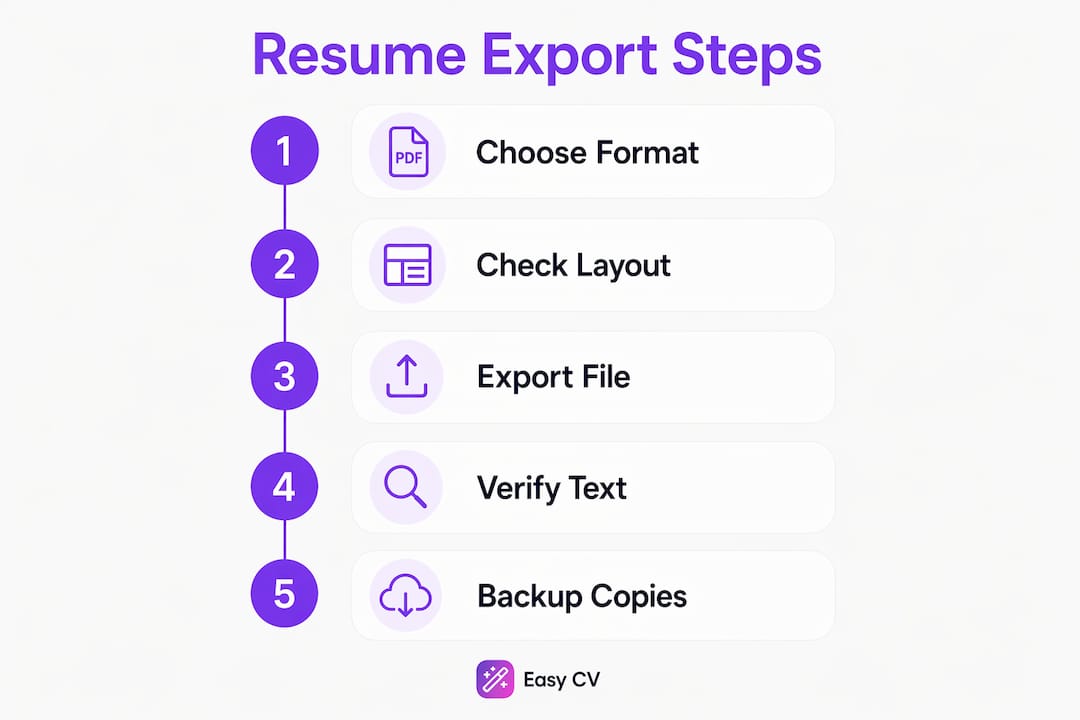
Follow these steps every time you export a resume for a job application:
- Use native export, not print-to-PDF, as your first attempt. Most dedicated resume builders generate cleaner text layers through their own export function. Test the result before assuming it worked.
- Try print-to-PDF as a backup. Exporting via print-to-PDF from a browser often preserves text layers better than native export in some web-based tools like Notion. If your native export produces garbled text, switch to this method.
- Run the select-all-copy test. Open the exported PDF, press Ctrl+A to select all text, then paste it into a plain-text editor like Notepad. This copy-paste test immediately reveals whether your text is machine-readable and whether the reading order makes sense.
- Check for missing contact information. If your name, phone number, or email address sits inside a header or footer, it may not appear in the plain-text paste. Move all contact details into the main body of the document.
- Review metadata. Open the file properties and confirm the document title and creator fields are filled in correctly. Blank or auto-generated metadata can flag a file as low quality in some systems.
- Name the file clearly. Use a format like FirstName-LastName-Resume-JobTitle.pdf. Avoid spaces, special characters, and version numbers in the file name you send to employers.
Pro Tip: Keep a “test application” folder. Each time you export a new version, paste the plain-text result into a saved document. This gives you a quick reference to compare versions and catch formatting regressions.
The 3-2-1 backup strategy applies directly to resume files: keep one copy locally, one in cloud storage like Google Drive or OneDrive, and one on an offline medium such as a USB drive. Losing your master resume file the night before a deadline is a real and avoidable problem.
How should you organize master and variant resumes?
The most effective resume preparation technique is maintaining two distinct types of files. Your master resume contains every job, project, skill, and credential you have ever accumulated. It is not meant to be submitted. It is your source of truth.
Your variant resumes are lean, targeted exports built from the master. Each variant is tailored to a specific job description, mirroring the language and keywords used in the posting. ATS systems rank resumes partly by keyword match, so a variant that reflects the exact phrasing of a job description will consistently outperform a generic version. This approach also gives you a practical edge when applying to roles across different industries or seniority levels.
Organizing these files requires a clear naming system. A structure like:
MasterResume-2026.docx(never submitted, always updated)JohnSmith-Resume-MarketingManager-CompanyName.pdf(submitted variant)JohnSmith-Resume-ContentStrategist-CompanyName.pdf(separate variant)
This naming convention makes it easy to track which version went to which employer. Pair it with a job tracker to avoid sending the wrong variant to a company you have already contacted. Easy-cv includes a built-in job tracker that keeps your applications organized alongside your resume versions, so nothing slips through.
- Never submit your master resume directly. It is too long and unfocused for any single application.
- Update your master resume within 48 hours of completing a project or leaving a role. Memory fades fast.
- Mirror the exact job title from the posting in your variant when your experience supports it.
- Review each variant against the job description one final time before exporting. A mismatched keyword can cost you a ranking.
Pro Tip: Use a tailored resume approach for every application rather than sending one generic file. Recruiters and ATS systems both respond better to specificity.
What are the most common resume export mistakes?
The most damaging export errors are invisible until an ATS rejects your application silently. Multi-column layouts and tables cause ATS systems to lose between 28% and 41% of structured data fields during parsing. That means nearly half your work history could disappear before a recruiter sees your name.
“Over-designing a resume with icons, graphics, and non-standard alignments does not impress recruiters. It signals a lack of professional focus and causes ATS parsing failures that remove your application from consideration entirely.” — Robert Half
The most frequent mistakes job seekers make during export include:
- Image-based PDFs. Scanning a printed resume or exporting from a design tool like Canva often produces an image file. ATS systems read zero text from these files.
- Headers and footers containing contact info. Many parsers skip header and footer zones entirely. Your phone number and email must appear in the main body.
- Creative section headings. Labels like “What I Bring” or “My Background” are not recognized by ATS parsers. Use “Skills” and “Experience” without exception.
- Embedded graphics and icons. A phone icon next to your number looks polished to a human. To an ATS, it is noise that can corrupt the surrounding text.
- Inconsistent fonts after export. A font that looks correct in your editor may render differently in the exported PDF if it is not embedded. Always open the exported file on a second device to confirm it looks right.
Fixing these errors is straightforward once you know what to look for. Run the copy-paste test described earlier, check your resume parsing results against a plain-text standard, and rebuild any section that produces scrambled output. Simplicity is not a design compromise. It is the technical requirement for getting your resume read.
For a broader look at formatting errors that cost candidates interviews, the common resume mistakes guide covers the full list with practical fixes.
Key Takeaways
Correct resume export format and layout are the single biggest factors determining whether your application reaches a human recruiter or disappears inside an ATS.
| Point | Details |
|---|---|
| Choose the right file format | Text-based PDF works for 53% of ATS systems; DOCX is the reliable backup. |
| Use single-column layouts | Multi-column designs cause up to 41% data loss during ATS parsing. |
| Run the copy-paste test | Paste exported PDF text into Notepad to confirm readable, correctly ordered content. |
| Maintain master and variant files | Keep one master resume and create targeted variants for each job application. |
| Avoid graphics and creative headings | Standard labels and plain formatting protect your data through every ATS system. |
Why I think most job seekers export resumes wrong
Most professionals spend hours perfecting resume content and then export it carelessly. I have reviewed hundreds of resumes where the content was genuinely strong, but the file was an image-based PDF or a two-column layout that no ATS could parse. The candidate never knew why they heard nothing back.
The part that surprises most people is how little the visual design matters to the systems making the first cut. A clean, plain, single-column resume in a text-based PDF will outperform a beautifully designed multi-column file every single time in an automated screen. That is not an opinion. It is how the technology works.
ATS requirements are also not static. Systems update their parsing logic, and what worked in 2023 may underperform in 2026. The job seekers who stay ahead are the ones who test every export, keep their master resume current, and treat each application as a targeted document rather than a copy-paste job. Applying for roles that match your actual profile with a well-exported, keyword-matched variant will consistently outperform blasting a generic resume to 50 companies.
My strongest recommendation is to use an AI-powered resume builder that generates ATS-safe exports by default. It removes the guesswork from format and layout decisions, and it frees you to focus on the content that actually differentiates you. Pair that with a job application strategy built around targeted variants, and your application-to-interview rate will improve noticeably.
— Andras
Easy-cv makes resume export and ATS compliance straightforward
Getting your resume export right should not require a technical checklist every time you apply for a job.

Easy-cv handles the format, layout, and ATS compliance decisions automatically. Its AI resume builder generates text-based PDFs from ATS-friendly templates, so your exports are machine-readable by default. You can create a master resume, build targeted variants for each application, and track every submission inside the same platform. Easy-cv also supports resume creation and translation in 30+ languages, which matters if you are applying across borders. The built-in job tracker keeps your variants matched to the right applications, and the AI writing assistant refines your content for each role. Explore the full feature set to see how it fits your search.
FAQ
What is the best file format for resume export?
Text-based PDF is the best default format, preferred by 53% of ATS systems. Use DOCX when an employer specifically requests it.
How do I know if my exported resume is ATS-readable?
Open the PDF, select all text with Ctrl+A, and paste it into a plain-text editor. If the text appears in a logical order without symbols or gaps, the file is ATS-readable.
What common resume mistakes cause ATS rejection?
Multi-column layouts, image-based PDFs, headers and footers containing contact info, and creative section headings are the most frequent causes of ATS rejection and data loss.
What is a master resume and why do I need one?
A master resume is a complete record of your entire career history, kept as a private working document. You build targeted variant resumes from it for each specific job application.
How should I name my resume file before submitting?
Use a clear format like FirstName-LastName-Resume-JobTitle.pdf. Avoid spaces, special characters, and generic names like “Resume-Final-v3.pdf.”