What Is CV Export? Your Job Search Guide for 2026
You’ve spent hours perfecting your resume on a CV builder, and then you see a button that says “Export.” Simple enough. But what is CV export, exactly, and why does your choice of format matter more than most job seekers realize? The wrong file type can scramble your formatting, trip up an applicant tracking system, or accidentally expose your personal contact details. This guide breaks down the cv export meaning in plain terms, walks you through the full cv export process, and gives you the practical knowledge to share your resume with confidence.
Table of Contents
- Key Takeaways
- What CV export really means
- How the CV export process works
- Privacy and formatting pitfalls to watch out for
- Comparing export formats and picking the right one
- Practical tips for exporting and managing your CV in 2026
- Why CV export mastery matters more than people think
- How Easy-cv makes CV export work for you
- FAQ
Key Takeaways
| Point | Details |
|---|---|
| CV export defined | Exporting a CV converts your resume data into a shareable file format like PDF, Word, or JSON. |
| Format choice matters | PDF protects layout; Word allows editing; JSON enables version control across platforms. |
| Privacy risks are real | Some export tools let you remove personal contact details before sharing publicly. |
| One source of truth | Keeping your CV data in a single structured file prevents formatting drift across versions. |
| AI speeds up the process | AI-powered builders can optimize content before export, but you should always review the output. |
What CV export really means
At its core, CV export is the process of taking your resume data from a builder, editor, or database and converting it into a file that can be downloaded, sent, or uploaded somewhere else. Think of it as publishing. You write in one environment, then distribute the result in a format that works for the recipient.
CV export commonly involves creating different file formats such as PDF, Word, HTML, or JSON from a single CV source. Each format serves a different purpose, and understanding that distinction is the foundation of a smarter job search.
Here is a quick look at the most common CV export file types and what they are actually good for:
| Format | Best for | Main advantage | Main drawback |
|---|---|---|---|
| Final job applications | Preserves layout exactly | Not editable by recruiters | |
| Word (.docx) | Editable sharing | Easy to modify and re-format | Layout can shift across devices |
| JSON | Data backup and version control | Machine-readable and portable | Not human-friendly without a viewer |
| HTML | Online portfolios and web profiles | Renders in browsers, ATS-friendly | Requires some technical comfort |
The contexts where CV export comes up are broader than most people expect. You export when you apply through an employer’s portal, when you email a recruiter directly, when you upload to a job board like LinkedIn or Indeed, and when you back up your data before switching to a different CV builder. Each of those scenarios may call for a different format. Getting that call right is what separates a polished applicant from one whose resume arrives garbled or unreadable.
For a deeper understanding of what goes into a strong CV before you export it, the CV basics guide from Easy-cv is a solid starting point.
How the CV export process works
The mechanics are simpler than they sound, but skipping steps is where most people run into trouble. Here is how the cv export process typically unfolds:
- Enter and finalize your CV data. Fill in every section of your builder: work history, education, skills, and contact information. Fix spelling and formatting before you touch the export button.
- Choose your output format. Decide whether the recipient needs a PDF, a Word document, or something else. Match the format to the context.
- Configure export options. Many tools let you choose page size, font settings, or privacy toggles at this step. Do not skip this screen.
- Generate and download the file. The builder converts your data into the selected format and delivers the file to your device.
- Review the output. Open the exported file on your own device and check that formatting held up. Look for font changes, broken bullet points, or missing sections.
- Save a backup copy. Store a versioned copy with a clear filename so you can track changes over time.
Popular CV builder tools support exporting CVs to Word, PDF, and customizable templates, which cuts the manual work significantly. What makes modern builders smarter is that many store your data in a structured format behind the scenes, then generate your chosen output from that single source. That means you can export a polished PDF for a direct application and a clean Word file for a recruiter without rewriting anything.
Maintaining a single source of truth for career data, often a JSON or structured file, prevents formatting drift between CV versions exported in different formats. Separating your content from its presentation is the principle that makes this possible.

Pro Tip: Never work directly inside an exported Word file and then try to re-import it. Every time you do that, you risk introducing formatting inconsistencies. Keep your master data in the builder and export fresh copies as needed.
Privacy and formatting pitfalls to watch out for
Exporting a CV is not just a technical step. It carries real privacy implications that most job seekers overlook entirely.
Privacy is a crucial concern during CV export, and some exporters offer options to remove personal information like email and phone numbers for public sharing. If you post your CV on a public portfolio site or share it in an open forum, a full-contact version exposes you to spam, data scraping, and unwanted outreach. Using a “privatize” mode, when your tool offers one, is the right call for those situations. Save the full-contact version exclusively for direct application submissions.
Formatting errors are the other major trap. They are more common than you might expect, and they often appear only after the file leaves your hands.
Here are the most important privacy and formatting practices to follow:
- Use UTF-8 encoding. Encoding errors during export can corrupt text, especially when CV data passes through spreadsheet or CSV conversions. Always confirm your tool is set to UTF-8.
- Test on a second device. A file that looks perfect on your laptop may render differently on a recruiter’s system. Send it to yourself and open it on a phone or a different computer.
- Avoid decorative fonts in Word exports. Non-standard fonts often substitute or disappear when the recipient does not have them installed.
- Check your PDF text is selectable. An ATS cannot parse a PDF that is saved as an image. Open the file and try highlighting a word. If you can select text, you are in good shape.
- Remove hidden metadata. Word documents can carry author names, revision history, and tracked changes. Use “Inspect Document” in Microsoft Word before sending.
Pro Tip: Before sending any CV, open the exported file and use Ctrl+A to select all text. If nothing highlights, your PDF was saved as an image and ATS systems will not read it.
Comparing export formats and picking the right one
Not all formats are created equal, and the right choice depends on who is reading your CV and how they plan to use it.
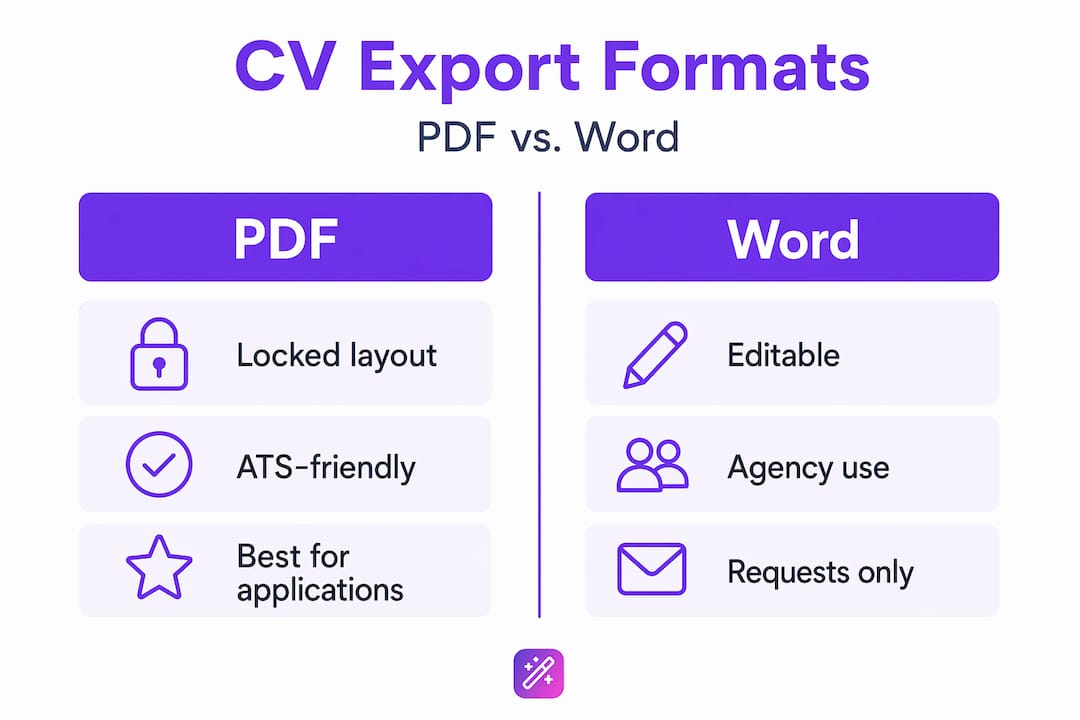
PDF is the default for good reason. It locks your layout so the recruiter sees exactly what you designed, regardless of their operating system or software. For final application submissions, PDF is almost always the correct choice. The one situation where it works against you is when a company uses an older ATS that struggles to parse PDF content accurately. In that case, Word is safer.
ATS-optimized CV exports improve recruiter parsing and increase application success. Schema.org markup and semantic HTML enhance ATS scanning, which means HTML exports from well-built tools can actually outperform PDFs in automated screening, even if they are less common in practice.
Word documents are best when a recruiter explicitly asks for an editable version, when you are working with a staffing agency that will reformat your CV under their own branding, or when you want to tailor a version quickly without going back into a builder. The risk is that formatting breaks. Tables, columns, and custom fonts are especially vulnerable.
JSON is the format most job seekers never think about, but it is genuinely useful. It is not something you send to a recruiter. Instead, it is a structured backup of your CV data that you can import into a new tool if you switch platforms. Think of it as your portable career record.
Here is a summary to guide your decision:
| Situation | Recommended format |
|---|---|
| Direct application to a company | |
| Staffing agency or editable request | Word (.docx) |
| Online portfolio or personal website | HTML |
| Switching CV tools or backing up data | JSON |
| ATS-heavy application portal | Word or ATS-optimized PDF |
Practical tips for exporting and managing your CV in 2026
The mechanics of exporting are only part of the picture. How you organize, name, and maintain your CV files over time is what determines whether your job search stays under control or turns into a folder of identically named documents you cannot tell apart.
Having multiple CV versions tailored for different roles and easily exportable increases job search effectiveness by letting you target different industries without starting from scratch each time. The practical challenge is keeping those versions organized.
A few habits that make a real difference:
- Use descriptive filenames. “CV_MarketingManager_TechSector_2026.pdf” tells you everything. “CV_Final_v3.pdf” tells you nothing in six months.
- Date your exports. Add the export date to your filename or keep a simple spreadsheet log. Resumes go stale faster than people realize.
- Keep one master version in your builder. Export role-specific variations from that master rather than maintaining separate source files for each version.
- Store exports in organized folders. One folder per application, named after the company, works well and keeps your cover letters and CVs paired together.
- Use AI assistance thoughtfully. AI tools for CV optimization accelerate language refinement and keyword matching before export, but manual review remains necessary. AI gets you 80% of the way there. You close the gap.
If you are switching between CV platforms, always export a JSON or plain-text backup from your old tool before closing your account. Most platforms delete your data when you leave. Getting that backup takes two minutes and can save hours of reconstruction later.
For a deeper look at what makes a CV worth exporting in the first place, Easy-cv’s guide on writing a resume that gets noticed covers the content side in detail.
Why CV export mastery matters more than people think
I’ve watched job seekers spend days crafting a polished resume and then undo all of that work in ten seconds by exporting it in the wrong format. A PDF saved as an image passes the eye test but fails every ATS scan. A Word document sent without checking metadata can reveal revision history the applicant never intended to share. These are not rare edge cases. They happen constantly.
What I’ve come to believe, after seeing this pattern repeat, is that most people treat CV export as an afterthought. The real work, they assume, is the writing. Export is just the last click. That framing is wrong. The export step is where your carefully built resume either arrives intact or falls apart.
In my experience, the job seekers who get the most out of modern CV tools are the ones who understand the full pipeline: build once, centralize your data, and export intentionally for each specific context. That approach is not complicated. It just requires treating your CV data as something worth managing rather than a one-time document you create and forget.
The tools available in 2026 make this genuinely easier than it has ever been. AI builders can generate and refine content, output multiple formats from a single source, and flag formatting issues before you send anything. The technology is there. The gap is awareness, and that is exactly what this guide is meant to close.
— Andras
How Easy-cv makes CV export work for you

Easy-cv was built around the idea that exporting your CV should be the easiest part of your job search, not a source of anxiety. The AI-powered CV builder lets you create a polished resume once and export it in multiple formats without reformatting anything manually. PDF, Word, and ATS-optimized outputs are all available from the same source document, so your layout stays consistent whether you are submitting directly to a company or sharing with a recruiter.
Privacy controls let you toggle contact details on or off before export, which means you can share publicly without exposing your phone number or email address. Version management keeps your tailored CVs organized in one place, and the built-in AI writing assistant refines your content before you export so what arrives in a recruiter’s inbox reflects your best work. Explore the full platform features to see how it fits your workflow.
FAQ
What does CV export mean?
CV export is the process of converting your resume data from a builder or editor into a downloadable file format, such as PDF, Word, HTML, or JSON, for sharing or submission. The format you choose determines how the file appears and how it is processed by employers or automated systems.
What is the best file format for exporting a CV?
PDF is the most reliable format for direct job applications because it preserves your layout exactly. Word documents are better when a recruiter needs an editable file. JSON is the right choice for backing up your data when switching CV platforms.
Can CV export expose my personal information?
Yes. If you export a full-contact CV and share it publicly, your email and phone number are visible to anyone who finds the file. Many CV tools offer a privacy or privatize mode that strips contact details for public sharing while keeping them in application-specific exports.
How do I avoid formatting errors when exporting a CV?
Open every exported file on a second device before sending it. For Word files, avoid non-standard fonts. For PDFs, confirm the text is selectable rather than saved as an image. Always use a tool that outputs UTF-8 encoded files to prevent garbled characters.
How many CV versions should I export?
Most active job seekers benefit from two to four tailored versions targeting different roles or industries. Keeping one master version in your CV builder and exporting role-specific variations from it is the most efficient approach, as it avoids maintaining multiple source files.