Relevant Experience on Resume: Make Hiring Managers Notice
Relevant experience on a resume is any past work, project, or skill that directly maps to what the target job requires. That’s the whole definition. The practical move right now: open the job posting, identify the top three to five requirements, and place your strongest matching experience at the top of your resume where a recruiter’s eye lands first.
Here’s what counts as relevant experience:
- Paid full-time or part-time roles where you used the required skills
- Internships and co-ops tied to the field
- Freelance or contract work with measurable outcomes
- Volunteer roles with responsibilities that mirror the job
- Academic projects, capstone work, or coursework with real deliverables
What usually doesn’t belong: a retail job from a decade ago when you’re applying for a software role, minor tasks that don’t connect to any core requirement, or one-off duties buried inside an otherwise unrelated position.
Three things you can do in the next ten minutes:
- Highlight every skill or requirement mentioned in the first four bullet points of the job posting.
- Match each highlight to a specific role, project, or result from your history.
- Move those matched items to the top of your Experience section, or create a “Relevant Experience” heading if your background is mixed.
Table of Contents
- How do you identify your most relevant experience?
- How should you present relevant experience on your resume?
- Sample bullets for common job-seeker situations
- What should you do when you have little or no direct experience?
- What do career experts say about listing too much work history?
- Key Takeaways
- The case for relevance-first resumes
- Easy-cv makes tailoring your resume faster than doing it manually
- Useful sources and further reading
How do you identify your most relevant experience?
The fastest way to figure out what belongs on your resume is to treat the job posting as a prompt. The first three or four bullet points in any job description are almost always the core functions. Everything else is secondary. Mirror that language in your top bullets, and you’ve already done most of the tailoring work.
Here’s a repeatable four-step method:
-
Read the posting as a prompt. Copy the job description into a document and bold every skill, tool, or responsibility that appears in the first four requirements. Those are the hiring manager’s priorities.
-
Do a gap analysis. List every role, project, and skill from your history. For each item, ask: does this directly address one of the bolded requirements? If yes, flag it. If it’s a stretch, note it separately.
-
Score each item on three factors. Give each flagged item a 0, 1, or 2 on impact (did it produce a measurable result?), recency (is it from the last five years?), and direct skill overlap (does it use the exact skill the job requires?). Items scoring 5 or 6 go to the top of your resume. Items scoring 3 or 4 get a condensed mention. Items scoring 2 or below get cut or moved to an “Additional Experience” section.
-
Salvage borderline items by reframing. A role that scores low on direct overlap can sometimes score higher when you reframe the outcome. A customer service job becomes relevant to a project management role when you describe it as “coordinated cross-functional requests from 40+ clients weekly, resolving escalations within 24 hours.” The job is the same; the framing is different.
Pro Tip: When you tailor your resume to a job description, use the exact verbs from the posting in your bullets. ATS systems often match on verb stems, not just nouns. “Managed” and “oversaw” are not the same token to a parser.
How should you present relevant experience on your resume?
Placement, order, and bullet structure each carry more weight than most job seekers realize. Get all three right and your resume reads cleanly to both a recruiter and an ATS.
Placement and section headings
Put your most relevant experience where the eye lands first: directly below your summary or objective, before anything else. If your background is straightforward, a single “Professional Experience” or “Work Experience” section works fine. If your history is mixed (career change, gaps, freelance alongside full-time), consider splitting it:
- Relevant Experience — for the roles and projects that match the job
- Additional Experience — for everything else that still shows professional history
CareerOneStop recommends using headings that help recruiters scan quickly and giving more detail to current positions while keeping older entries brief. That’s the right instinct: your resume is a scanning document before it’s a reading document.
Ordering: relevance vs. chronology
Chronological order is the default, but it’s not always the best choice. When your most relevant role is three jobs back, a hybrid or combination format lets you lead with a “Relevant Experience” block, then follow with a standard chronological history. This is especially useful for career changers and candidates returning after a gap.

Bullet structure
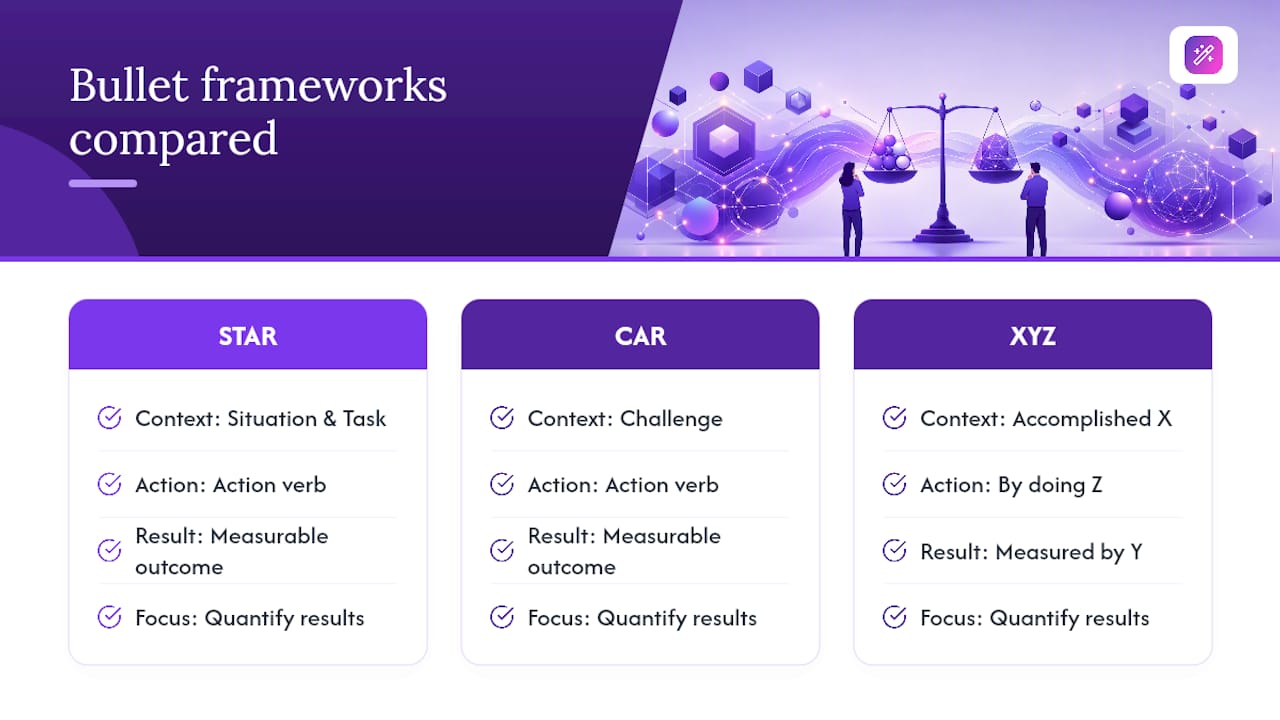
Every bullet should follow a simple pattern: action verb + context + measurable result. The STAR (Situation, Task, Action, Result), CAR (Challenge, Action, Result), and XYZ (Accomplished X, as measured by Y, by doing Z) frameworks all arrive at the same place. CareerReload’s guidance on bullet frameworks makes the case clearly: quantifying results is the single most effective fix for vague, duty-based bullets.
For core roles, write three to five bullets. For secondary or older roles, one line is enough.
ATS formatting rules
ATS systems parse text, not design. A few rules that matter:
- Keep critical information (job titles, dates, company names) in the body, never in headers or footers
- Use standard date formats: “Jan 2022 – Mar 2024” or “01/2022 – 03/2024”
- Avoid tables, text boxes, and columns for the experience section; plain left-aligned text parses cleanly
- Match resume keywords from the job posting exactly, including acronyms (write both “Search Engine Optimization (SEO)” and “SEO” on first use)
Before/after example:
Before: “Responsible for managing social media accounts and creating content.”
After: “Grew Instagram following from 4,200 to 18,000 in 11 months by producing three weekly short-form videos and A/B testing caption formats, increasing average post reach by 62%.”
The second version answers the hiring manager’s real question: not what you did, but what happened because you did it.
Sample bullets for common job-seeker situations
Ready-to-adapt examples across five common scenarios. Each one follows the action + context + result structure.
Mid-level professional
- “Led a cross-functional team of eight to migrate legacy CRM data to Salesforce, cutting data-entry errors by 34% and reducing onboarding time for new reps by two weeks.”
- “Negotiated vendor contracts for office supplies and IT equipment, saving $47,000 annually against prior-year spend.”
Career changer (teacher moving into corporate training)
- “Designed and delivered curriculum for 120 high school students across five sections, adapting content weekly based on assessment data — directly transferable to adult learning design.”
- “Facilitated parent and community workshops on digital literacy for groups of 30–50, building presentation and facilitation skills now applied to corporate L&D contexts.”
Recent graduate
- “Capstone project: built a Python-based data pipeline that processed 500,000 rows of retail transaction data and produced weekly sales dashboards for a simulated client.”
- “Volunteer data analyst, local food bank: cleaned and visualized donor data in Tableau, identifying a 22% drop in recurring donations that led to a targeted re-engagement campaign.”
Freelancer
- “Delivered brand identity packages for six small-business clients over 18 months, including logo, style guide, and social media templates; three clients reported measurable increases in online engagement within 90 days.”
Volunteer-driven experience
- “Coordinated logistics for an annual 5K fundraiser (800+ participants), managing vendor relationships, volunteer scheduling, and day-of operations — comparable in scope to mid-size corporate event planning.”
Before/after for a vague duty:
Before: “Helped with marketing campaigns.”
After: “Supported email marketing campaigns for a SaaS startup, writing A/B subject lines that lifted open rates from 18% to 26% across a 12,000-subscriber list.”
For converting project work into bullets, use this template: “[Action verb] + [project name or type] + [scope or scale] + [outcome or learning].” For volunteer roles: “[Action verb] + [responsibility] + [organization context] + [measurable result or equivalent scope].”
What should you do when you have little or no direct experience?
Thin job history doesn’t mean a weak resume. It means you need a different structure and sharper framing.
Choose the right format
A skills-based or hybrid resume puts your transferable skills and relevant projects front and center, before a short chronological history. This format works well for:
- Recent graduates with strong coursework but limited paid experience
- Career changers whose titles don’t match the target role
- Candidates returning after a gap who have kept skills current through freelance, volunteering, or self-directed learning
Frame transferable skills with specifics
Generic transferable skills (“communication,” “teamwork”) don’t move the needle. Specific ones do. Here’s how to phrase them:
- Instead of “strong communicator,” write: “Presented weekly project updates to a 15-person stakeholder group, translating technical findings into plain-language recommendations.”
- Instead of “organized,” write: “Managed competing deadlines across four concurrent projects using Asana, consistently delivering on schedule.” For more phrasing examples on skills like time management for resumes, concrete language always outperforms adjectives.
Addressing gaps directly on the resume is usually unnecessary for short breaks. A gap under six months rarely needs a label. For gaps over a year, a brief parenthetical like “(Professional Development)” or “(Caregiving, 2022–2023)” is enough. Don’t over-explain on the resume itself; save the context for the cover letter or interview.
What do career experts say about listing too much work history?
The risk of listing every job you’ve ever held isn’t just clutter. It’s the perception of being overqualified, or worse, of not knowing what’s relevant to the role you’re actually applying for.
University of Phoenix’s resume guidance is direct on this point: candidates with extensive histories should use a primary detailed section for the last ten to fifteen years and a separate “Additional Experience” section for older roles. The goal is to focus recruiter attention on recent, high-impact work rather than a full career inventory.
NACE research on employer preferences reinforces why this matters: employers consistently prefer candidates who can demonstrate relevant, recent work experience with measurable outcomes. A resume that buries those outcomes under fifteen years of chronological history works against that preference.
Pro Tip: If you’re worried about appearing overqualified, omit graduation years and dates on roles older than fifteen years. The experience still shows; the timeline doesn’t invite the wrong calculation.
The implementation is straightforward: write full bullets for the last ten to fifteen years, list older roles as single-line entries under “Additional Experience,” and let the recent work carry the argument. Aligning your LinkedIn profile to tell the same story reinforces the narrative across every touchpoint a recruiter checks.
Key Takeaways
Relevant experience on a resume is defined by how well it maps to the job’s core requirements, and the fastest way to improve any resume is to identify your top three to five matching items and put them where recruiters look first.
| Point | Details |
|---|---|
| Define relevance by the job | Paid roles, internships, freelance, volunteer, and projects all count if they match the job’s core requirements. |
| Use the 10–15 year rule | Give full bullet treatment to recent roles; condense or omit anything older to avoid appearing overqualified. |
| Quantify every key bullet | Add at least one metric (number, percentage, or scope) to your top three bullets before applying. |
| Mirror job posting language | Use the exact keywords from the first four requirements in your top bullets to pass ATS parsing. |
| Easy-cv automates tailoring | Easy-cv’s AI rewrites bullets to match each job posting and exports ATS-friendly resumes, cutting the manual work to minutes. |
The case for relevance-first resumes
There’s a version of resume advice that focuses almost entirely on formatting: which template to use, how wide the margins should be, whether to use a serif or sans-serif font. None of that matters if the content isn’t doing its job.
The real work is selection. A resume isn’t a career biography. It’s a curated argument that you are the right person for one specific role. Every item on the page either supports that argument or dilutes it. Most resumes I’ve seen fail not because they’re badly formatted, but because they include too much. The candidate is trying to show everything they’ve done rather than the three or four things that matter most to this particular employer.
The benefits of tailored resumes are well-documented, but the deeper point is this: tailoring forces you to make a decision about relevance. That decision, made deliberately before every application, is what separates candidates who get callbacks from candidates who wonder why they don’t.
The practical habit worth building: after each interview or job match, open your saved resume for that role and update one bullet based on what you learned about the company’s priorities. Over time, you’ll build a library of tailored versions that get sharper with each iteration. That’s not extra work. That’s compounding.
Easy-cv makes tailoring your resume faster than doing it manually
Identifying relevant experience is a thinking task. Rewriting bullets, matching keywords, and reformatting for ATS is mechanical work that doesn’t need to take an hour per application.

Easy-cv handles the mechanical part. The AI writing assistant rewrites your bullets to match the specific job posting you’re targeting, pulling the right keywords and framing your experience in the language the hiring manager used. The ATS-friendly templates are built to parse cleanly across major applicant tracking systems, so you’re not losing applications to formatting errors. The built-in job tracker keeps your tailored versions organized by role, so you always know which resume you sent where.
The job matcher pre-scores open roles against your existing CV, which means you spend less time hunting and more time applying to positions where your experience already fits. Start with a free tailored CV for one application at easy-cv.ai and see how much of the process you can hand off.
Useful sources and further reading
The sources below each add something specific beyond what’s covered here.
| Source | What it adds |
|---|---|
| Indeed: What Is Relevant Experience? | Broad definition with examples across experience types; useful for borderline cases |
| CareerOneStop: Work Experience Sample | Annotated sample resume walkthrough with formatting guidance from a U.S. Department of Labor resource |
| CareerReload: How to List Work Experience | Detailed bullet framework examples (STAR/CAR/XYZ) with before/after rewrites |
| University of Phoenix: Resume With a Lot of Experience | Practical guidance for experienced candidates on the 10–15 year rule and two-section structure |
| Toppel Career Center, University of Miami | Skills-based and hybrid format guidance for career changers and candidates with gaps |
| NACE: Employers Prefer Candidates With Work Experience | Employer research on what hiring managers actually prioritize in candidate selection |
| LinkedIn: Highlighting Relevant Experience | Guidance on aligning resume and LinkedIn messaging for a consistent recruiter-facing narrative |