Chronological Resume Template: Download and Fill It Right
The safest choice for most U.S. job applications is a single-column, reverse-chronological resume template with standard section headers. Download one now in Google Docs or grab the University of Arizona’s free reverse-chronological .docx template, open it in Microsoft Word, fill in your details, and export as a text-selectable PDF. That combination clears ATS filters and holds up under a recruiter’s 7-second scan.
Three reasons this format works:
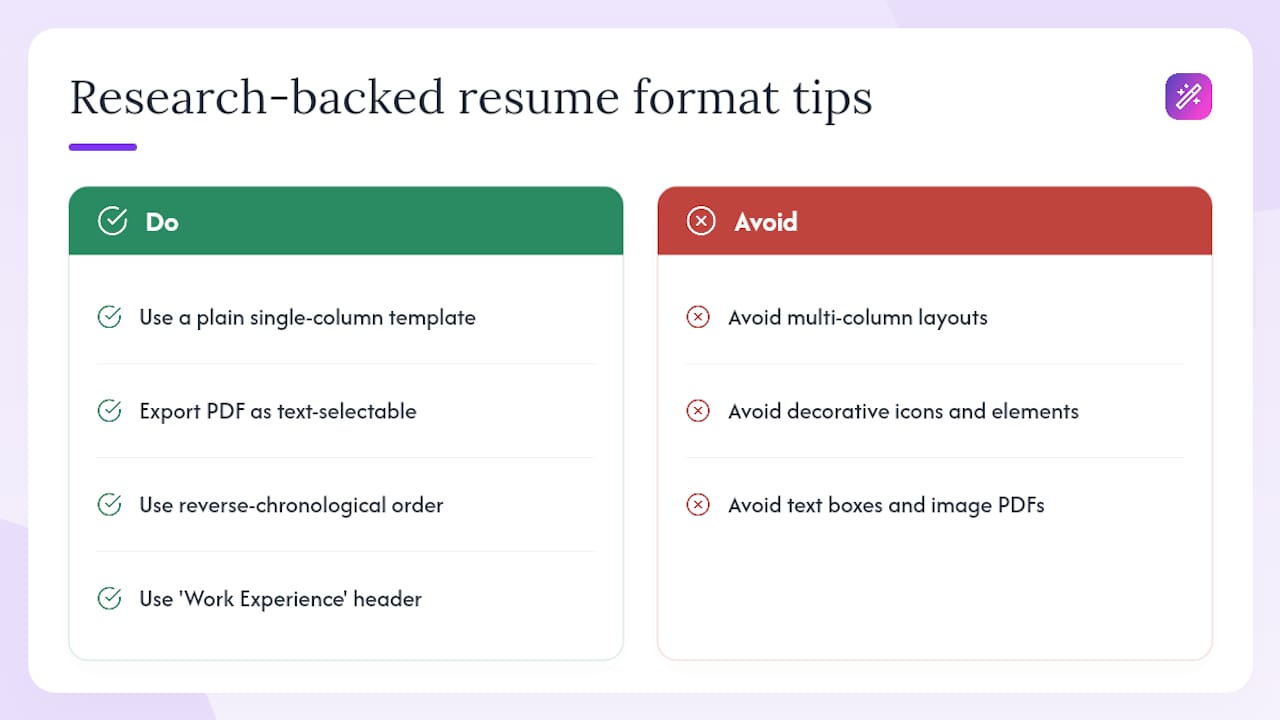
- ATS compatibility: Single-column layouts with standard headers (Work Experience, Education, Skills) parse cleanly through applicant tracking systems. Text boxes, icons, and multi-column designs frequently cause extraction failures before a human ever reads your resume.
- Recruiter scanability: Reverse-chronological order puts your current or most recent role at the top, which is exactly where a hiring manager looks first.
- Universal recognition: Indeed, Jobscan, and university career centers from Purdue to UC Davis all recommend this structure as the default for U.S. applications. Easy-cv’s ATS-friendly template library follows the same standard.
Table of Contents
- What is a chronological resume format?
- When should you use a chronological resume?
- How to structure a chronological resume section by section
- Ready-to-use templates and sample entries you can copy
- Practical writing tips, the ATS checklist, and the 7-second rule
- Chronological vs. functional vs. combination: which fits your situation?
- What research and university career centers say about this format
- Key Takeaways
- Easy-cv makes building your chronological resume faster
What is a chronological resume format?
A chronological resume, more precisely called a reverse-chronological resume in modern U.S. usage, lists your work experience starting with the most recent role and working backward. Experience is the centerpiece; everything else supports it.
Resume.io identifies six core sections employers expect on a U.S. resume:
- Contact block (name, phone, email, LinkedIn, city/state)
- Professional summary (3–4 lines)
- Work experience, newest role first
- Education
- Skills
- Certifications (when relevant)
Optional extras such as languages, volunteer work, or publications can be included as needed. The terms “chronological” and “reverse-chronological” are used interchangeably across U.S. job boards and career centers. They mean the same thing.
When should you use a chronological resume?
Use it when your recent work history tells the hiring story on its own. Specifically:
- You have a steady career path with no gaps longer than roughly 12 months.
- Your most recent roles are directly relevant to the job you’re applying for.
- You want to show clear progression, promotions, or growing scope of responsibility.
The UC Davis career center describes reverse-chronological as the recruiter-preferred structure because it delivers immediate clarity. Hiring managers don’t have to hunt for context.
When to choose a different format: If you have a gap over 12 months, are making a significant industry pivot, or have a patchy work history, a combination (hybrid) format serves you better. It opens with a skills summary that frames your value, then preserves reverse-chronological work history underneath. That structure addresses the “why” before the “what.” For a full breakdown of how hybrid formats work, see JobAlign’s hybrid resume guide.
A practical rule: if your most recent 10–15 years tell the story you want a recruiter to read, go chronological. If they don’t, go hybrid. For guidance on handling resume gaps, the approach matters more than most applicants realize.
How to structure a chronological resume section by section
Follow this order. Deviating from it costs you on both ATS parsing and recruiter speed-reading.
- Contact block. Name (larger font), phone, professional email, LinkedIn URL, and city/state. No full street address. No photo.
- Professional summary. Three to four lines. State your title, years of experience, and one or two specific strengths tied to the role. Write it last, after you’ve filled in everything else.
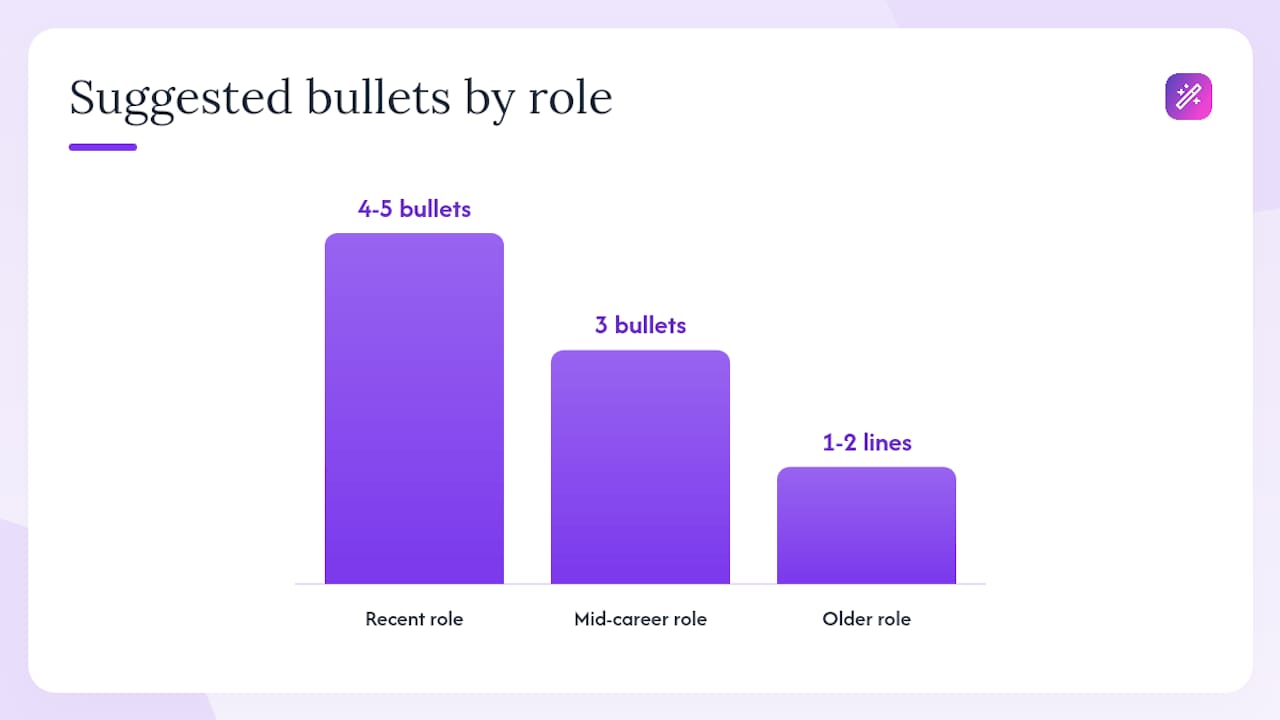
- Work experience. Each role gets: job title, company name, city/state, and dates on the same line (format: January 2022 – Present). Follow with 3–8 bullets per role, more for recent positions, fewer for older ones.
- Education. Degree, institution, graduation year. Omit GPA unless it’s above 3.5 and you’re within two years of graduation.
- Skills. A clean list of hard skills and tools. Keep it honest; recruiters verify these.
- Certifications. Name, issuing body, and year. Only include current, relevant credentials.
Optional sections such as languages, volunteer work, or publications may be added if they bring value for the specific role.
Date format guidance: Write out the month name (January 2022 – March 2024) or use the abbreviated form (Jan 2022 – Mar 2024). Both parse reliably. Avoid formats like 01/2022, which some ATS systems misread. Use “Present” for your current role, not “Now” or “Ongoing.”
Formatting checklist for ATS safety:
- Single column only
- Standard header names (Work Experience, not “Where I’ve Been”)
- No text boxes, tables, or graphics inside the body
- No icons or symbols in place of bullet points
- Export as a text-selectable PDF (open the exported file, try to highlight and copy a line of text; if it works, you’re good)
For a deeper look at ATS-friendly resume formatting, the rules are more specific than most guides admit.
Ready-to-use templates and sample entries you can copy
Download options:
- Google Docs: Search “chronological resume” in the Google Docs template gallery, or use a university-provided shareable link. Make a copy to your Drive, edit directly, then export as PDF (File > Download > PDF Document). Verify text selectability before sending.
- Microsoft Word (.docx): The University of Arizona CALES program offers a free reverse-chronological .docx template with step-by-step fill instructions. Download, edit in Word, save as PDF.
- Colorado State University provides a formatted chronological resume sample PDF that shows real bullet phrasing and layout you can model directly.
Sample work-history entries:
Recent role (4–5 bullets):
Marketing Manager | Acme Corp, Austin, TX | June 2021 – Present
- Grew organic search traffic by a significant share in one year by rebuilding the content calendar around keyword clusters.
- Managed a substantial annual paid media budget across Google Ads and LinkedIn, achieving a strong return on ad spend.
- Led a team of content specialists, introducing a sprint-based editorial workflow that reduced production time.
- Launched a product email series that generated notable attributed pipeline within a few months.
Mid-career role (3 bullets):
Content Strategist | BrightPath Media, Chicago, IL | March 2018 – May 2021
- Produced 60+ long-form articles per quarter, averaging 4,200 organic sessions per piece within 60 days of publication.
- Collaborated with the SEO team to align content briefs with target keyword clusters, improving average position from 18 to 6.
- Trained two junior writers on brand voice guidelines and editorial standards.
Older role (1–2 lines):
Junior Copywriter | Spark Agency, New York, NY | August 2015 – February 2018 — Wrote web copy, email campaigns, and social content for 12 B2B clients across SaaS and fintech verticals.
File format note: Always export as a PDF with selectable text, not an image PDF or a scanned document. Open the file, try to highlight a word, and confirm it works. Image-based PDFs fail ATS parsing entirely.
Practical writing tips, the ATS checklist, and the 7-second rule
ATS checklist (quick reference):
- Single-column layout with no graphics in the body
- Standard section headers spelled out in full
- Dates on the same line as job title and company
- Bullets start with an action verb, not “Responsible for”
- Exported as a text-selectable PDF
Writing strong bullets:
The formula is: action verb + task or scope + measurable outcome. “Managed social media” tells a recruiter nothing. “Grew Instagram following from 8,000 to 34,000 in 10 months by shifting to short-form video” tells them everything. Jobscan’s guidance on keyword alignment reinforces this: mirror the exact phrasing from the job description in your bullets and summary, but only where it’s accurate. Stuffing keywords you can’t speak to in an interview backfires fast.
Aim for 3–8 bullets on recent roles, 2–3 on older ones. Bullets that wrap to three lines on a standard page are too long; cut them. For more on tailoring each application, the payoff is measurable.
The 7-second rule: Recruiters spend roughly seven seconds on a first pass. They look at three things: your current or most recent job title, the company name, and one clear achievement. Put those three elements where they can’t be missed: job title on its own line, company name right next to it, and your strongest bullet first under each role.
Pro Tip: Write your professional summary after you’ve filled in all your experience bullets. By then you know exactly which two or three strengths to lead with, and the summary writes itself in half the time.
Chronological vs. functional vs. combination: which fits your situation?
| Format | Best for | ATS friendliness | What it signals |
|---|---|---|---|
| Chronological | Steady career path, relevant recent experience, showing progression | High — standard structure parses reliably | Transparency, consistent growth, confidence in your history |
| Functional | Early-career applicants with limited history | Low — skills-first layout confuses most ATS parsers | Can raise red flags about gaps or lack of direct experience |
| Combination | Career changers, gaps over 12 months, pivots | Moderate — depends on execution | Adaptability; skills lead, but history is still visible |
Reverse-chronological is the default for most U.S. roles because it gives recruiters exactly what they want without making them work for it. Functional resumes often trigger suspicion unless the candidate has a clear reason for the format. The combination format is the practical middle ground when your history needs context before it lands.
For readers who need the combination route, JobAlign’s ATS resume guide covers the technical execution in detail.
What research and university career centers say about this format
Purdue OWL’s chronological resume sample demonstrates exact section placement and bullet formatting for both academic and professional contexts, and it’s one of the most-referenced free resources in U.S. career advising. UC Davis and Arizona both provide downloadable templates built on the same single-column, reverse-chronological structure.
The SparrowCV analysis of common template failures makes a point worth taking seriously: designer templates with multi-column layouts, icons, and decorative elements are one of the most common reasons well-qualified candidates get filtered out before a recruiter reads a single word. The fix is straightforward: use a plain, single-column template and verify the exported PDF is text-selectable.
Statistic: According to SparrowCV’s analysis, a large share of resumes submitted through ATS-based hiring systems fail parsing at the formatting stage, not the content stage. The most common culprits are text boxes, columns, and image-based exports.
Matching your section header labels to what ATS systems expect (“Work Experience” rather than “Career Highlights”) measurably improves field extraction. It’s a small change with a real effect. For a complete ATS optimization checklist, the technical rules are worth reviewing before you finalize any template.
Key Takeaways
A single-column, reverse-chronological resume template with standard headers is the most reliable format for passing ATS filters and recruiter scans in U.S. job applications.
| Point | Details |
|---|---|
| Use reverse-chronological order | List your most recent role first; this is what recruiters and ATS systems expect by default. |
| Single-column layout is non-negotiable | Multi-column and designer templates frequently break ATS parsing before a human sees your resume. |
| Bullets need a measurable outcome | Use action verb + task + result; vague bullets waste the recruiter’s 7-second scan. |
| Hybrid format for gaps or pivots | If you have a gap over 12 months or are changing industries, a combination format serves you better. |
| Easy-cv builds ATS-ready templates | Easy-cv’s template library follows the single-column, standard-header structure and exports as a text-selectable PDF. |
The case for structure over style
Most applicants spend their energy on how a resume looks. The research points the other way. A clean, single-column template that parses correctly will outperform a beautifully designed multi-column layout every time, because the beautifully designed one often never reaches a human reader. The ATS doesn’t care about your font choice; it cares whether it can extract your job title and dates from the right fields.
The other mistake worth flagging: treating the professional summary as an afterthought. It’s the first text block a recruiter reads after the contact line, and it’s where you control the narrative. A generic “results-driven professional with 10 years of experience” wastes that space. A specific, tailored two-sentence summary that mirrors the job description’s language does real work.
Easy-cv makes building your chronological resume faster
Formatting a resume from scratch in Word or Google Docs works, but it’s slow, and one wrong table cell can break your ATS score. Easy-cv’s AI-powered resume builder gives you a library of ATS-friendly, single-column templates pre-structured in the exact reverse-chronological order this guide recommends. The AI writing assistant helps you draft and sharpen bullets, the export goes straight to a text-selectable PDF, and the built-in job matcher surfaces roles already scored against your resume so you’re not applying blind.

Free plan available. No design experience needed. Build your chronological resume in under 30 minutes, verify it’s ATS-ready, and start applying to pre-matched roles the same day.
Authoritative sources and further reading
The sources below are the most useful references for templates, ATS guidance, and sample bullets:
Recommended resources:
- Indeed: How to Write a Chronological Resume — canonical structure and section-by-section writing tips
- Purdue OWL Chronological Resume Sample — university-style sample with exact formatting
- UC Davis Career Center: Resume Formats — format comparison and when to use each
- University of Arizona CALES .docx Template — free downloadable Word template
- Colorado State University Resume Sample PDF — formatted sample showing real bullet phrasing
- Jobscan: Chronological Resume Guide — bullet-writing rules and keyword alignment
- Resume.io: Reverse Chronological Resume — six core sections and U.S. recruiter expectations
- SparrowCV: Chronological Resume Format — ATS parsing failures and single-column rules