The ATS Resume Format That Actually Gets You Interviews
The safest ATS resume format is a single-column, reverse-chronological layout with standard section headings, a plain sans-serif font at 10 to 12pt, 0.5 to 1 inch margins, saved as a .docx or true-text PDF. Get this right and most applicant tracking systems will read your resume the way you intended.
Before you do anything else, run through this:
- Move your contact information into the main body, never a header or footer.
- Use consistent date formatting like “Jan 2023 – Present.”
- Cut tables, graphics, and columns from the layout entirely.
- Export a plain-text version and check that everything still reads in order.
Key Takeaways
A single-column, reverse-chronological resume with standard headings, safe fonts, and a clean .docx or text-based PDF export is the format most applicant tracking systems parse correctly.
| Point | Details |
|---|---|
| Layout choice | Use a single-column, reverse-chronological structure and skip tables or multi-column designs entirely. |
| Font and spacing | Set Arial, Calibri, or a similar sans-serif font to 10 to 12pt with 0.5 to 1 inch margins. |
| Contact placement | Put your name and contact row in the body text, never in a header or footer field. |
| Date consistency | Format every date as “MMM YYYY – MMM YYYY” and place it beside the job title and employer. |
| Pre-submit test | Export a plain-text version before applying to confirm content order and catch missing fields. |
| Managed formatting | Easy-cv’s single-column templates and export tools apply these ATS rules automatically as you build. |
Table of Contents
- What Is an ATS-Friendly Resume Format, Exactly?
- How Should You Order Your Resume Sections?
- What Date Format Do ATS Parsers Expect?
- How Do You Add Keywords Without Sounding Robotic?
- Which Layout Choices Break ATS Parsing?
- Which Resume Templates Are Actually Safe to Use?
- How Do You Test a Resume Before Submitting It?
- Why Trust This ATS Formatting Guidance?
- Is the Standard ATS Advice Actually Complete?
- Build and Export Your ATS-Ready Resume With Easy-cv
- Sources
What Is an ATS-Friendly Resume Format, Exactly?
An applicant tracking system is software that scans, sorts, and ranks resumes before a human ever opens them. It pulls your job titles, dates, skills, and contact details into structured fields, then scores how well those fields match the job description. If the parser can’t find or read a piece of information, it doesn’t get scored, no matter how relevant you are.

That’s why format matters more than most job seekers think. A resume optimized for ATS isn’t about tricking software. It’s about presenting information in a shape the software can actually read.
Stick to these specs:
- Layout: single column, reverse-chronological, one page for most candidates, two only past the 10-year mark.
- Fonts: Arial, Calibri, Helvetica, Georgia, or Roboto, sized 10 to 12pt.
- Margins: 0.5 to 1 inch on all sides, with standard single or 1.15 line spacing.
- File type: .docx is the safest universal upload; a true text-based PDF works when a job posting specifically asks for one.
Pro Tip: Boring wins here. The clean, unstyled resume that looks plain to your eye is the one a parser reads cleanly. Visual flair built for humans is often exactly what confuses machines, according to MIT’s career advising team.
Testing across major platforms backs this up. FastApply’s parser research found that single-column layouts exported as plain text-PDF or .docx parsed cleanly across Workday, Greenhouse, Lever, and iCIMS, while fancier layouts triggered failures on at least one of those systems.
How Should You Order Your Resume Sections?
ATS software maps your resume to a set of expected fields, and it does that job far better when your headings match what it’s trained to look for. Go with something like this:
- Contact information (name, phone, email, city/state, LinkedIn) at the very top of the body
- Professional summary — three or four lines, no more
- Work experience (or “Professional Experience”)
- Education
- Skills
- Certifications, if relevant to the role
Use plain labels: “Work Experience,” “Skills,” “Education.” Creative alternatives like “My Journey” or “What I Bring” might read well to a human, but they can confuse a parser looking for standard field names.
Keep your name, title, and contact row as a single line of plain text in the body itself, never inside a header or footer element. Skip the icons and phone/email symbols too. They add nothing for a parser and sometimes get dropped along with the rest of the header content.
What Date Format Do ATS Parsers Expect?
Dates determine how the system calculates your tenure at each job, and inconsistent formatting is one of the fastest ways to confuse that calculation. Use “MMM YYYY – MMM YYYY,” so something like “Jan 2023 – Mar 2025,” and “Present” for a current role.
- Keep dates on the same line as the job title and employer, never in a separate column or a floating text box.
- Avoid shorthand like “3/21” or “Spring 2024,” both of which parsers frequently misread.
- Apply the same date pattern to every single entry on the resume, including education and certifications.
Santa Clara University’s career center flags inconsistent date formatting as one of the most common resume mistakes it sees, right alongside contact details buried in a header.
How Do You Add Keywords Without Sounding Robotic?
Job-description keywords tell an ATS you’re a match, but stuffing them in awkwardly reads as spam to the human who reads your resume next. Place the highest-value terms from the job posting in your professional summary, your skills section, and inside your experience bullets, where they carry actual context.
- Write out both the acronym and the full term: “Master of Business Administration (MBA),” “Search Engine Optimization (SEO).” A parser might be configured to catch one and not the other.
- Structure bullets as action verb, plus tool or method, plus measurable result: “Managed a $2M budget using Salesforce to cut vendor costs by 15%.”
- Repeat the exact phrasing from the posting where it fits naturally, rather than swapping in a synonym that means the same thing to you but not to the parser.
Pro Tip: Read the job posting twice before you touch your resume. The second read is where you catch the specific tool names and certifications you’d otherwise paraphrase into invisibility. Keyword optimization done this way tends to outperform generic tailoring by a wide margin.
Which Layout Choices Break ATS Parsing?
Tables and multi-column layouts are the single biggest cause of scrambled resumes. When a parser reads left to right, top to bottom, a two-column design forces it to stitch together fragments from unrelated sections, and the result is often gibberish.
- Skip tables entirely, even for skills lists. A comma-separated line or a short bulleted list reads far more reliably.
- Drop the visual skill bars, star ratings, and progress graphics. They carry zero parsable text.
- Cut icons, headshots, logos, custom bullet characters, and text boxes.
- Never place contact information, job titles, or dates inside a header or footer. Some ATS platforms ignore those regions completely, and internal testing shows table-based resumes failing outright on systems like Workday.
Which Resume Templates Are Actually Safe to Use?
Not every “professional” template plays nice with a parser. Sidebar-heavy designs with colored blocks for skills or contact info look sharp to a recruiter’s eye and terrible to the software that screens the resume first.
- Choose single-column templates only. If a template splits your resume into a left sidebar and a right body, skip it, no matter how polished it looks.
- Strip out hidden formatting. Delete text boxes, convert any decorative bullet style to a plain round or square bullet, and unify the whole document to one font family.
- Test before you commit. Open the file, select all, and copy it into a plain text document to confirm nothing disappears or reorders.
Easy-cv builds its template library around this exact constraint. Every template in the feature set is single-column by design, so you’re choosing between visual styles rather than gambling on whether the layout underneath will parse.
How Do You Test a Resume Before Submitting It?
A plain-text export test catches more real formatting problems than most paid ATS-checker tools, according to MIT’s career center. It takes two minutes and needs no special software.
- Save or copy your resume as plain text (.txt), stripping all formatting.
- Check that your name, contact line, job titles, employers, dates, and skills all appear, in the right order, with nothing missing.
- If a section vanishes or the order scrambles, that section had a formatting element the parser couldn’t handle. Fix it before applying.
Name your file clearly: “FirstName-LastName-JobTitle-Resume.docx.” Avoid PDF/A format and scanned PDFs entirely; both strip out the selectable text layer that a parser needs to read your document. If you can’t highlight and copy text from your own PDF, an ATS can’t read it either.
Why Trust This ATS Formatting Guidance?
This guide draws on published formatting research from MIT’s career advising office, Santa Clara University’s career toolkit, and parser-specific testing from FastApply covering Workday, Greenhouse, Lever, and iCIMS.
Easy-cv builds its resume tools around the same rules:
- ATS-friendly templates that are single-column by default, with no sidebar traps
- An AI writing assistant that helps phrase bullets with the action-verb-plus-outcome structure ATS and recruiters both respond to
- Export options that produce clean .docx and true text-based PDF files, ready for the plain-text test described above
- Built-in job aggregation, so you can pull a job description’s exact language while you’re still editing
For a deeper look at how parsing actually works field by field, the resume parsing guide breaks down what each ATS field expects from your document.
Is the Standard ATS Advice Actually Complete?
Most guides on this topic stop at “use a simple template,” and that’s technically true but practically useless. The real gap is that job seekers treat ATS formatting as a one-time setup instead of a per-application check. You can build the cleanest single-column resume on earth and still fail a parser if you paste in a table from an old version, or if a recruiter’s specific ATS handles date columns differently than the one you tested against.
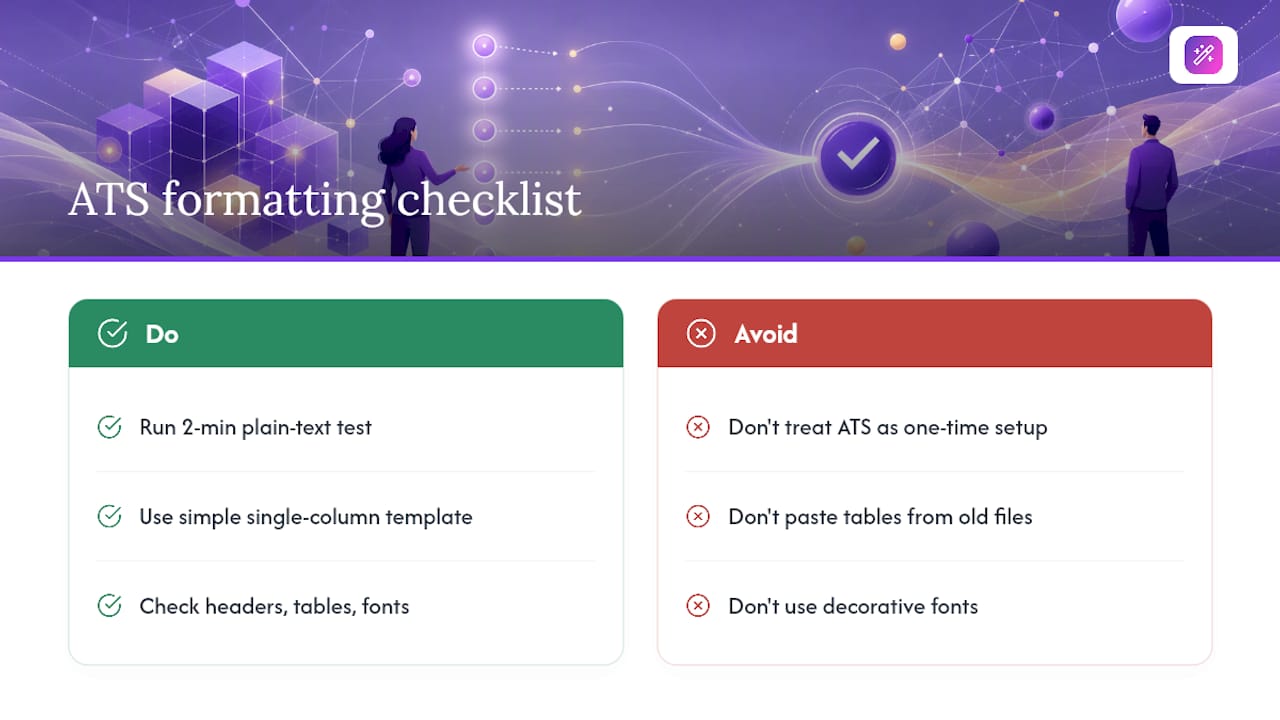
The conventional advice also undersells how often the fix is embarrassingly simple. Nine times out of ten, a scrambled ATS parse traces back to one of three things: a header holding your contact info, a table hiding your skills, or a decorative font swapped in during a last-minute redesign. None of that requires a rebuild. It requires the two-minute plain-text test that almost nobody actually runs before hitting submit.
If you take one thing from this guide, make it that test. Not the font choice, not the margin size. Those matter, but they’re set-and-forget. The plain-text check is the one step that catches whatever broke since your last successful application, and it costs you nothing but two minutes you’d otherwise spend refreshing your inbox.
— Andras
Build and Export Your ATS-Ready Resume With Easy-cv
You’ve got the format rules. Now the faster path is not rebuilding this from scratch in a word processor every time a job posting changes. Easy-cv’s template library is built single-column from the ground up, so every design choice you make stays parser-safe by default, while its AI writing assistant helps you rework bullets and keywords for each specific job description in minutes instead of hours.

Beyond templates, Easy-cv’s job matcher scores roles against your existing resume, so you can see which postings are worth tailoring before you spend the time. Pair that with clean .docx and true-text PDF exports, and the plain-text test described earlier becomes a formality rather than a rescue mission. If you’re managing applications across multiple countries or languages, the CV translator carries your formatting over intact rather than forcing a rebuild. Start a resume in Easy-cv’s builder and run your first export today.
Sources
- Make your resume* ATS-friendly – Career Advising & Professional Development | MIT
- Job scan - common ATS resume formatting mistakes | Santa Clara University Career Center
- ATS Resume Format Guide 2026: What Actually Parses | FastApply (blog)