What Is Keyword Optimization on a Resume?
Resume keyword optimization means selecting the exact skills, tools, job titles, certifications, and phrases from a job posting and placing them in your CV and cover letter so an applicant tracking system (ATS) and the human reading it both see a clear match. Do this before you submit anything: scan the job posting, pull out the top 3 to 6 terms that repeat, and work them into your summary and skills section.
You don’t need special software to start. You need five minutes and the job description in front of you.
- Definition: matching your resume’s language to the employer’s language, honestly
- First move: highlight repeated nouns in the Requirements section
- Industry heuristic: aim for a reasonable keyword density, not more
- Tool option: platforms like Easy-cv can extract and check keyword matches automatically
Key Takeaways
Resume keyword optimization works because it aligns your exact language with what an ATS parses and scores, while quantified proof convinces the human reading it next.
| Point | Details |
|---|---|
| Definition first | Keyword optimization means matching exact job-posting terms to your resume’s summary, skills, and bullets. |
| Extract before you write | Pull your top 5 terms from the Requirements section before drafting anything new. |
| Placement beats volume | Repeat each core keyword in multiple sections rather than stuffing it once everywhere. |
| Aim for 65 to 75% match | Chasing a perfect match usually signals stuffing rather than genuine fit. |
| Use Easy-cv to verify | Easy-cv’s job matcher scores your resume against a posting and suggests phrase-matched bullets automatically. |
Table of Contents
- How ATS Software Scans and Ranks Your Resume
- Which Resume Keywords Actually Matter
- How to Find the Right Keywords for a Job Posting
- Where to Put Keywords for the Biggest Impact
- What to Avoid When Optimizing Resume Keywords
- A Resume Keyword Checklist You Can Reuse
- Why Human Judgment Still Beats the Scanner
- Let Easy-cv Handle the Keyword Grunt Work
- Sources
How ATS Software Scans and Ranks Your Resume
Every ATS runs your resume through three mechanical steps, and understanding them explains almost every rule in this guide. First, the parser converts your document into plain text and tries to sort it into fields: job titles, dates, skills, education. A resume built with text boxes, columns, or graphics often gets scrambled here before matching even starts.

Second comes matching. The system looks for exact matches, “stemmed” matches (managing vs. manage), and phrase matches, then scores based on frequency and where the term appears. SparrowCV explains that parsers build a searchable index from your resume and compare it against the posting, which is why a keyword buried in a paragraph counts for less than one sitting in your skills list.
Third, ranking. Modern platforms don’t just count keywords anymore. RecruitBPM notes that many systems now add semantic understanding, recognizing “led a team” as related to “management,” while also flagging unnatural repetition as possible spam.
The practical result: use the exact wording for critical terms, then back each one up with a real example in your experience section. Don’t rely on synonyms alone, and don’t rely on a keyword with zero supporting evidence either.
- Parsing breaks on complex layouts before scoring even begins
- Matching rewards exact phrases over paraphrases for must-have terms
- Ranking increasingly factors in context, not just word count
Which Resume Keywords Actually Matter
Not every word in a job posting deserves a spot on your resume. Hard skills carry the most weight with both ATS and recruiters: programming languages, named tools, platforms, software. If a posting says “proficient in Tableau,” write Tableau, not “data visualization software.”
Job titles and role-specific phrases matter almost as much, as long as they’re truthful. If you held a “Marketing Coordinator” role that did the same work as a “Marketing Specialist,” it’s fair to mirror the posting’s title on your resume if the responsibilities genuinely overlap.
Certifications and named methodologies deserve special handling. Indeed’s guidance recommends including both the acronym and the spelled-out version once, since different ATS configurations search for one or the other. Write “PMP (Project Management Professional)” rather than picking just one.
- Hard skills: tools, languages, platforms named explicitly in the posting
- Job titles: mirror them where your actual duties support it
- Certifications: list both the acronym and full term (PMP, HIPAA, Agile/Scrum)
- Soft skills: save these for accomplishment bullets, not a standalone list
How to Find the Right Keywords for a Job Posting
This is the workflow. Run it for every application, and it takes less time than customizing your cover letter from scratch.
- Copy the full job description into a plain document. Read the Requirements and Qualifications sections closely. Coursera’s research points to these sections as the primary source of the terms an ATS is built to weight.
- Highlight concrete nouns. Tools, certifications, job titles, repeated phrases. Count how often each appears. Anything mentioned more than once is almost always a priority term.
- Sort keywords into three tiers. Must-have (listed under “Required”), strong-match (repeated but not labeled required), and nice-to-have (mentioned once under “Preferred”).
- Map each keyword to a resume section. Your summary, your skills list, and at least one bullet in your most recent relevant role. Draft phrases that describe what you actually did, not just a keyword dump.
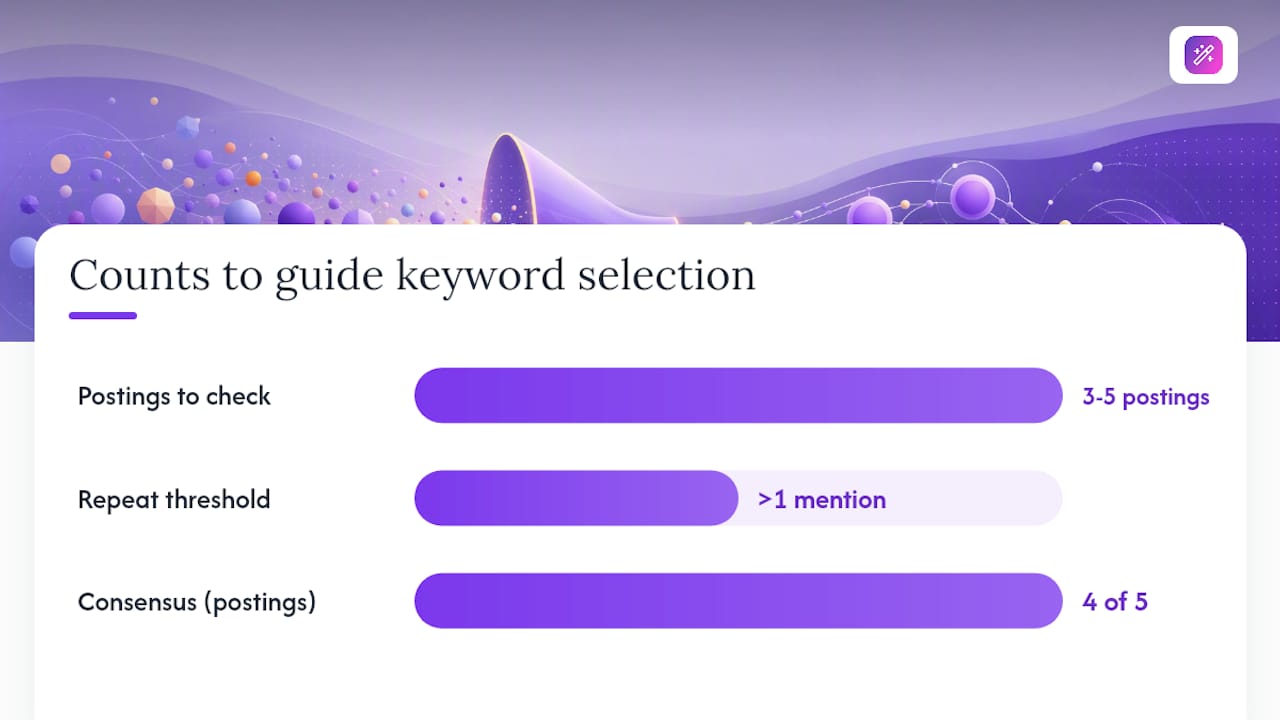
Pro Tip: Pull up 3 to 5 similar job postings for the same title before you finalize your list. Terms that show up across most of them are core to the role, not just one hiring manager’s preference. This cross-checking habit alone catches keywords a single posting might bury or skip entirely.
Comparing multiple listings also protects you from over-indexing on one company’s quirky phrasing. If four out of five postings say “cross-functional collaboration” and only one says “team synergy,” you know which phrase to use. Tools like Easy-cv’s AI resume builder can speed up this extraction step if you’re applying to a high volume of roles and don’t have time to manually parse every posting.
Where to Put Keywords for the Biggest Impact
Placement matters as much as word choice. Roleframe’s ATS research identifies three locations that carry the most signal: your professional summary, your skills section, and the top bullets of your most recent relevant role. A keyword sitting only in your 2015 job history does far less work than one in your headline.
Aim to repeat each primary keyword in two or three of these spots, not just once. That repetition is what separates a resume that merely “mentions” a skill from one that demonstrates it.
Write your bullets with a simple formula: action verb plus keyword plus measurable outcome. Indeed’s own examples follow this same pattern of pairing action verbs with keyword nouns for exactly this reason.
- Put your top 3 keywords in the summary, not buried mid-paragraph
- List specific tools by name (Salesforce) and add the generic category once too (CRM)
- Back every headline keyword with at least one quantified bullet
- Keep your skills section as plain, structured text, never as a graphic or sidebar
Structured skills sections do double duty in many systems, since they get read both as a distinct field and as part of the full-text scan, which is one reason a bulleted skills list tends to outperform skills mentioned only in prose.
What to Avoid When Optimizing Resume Keywords
Keyword stuffing backfires. Repeating a term unnaturally, or hiding it in white text or a footer, risks tripping spam detection in modern ATS and looks obvious to any recruiter who actually reads the document. RecruitBPM and Roleframe both point to a practical target: matching roughly 65 to 75% of a posting’s critical requirements is usually enough to advance to human review. Chasing 100% almost always means padding.
Formatting mistakes cause just as much damage. Two-column layouts, embedded images, text boxes, and unusual fonts can scramble parsing before your keywords ever get scored. Stick to a single-column, text-based format.
- Never claim a skill or certification you can’t defend in an interview
- Never hide keywords in headers, footers, or images where a parser can’t read them
- Never repeat a term more than a handful of times just to hit a density target
- Never let layout choices override readability for the sake of “ATS tricks”
A Resume Keyword Checklist You Can Reuse
Run through this list before you hit submit on any application.
- Extract your top 5 keywords from the job posting
- Place 3 of them in your professional summary
- Add all 5 to a structured skills section
- Back at least one keyword with a quantified bullet in your experience section
- Run an ATS compatibility check on the final document
- Export as a parser-safe .docx or text-based PDF, never a design-heavy image export
Here are two snippets you can adapt directly.
Summary line: “Data analyst with 4 years of experience building SQL dashboards and automating reporting workflows, reducing manual reporting time by 40% across two teams.”
Experience bullet: “Managed Salesforce CRM data pipeline for a 12-person sales team, cutting lead-response time by 30% through automated tagging rules.”
Notice both examples use exact tool names, a real number, and language a recruiter would recognize instantly from the posting they wrote.
Why Human Judgment Still Beats the Scanner
Tools and scanners are helpers, not authors. The strongest resumes I’ve seen pair an automated keyword check with genuinely specific, measurable achievements that only the candidate could write. An algorithm can tell you which words are missing. It can’t tell you which project actually proves you know how to use them.
Mirroring a job posting’s language is communication, not deception, as long as the words describe something true. If you didn’t do it, don’t write it. If you did, use their exact term for it.
Let Easy-cv Handle the Keyword Grunt Work
Manually comparing five job postings and hand counting repeated terms works, but it’s slow when you’re applying to a dozen roles a week. Easy-cv’s job matcher reads a posting, extracts the terms an ATS is likely to weight, and scores how well your current CV matches before you ever hit submit.

Instead of guessing which of your five bullet points needs a keyword swap, you get a match score and specific suggestions tied to that exact posting. The AI writing assistant then drafts phrase-matched bullets you can edit for accuracy, and every template in the builder exports in a parser-safe format so your formatting never undoes your keyword work. If you’re tailoring the same base resume for multiple roles, try the job matcher on your next application and see your match score before you send it.
Sources
- Resume keywords — Coursera
- ATS-optimized resume tips and tricks — RecruitBPM
- Resume keywords and phrases — Indeed