Two Page Federal Resume Format: OPM/USAJOBS 2025–2026 Rule
A compliant federal resume format now caps out at two pages and must include specific, verifiable fields: job title, employer with city and state, exact start/end dates in MM/YYYY, hours worked per week, supervisor contact, and series/grade where it applies. USAJOBS accepts PDF, Word, and a handful of other file types up to 5 MB. The safest route to full compliance is building the document directly in the USAJOBS Resume Builder, which prompts for every required field automatically.
TL;DR:
- Federal resumes must include exact start and end dates in MM/YYYY format, hours worked per week, supervisor contact info, and series or grade details.
- The two-page limit is mandated by policy and requires concise formatting, with clear headings and plain, linear text free of graphics or multi-column layouts.
- Use achievement-based CCAR bullets with specific keywords from the job announcement to improve scoring and relevance.
- Prioritize recent and directly relevant experience, trimming older or unrelated roles to fit within two pages without sacrificing clarity.
- Building resumes with dedicated tools like EasyCV streamlines compliance, formatting, and keyword integration, speeding up the application process.
Table of Contents
- What Federal Resumes Must Include: Mandatory Fields Checklist
- How Should a Federal Resume Be Formatted?
- How Do You Write Federal Resume Bullets That Score?
- What Do You Cut to Fit Two Pages?
- Sample Structure You Can Adapt
- Faster Federal Resume Formatting With the Right Tools
- What I’ve Learned Helping People Adjust to the Two-Page Rule
- Build Your Federal Resume Faster With EasyCV
- Sources
What Federal Resumes Must Include: Mandatory Fields Checklist
Federal reviewers don’t skim for vibes. They check boxes against your resume line by line, and a missing field can mean your experience simply doesn’t count, even when you’re clearly qualified. NIH’s guidance for applicants is blunt about this: leave out hours per week or exact dates, and a hiring specialist may not credit that job at all.
Every federal resume needs these baseline elements:
- Contact and eligibility info: legal full name, city/state, email, phone number, and citizenship status (plus veterans’ preference details if that applies to you).
- Per-position details: job title, employer name with city and state, series and grade (federal roles) or rank (military), exact start and end dates in MM/YYYY format, hours worked per week, and your supervisor’s name and phone number.
- A “may we contact your supervisor” preference, since agencies use this during reference checks.
- Education entries: school name, city/state, degree or major, and completion date. Some series require transcripts, so note where you’ll attach them.
- Supporting documents, referenced by name in your application rather than buried in the resume text: SF-50, DD-214, transcripts, or veterans’ preference letters.
This structure isn’t optional decoration. NARA’s federal resume guide treats these fields as the minimum contents a reviewer expects to find, and skipping any of them is one of the fastest ways to get screened out before a human even reads your accomplishments.
How Should a Federal Resume Be Formatted?
The two-page limit isn’t a suggestion from a career blog. It’s OPM policy under the Merit Hiring Plan, effective for competitive and excepted service vacancies. Agencies are directed to require two pages unless a specific vacancy announcement says otherwise and explicitly invites longer documents through “other documents.”
That constraint changes how you should format the page itself:
- Fonts: Arial or Calibri work well. Keep body text at 10 to 11 point and headers around 14 point, nothing fancier.
- Margins: 0.5 inches minimum on all sides. Tighter margins eat into legibility without buying you much extra room.
- File type: PDF is the safer choice. USAJOBS accepts several file types with a 5 MB size cap, but PDF locks in your formatting so it doesn’t shift when a reviewer opens it on a different system.
- Emphasis: use bold or all caps for section headers instead of italics or underlines, which can confuse automated parsing systems.
- Skip the extras: no photos, no graphics, no text boxes, no multi-column layouts. Federal reviewers and the systems behind USAJOBS parse plain, linear text far more reliably.
The Department of Labor’s tips for federal resumes echo the same theme: clarity and structure beat visual polish every time.
How Do You Write Federal Resume Bullets That Score?
Federal HR specialists are trained to look for evidence, not adjectives. That’s where CCAR comes in: Context, Challenge, Action, Result. It’s the format NARA recommends for turning a job description into proof of what you actually accomplished.
Here’s how to build a CCAR bullet:
- Context: one short phrase on the setting (team size, program, or scope).
- Challenge: the specific problem or gap you were brought in to solve.
- Action: what you personally did, using strong verbs (led, negotiated, redesigned, audited).
- Result: the measurable outcome, with a number wherever you can attach one.
A quick before and after shows the difference:
Before: “Responsible for managing office budget and supervising staff.”
The second version isn’t just more impressive. It’s the version a reviewer can actually score against a vacancy announcement’s qualification criteria, because it names scope, hours, and a result.
Before you write a single bullet, pull the exact language from the job announcement and the assessment questionnaire. Federal hiring leans heavily on keyword matching, both by human reviewers and by the systems screening resumes before they reach a human at all. If the announcement says “stakeholder engagement,” use that exact phrase somewhere in your bullets, not a synonym you think sounds better.
Pro Tip: Keep a running list of the exact competencies named in the announcement, then check off each one as you place it in a bullet. If a competency has no matching bullet, you have a gap to fix before you submit.
What Do You Cut to Fit Two Pages?
Two pages sounds tight until you realize most reviewers only care about the last decade of relevant work anyway. Start by ranking your experience: anything that maps directly to the announcement’s minimum qualifications goes first, and anything older than about 10 years, unless it’s uniquely relevant, moves to the bottom of your priority list or gets cut entirely.
Compression techniques that actually preserve substance:
- Tighten CCAR bullets to one or two lines each. Cut adjectives before you cut numbers.
- Convert long narrative paragraphs into bullets. Reviewers scan bullets faster than prose blocks.
- Use tighter verb forms (“managed” instead of “was responsible for managing”).
- Move full project lists, lengthy publication records, or an extended CV into “other documents,” and label that attachment clearly in your USAJOBS submission.
- Cut personal data beyond what’s required, older roles with no relevance to the target series, and any job history that doesn’t map to the announcement’s qualifications.
This isn’t about hiding information. It’s about making sure the two pages a reviewer actually reads contain the evidence that gets you referred.
Sample Structure You Can Adapt
A clean two-page federal resume typically runs in this order: header with contact and eligibility info, an optional two-line summary, work experience entries (most recent first, each with the full required fields), education, certifications, and other qualifications like security clearance or language skills.
The SEC’s sample federal resume is worth studying for exactly this reason. It shows the level of detail expected per entry: title, series/grade, dates, hours, and supervisor contact, all present without padding.
- Before: “Handled customer inquiries and resolved issues.”
- After: “Resolved an average of 45 constituent inquiries weekly (GS-9, 40 hrs/week) for a congressional casework unit, maintaining a 98% satisfaction rating.”
List supporting documents like SF-50s or DD-214s by name in your application, not embedded in the resume text itself.
Faster Federal Resume Formatting With the Right Tools
Building a compliant government resume by hand means juggling field checklists, CCAR phrasing, and page-count math all at once. Andras and the Easy-cv team built the platform’s resume templates with exactly that friction in mind: ATS-friendly layouts, achievement-focused content prompts, and clean PDF export that won’t scramble your formatting on upload.
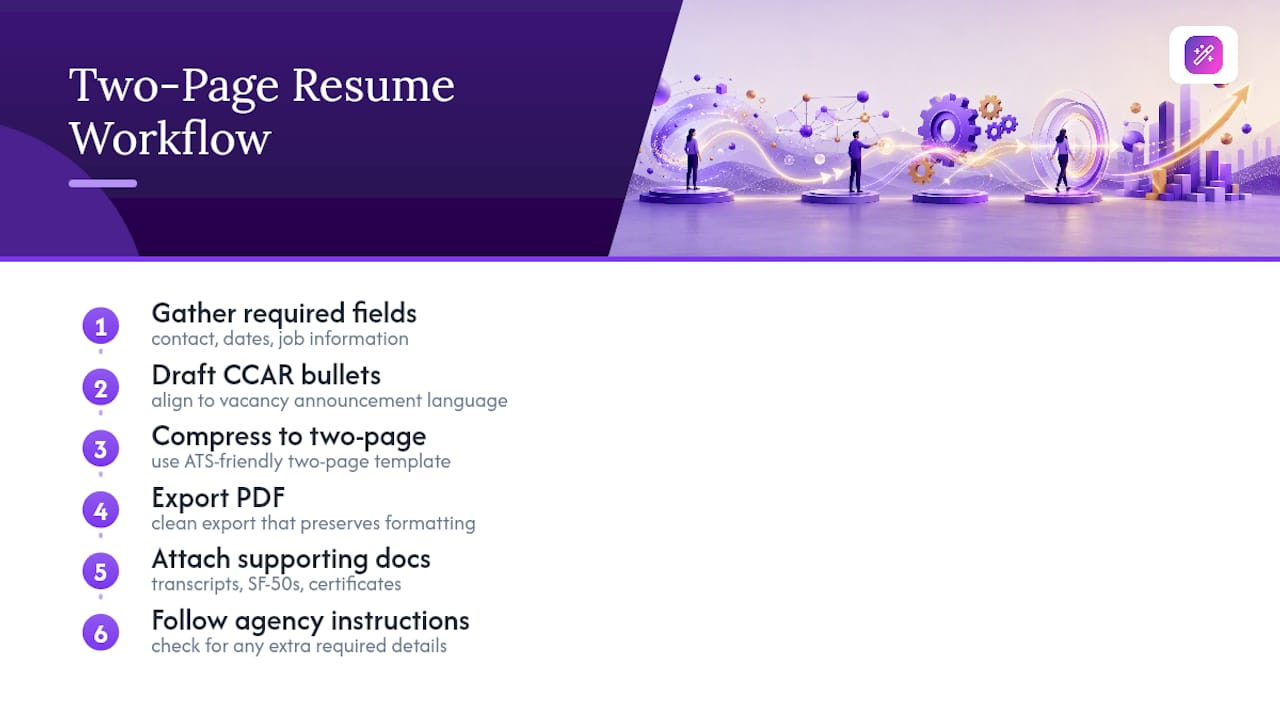
A practical workflow: gather your required fields first, draft CCAR bullets against the vacancy announcement’s language, compress using a two-page template, then export to PDF and attach your supporting documents separately. Always follow the specific agency’s “How to Apply” instructions. They sometimes ask for details beyond the baseline.
What I’ve Learned Helping People Adjust to the Two-Page Rule
The most common mistake isn’t bad writing. It’s applicants trying to cram a ten-year, three-page career history into two pages by shrinking the font instead of cutting content. That fails legibility and reviewer patience at the same time.
A tighter approach works better: gather every required field first, map your strongest experience to the announcement’s actual language, compress using CCAR, then export and upload your supporting documents last. Do those four steps in order and the two-page limit stops feeling like a punishment and starts feeling like a filter that rewards precision.
— Andras
Build Your Federal Resume Faster With EasyCV
Easy-cv gets you to a compliant two-page document faster than building one from scratch in a word processor, because the templates are already structured around the fields USAJOBS reviewers expect.

You get achievement-focused prompts that push you toward CCAR phrasing instead of vague duty statements, layouts built for ATS-friendly parsing, and one-click PDF export that keeps your margins and fonts intact when an agency system opens it. If you’re applying across multiple series or agencies, the swipe-based job matcher also helps you spot relevant federal postings without digging through USAJOBS listing by listing. For a broader look at format options before you commit to a structure, the NueCareer resume format guide is a solid outside reference too.
Start a free resume on Easy-cv and see how quickly you can turn your work history into a two-page document ready for your next USAJOBS submission.
Sources
- Agency guidance on the two-page limit on resume length | OPM
- NARA’s Federal Resume Guide: What You Should Know When Applying for a Federal Career
- Writing a Federal Resume | Office of Human Resources (NIH)
- Federal Resume Template (Sample) — SEC