The Application Process Explained for U.S. Job Seekers
The job application process is a six-step cycle: search for roles, research the employer, tailor your resume, decide on a cover letter, submit the application, and follow up. Indeed’s career guidance frames it exactly this way, and understanding the full procedure before you start is what separates a scattered job search from one that actually produces interviews.
Quick-start checklist (do this in the next 30–60 minutes):
- Pull three job postings that match your target role and save them somewhere you can reference them
- Create or update your USAJOBS profile if you’re open to federal work
- Open a spreadsheet and set up columns: company, role, date applied, follow-up date, status
- Read one job description end to end, highlight every required skill, and compare it to your current resume
Pro Tip: Save each job posting as a PDF the moment you find it. Postings disappear after closing, and you’ll need the original language when you tailor your materials.
Table of Contents
- What does the application process look like step by step?
- What should you expect after you apply?
- How do you tailor resumes and cover letters for ATS and hiring managers?
- What do you need to submit, and what gets you disqualified?
- How do you follow up and track multiple applications?
- Key Takeaways
- What actually separates applicants who get interviews from those who don’t
- Easy-cv puts the whole process in one place
- Useful sources and further reading
What does the application process look like step by step?
Each stage has a specific job. Skipping one or rushing through it is usually where applications go wrong.
Step 1: Search
Use a mix of sources: company career pages, aggregated job boards, and LinkedIn. Aggregated search pulls listings from multiple boards at once, which cuts the time you spend checking five sites separately. Set filters for location, experience level, and date posted. Prioritize postings from the last seven days; older listings may already be in late-stage review. For different application pathways like direct applications, referrals, and job boards, each has its own timing and competition level worth knowing.
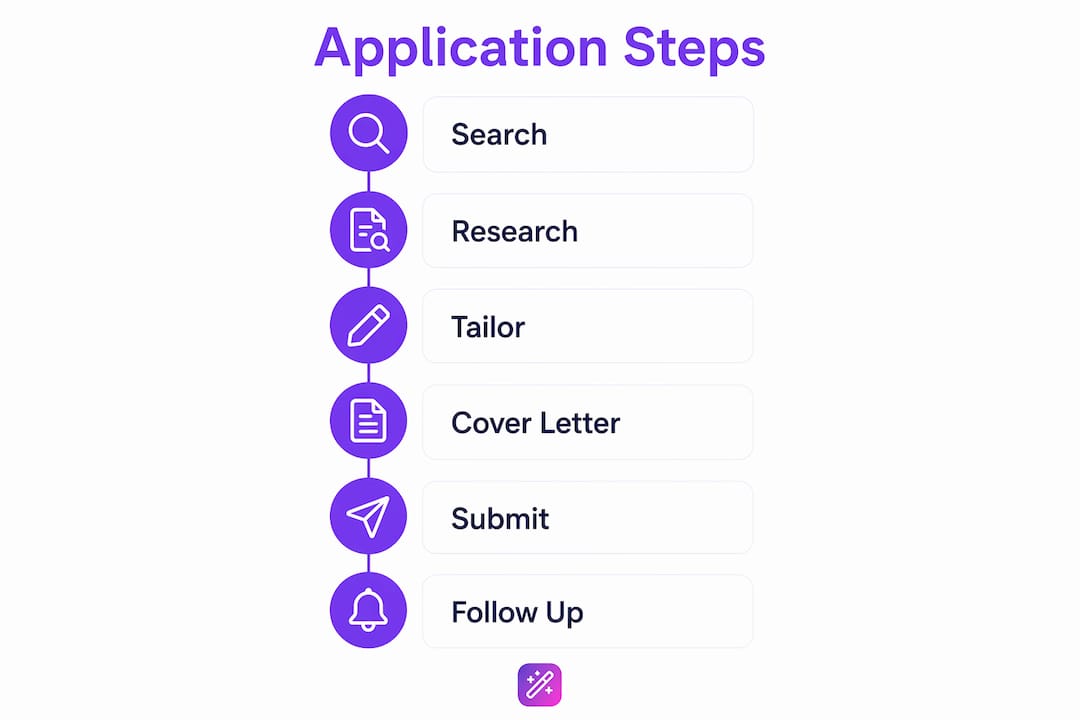
Step 2: Research the employer
Check the company’s About page, recent news, and LinkedIn employee profiles. What you’re looking for: growth signals, recent layoffs, leadership changes, and the actual job titles of people in similar roles. Red flags include vague job descriptions with no salary range, roles reposted every few months, or Glassdoor patterns showing high turnover. This research also feeds directly into your cover letter.

Step 3: Tailor your resume
Match the keywords in the job description to your resume. This isn’t cosmetic. ATS systems scan for specific terms before a human ever sees your file. Change your headline, reorder your top three bullets, and update your skills section for each role. The benefits of tailored resumes go beyond ATS: hiring managers notice when a resume reads like it was written for their specific opening.
Step 4: Cover letter decision
Not every role requires one, but when the posting asks for it or when you’re applying to a competitive position, write one. Keep it to three short paragraphs: why this role, what you bring that’s specific to their needs, and a clear close. Skip the “I am writing to express my interest” opener entirely.
Step 5: Submit
Read the full posting before you click submit. The U.S. Department of Labor is explicit: deadlines are commonly set to 11:59 PM Eastern Standard Time, and missing that cutoff by one minute disqualifies you automatically. Verify your contact information, confirm all attachments are the right files, and check file sizes before uploading.
Step 6: Follow up
Wait roughly two weeks before following up on a standard application. Following up sooner often yields no new information and can read as impatient. A short email to the recruiter or hiring manager works better than a phone call for most corporate roles.
Pro Tip: Name your files clearly: “FirstName_LastName_Resume_CompanyName.pdf.” Generic filenames like “resume_final_v3.pdf” look careless and make it harder for recruiters to find your file.
What should you expect after you apply?
Timelines vary by employer type, but there are reliable patterns.
For most corporate roles, initial screening typically takes several weeks. If you haven’t heard anything after four weeks, the role may have been filled or paused. Interview stages, once you’re in them, typically run for several weeks depending on the number of rounds and seniority of the role.
Corporate portals like Google Careers give you a dashboard with application statuses, but those statuses are limited. Google archives applications that reach a final state after 60 days, and you can apply to up to three jobs within a rolling 30-day window. There’s also a 90-day waiting period before reapplying for the same role. Don’t read too much into a status of “Under Review” — it often just means the application was received.
Federal hiring through USAJOBS moves on a different timeline entirely. After you submit, HR screens for eligibility, rates qualifications, and then forwards the best-qualified applicants to the hiring manager. Interviews follow, and background checks come after a tentative job offer. The full cycle can run several months.
Pro Tip: For federal roles, log back into your USAJOBS dashboard regularly. Status updates appear there before any email notification goes out.
How do you tailor resumes and cover letters for ATS and hiring managers?
Start with the job description. Read it twice: once for the required qualifications, once for the language they use to describe the work. Those exact phrases belong in your resume.
ATS parsers and online form fields are separate systems. Copying your resume into web form fields often strips formatting and can cause keyword mismatches. Upload a clean PDF and fill out form fields thoughtfully so both systems reflect the same qualifications.
Per-application tailoring checklist:
- Update your headline to match the job title or closest equivalent
- Rewrite your top three bullets to reflect the role’s specific priorities
- Add or reorder skills to match the posting’s required and preferred qualifications
- Adjust your summary line to name the company or role type
Example bullet adaptations:
- Technical: “Managed AWS infrastructure supporting 50+ microservices across three production environments”
- Achievement: “Reduced onboarding time by 30% by redesigning the new-hire documentation workflow”
- Metrics-driven: “Grew organic traffic 62% in six months through targeted content and technical SEO fixes”
For deeper guidance on how to tailor your resume to a specific posting, the process is more systematic than most job seekers realize.
Tailoring is the single biggest immediate lift: matching keywords and top-line bullets to the job description increases the chance your resume both passes ATS filters and resonates with hiring managers. — Indeed career guidance
Pro Tip: Use versioned filenames (e.g., “Resume_Google_SWE_2026.pdf”) and keep a master version you never submit directly. Always work from a copy.
What do you need to submit, and what gets you disqualified?
Pre-submit checklist:
- All required documents attached and in the correct format
- File sizes within portal limits (Google Careers caps resumes at 2 MB)
- Deadline confirmed in Eastern Standard Time for federal roles
- Contact information verified on every document
- Application reviewed for completeness before hitting submit
| Document | Typical Format | Common Pitfall |
|---|---|---|
| Resume | PDF or DOCX | Wrong file size; generic filename |
| Cover letter | Submitted as body text instead of attachment | |
| Transcripts | PDF (official or unofficial) | Unofficial when official is required |
| SF-50 (federal) | Missing for current/former federal employees | |
| DD-214 (veterans) | Wrong member copy submitted |
The Department of Labor is direct about this: failing to submit required documents can disqualify an applicant outright, with no opportunity to correct the omission after the deadline. For federal roles, USAJOBS requires a login.gov account and may require occupational questionnaires on top of standard documents.
Pro Tip: Always save both a PDF and a plain-text version of your resume. Web forms often strip PDF formatting, and a clean plain-text version pastes without breaking.
How do you follow up and track multiple applications?
When and how to follow up:
- Wait approximately two weeks from the application deadline or submission date
- Send a short email to the recruiter or hiring contact named in the posting
- Subject line: “Following up — [Job Title] Application, [Your Name]”
- Body: Two sentences max. Confirm your continued interest, note the date you applied, and ask if there’s a timeline for next steps
- If no response after one more week, move on mentally while keeping the application open in your tracker
Tracking columns to set up:
- Company name
- Role title
- Date applied
- Portal or contact name
- Follow-up date
- Current status
For roles where you’ve submitted multiple applications to the same employer, respect the portal’s own limits. Google’s 30-day, three-application cap exists for a reason, and submitting duplicates doesn’t increase your chances — it flags your account.
Pro Tip: Check the employer’s dashboard status before sending a follow-up email. If the status already shows “No longer under consideration,” a follow-up won’t change the outcome and wastes your time.
Key Takeaways
Tailoring every application to the specific job description is the single action most likely to improve your interview rate across both ATS filters and human reviewers.
| Point | Details |
|---|---|
| Follow the six-step cycle | Search, research, tailor, cover letter, submit, follow up — in that order, every time. |
| Wait two weeks before following up | Contacting a recruiter sooner rarely yields new information and can appear impatient. |
| Watch the deadline time zone | Federal deadlines default to 11:59 PM EST; submitting in a different time zone can disqualify you automatically. |
| Submit every required document | Missing a transcript, SF-50, or DD-214 on a federal application results in automatic disqualification. |
| Easy-cv handles tailoring and tracking | Easy-cv’s AI resume builder, cover letter generator, and job tracker map directly to the tailor, submit, and follow-up stages. |
What actually separates applicants who get interviews from those who don’t
The gap isn’t talent. It’s discipline and organization. The applicants who consistently land interviews treat the process like a project: they work backward from deadlines, version-control their documents, and review materials with a second set of eyes before submitting. That habit alone catches the kinds of errors that cause automatic disqualification — wrong file format, missing attachment, deadline miscalculated by time zone.
What I’d add from watching this process closely: most job seekers under-invest in the research step and over-invest in volume. Sending 40 generic applications produces fewer interviews than sending 10 tailored ones. The ACT’s guidance on building timelines applies here too: working backward from a closing date and having someone else review your materials before you submit catches errors that self-review misses every time.
Pair a job tracker with a weekly review from platforms like ChambaNow to streamline your hiring process. Every Sunday, check which applications are past the two-week mark, which portals have status updates, and which roles you haven’t yet followed up on. Batch your tailoring work in one focused session rather than doing it piecemeal. That rhythm keeps the search moving without burning you out.
Easy-cv puts the whole process in one place
Every step in this guide has a corresponding tool in Easy-cv. The AI resume builder tailors your CV to each job description automatically. The cover letter generator produces a role-specific letter in minutes. The built-in job tracker handles the spreadsheet work so you’re not managing a separate file. And the job matcher pre-scores roles against your profile so you spend time on applications worth submitting.

Easy-cv pulls from 10 million+ job listings per month, with new postings available within minutes of going live. ATS-friendly templates, AI headshot generation, and CV translation in 30+ languages round out the feature set. There’s a free plan for core features and a premium tier for unlimited AI-powered tailoring, exports, and headshots. Start your job search on Easy-cv and cut the manual work out of every stage covered in this guide.
Useful sources and further reading
The sources below are the primary references used throughout this article. Go to them directly when you need to verify a rule or dig deeper on a specific stage.
- USAJOBS Help Center — How the application process works: The official source for federal hiring steps, required documents, and the HR-to-hiring-manager review pipeline.
- U.S. Department of Labor — How to Apply: Covers deadline rules (11:59 PM EST), required documents (SF-50, DD-214, transcripts), and disqualification risks.
- Indeed — How to Apply for a Job: The source for the six-step framework, the two-week follow-up rule, and ATS/form-field behavior.
- Google Careers Help — Apply for a job: Details on the Careers Profile, the 2 MB file limit, the 30-day/three-application cap, the 90-day reapplication wait, and the 60-day archival rule.
- ACT — College Planning Resources: Useful for timeline-building and peer-review habits that transfer directly to job applications.
- OPM.gov — How do I apply for Federal jobs?: Step-by-step walkthrough of the USAJOBS application flow from the Office of Personnel Management.
For federal deadline and document questions, go to DOL and USAJOBS first. For corporate portal behavior, Google Careers Help is the most specific public source available.