Your Job Board Application Guide for 2026
Most job seekers treat job boards like vending machines: insert resume, press apply, wait. When nothing comes back, they blame the market. The real problem is usually the process. A solid job board application guide addresses something most generic career advice skips entirely — that each platform, each employer, and each role type has its own rules, and ignoring them costs you interviews before a human ever reads your name. This guide walks you through every stage, from setting up your accounts and documents to formatting your resume for automated screening systems, so your applications actually land where they’re supposed to.
Table of Contents
- Key takeaways
- Your job board application guide starts here: preparation
- Step-by-step: completing a job board application
- Resume formatting that gets past ATS screening
- Common mistakes that kill applications
- What happens after you submit
- What I’ve learned from watching people apply
- Let Easy-cv do the heavy lifting
- FAQ
Key takeaways
| Point | Details |
|---|---|
| Prepare before you apply | Gather all documents and create platform accounts before searching, so nothing stalls your submission. |
| ATS formatting matters | Plain fonts, keyword matching, and no graphics give your resume the best chance of passing automated screening. |
| Tailor every application | Generic resumes get filtered out; mirror the job posting’s language in your experience descriptions. |
| Verify before submitting | Missing documents or unsupported file formats can disqualify you before anyone reads your application. |
| Follow up with a plan | Tracking submissions and following up at the right time keeps you competitive across multiple applications. |
Your job board application guide starts here: preparation
Before you touch a single “Apply” button, you need your foundation in place. The job board application process begins with creating or signing into an account, then completing an online form — but instructions vary significantly by employer and application complexity. Walking in unprepared is how people end up with half-finished applications and missed deadlines.

Accounts and credentials
Most major job boards require a separate account from any company career portal. You may need one login for the job board itself and a second for the employer’s applicant tracking system. Federal jobs add another layer: federal applications require specific accounts like login.gov plus USAJOBS, and submissions via email or mail are not accepted. Set up any accounts you might need before you start searching, not during.
Documents to have ready
| Document | Why you need it | Notes |
|---|---|---|
| Resume / CV | Required for nearly every application | Keep an ATS-friendly base version |
| Cover letter | Often required or strongly recommended | Tailor to each role |
| Reference list | Requested at later stages or upfront | Have 3 contacts ready |
| Certificates / licenses | Mandatory for regulated roles | Upload as PDF or JPEG |
| ID or work eligibility proof | Required by many employers | Have digital copies ready |
Applications that require a cover letter, CV, certificates, and ID all submitted before a deadline are common across sectors. Missing even one item gets you disqualified before your qualifications are evaluated.
Pro Tip: Create a dedicated folder on your computer and cloud storage with all your job application documents. Label files clearly — “Resume_ATS_2026” and “CoverLetter_Template” — so you can grab the right one fast without hunting through downloads.
Step-by-step: completing a job board application
With your accounts created and documents ready, here is how the actual application process works from search to submission.
-
Search with filters. Use job title, location, salary range, and date posted filters to narrow results. Sort by newest listings to avoid applying to roles already filled. Set up email alerts for saved searches so new postings reach you immediately.
-
Read the full job posting. Skim reading is a trap. The requirements, application instructions, and deadlines are usually buried mid-post or at the bottom. Note any specific instructions like “include the job reference number in your subject line.”
-
Identify the application route. Most postings use one of three buttons: “Apply,” “Apply Now,” or “Apply on Company Site.” The third option redirects you to the employer’s own portal, where you will create yet another account. Plan for this so it does not catch you off guard.
-
Fill out the application form. Required fields typically include contact information, work eligibility, employment history, and education. Type carefully. Autocomplete can pull wrong data from your browser and submit incorrect details without you noticing.
-
Upload your tailored documents. Do not upload your generic base resume without reviewing it first. Adjust your resume and cover letter to reflect the language and priorities in this specific job description. Then upload in the required format, usually .docx or PDF.
-
Review everything before submitting. Read through every field. Check that uploaded files opened correctly by downloading them from the preview if the system allows it. Documents do not carry over automatically between vacancies on many platforms, so a per-application checklist prevents gaps.
-
Submit and save confirmation. Screenshot or save the confirmation page and any confirmation email. This is your record of submission in case the employer claims they never received it.
Pro Tip: Set a personal deadline 24 hours before the actual application deadline. Technical issues, slow uploads, and form errors happen. Giving yourself a buffer means a site glitch does not cost you the opportunity.
Resume formatting that gets past ATS screening
Applicant Tracking Systems (ATS) are software programs that scan resumes before a human sees them. They parse text, look for keywords, and rank candidates. The problem is that ATS tools are not reading your resume the way a person does. They are looking for matches, and they choke on anything visually complex.
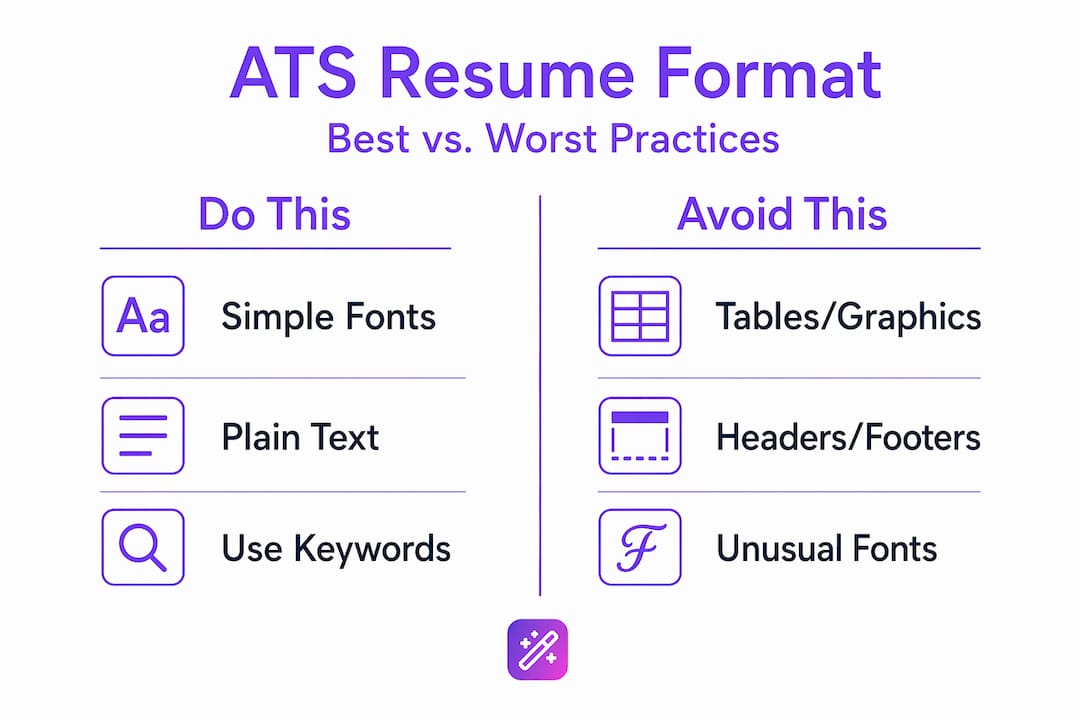
ATS-friendly resume practices include using exact keywords from the job posting, avoiding graphics and headers/footers, and sticking to .docx or simple PDF formats.
What the formatting comparison looks like
| Do this | Avoid this |
|---|---|
| Standard fonts: Arial, Calibri, Times New Roman, 10-12pt | Decorative fonts, font sizes below 10pt |
| Simple bullet points for experience | Tables, columns, text boxes |
| Plain white background | Colored backgrounds, graphics, logos |
| Margins between 0.5 and 1 inch | Full-bleed layouts or borderless designs |
| .docx or simple PDF file type | .pages, .odt, or image-based PDFs |
| Keywords mirroring the job description | Generic phrases like “excellent communicator” |
Federal resumes add stricter requirements still. Federal resumes must avoid non-text elements, hyperlinks, and AI-generated content, and must include job title, employer name, dates of employment, and hours per week for each position listed.
The smartest move is maintaining a master resume with plain text and simple formatting that you can copy and tailor for each application. This base document reduces ATS parsing errors and makes the tailoring process faster.
Pro Tip: When tailoring for a specific role, focus on adjusting the content in your experience bullets, not the formatting. The format should stay consistent. The keywords and examples should change to match the language in the job posting.
Knowing how to match your CV to a specific job description makes this step dramatically more effective. Job titles alone do not communicate your qualifications to ATS systems or hiring managers. Applicants must detail their experience with concrete examples that mirror the vacancy’s specialized requirements. “Managed” tells the system nothing. “Managed a 12-person team to deliver quarterly targets 15% ahead of schedule” tells it everything.
Common mistakes that kill applications
Even well-prepared applicants make errors that quietly end their chances. These are the most common, and how to avoid them.
-
Incomplete applications. The biggest failure mode in federal and private applications alike is missing required documents or failing to address specialized experience requirements explicitly. Always use a checklist.
-
Late submissions. Job boards often hard-close applications at the deadline. Submitting at 11:58 PM on the final day is a gamble. Systems lag. Build in your 24-hour personal buffer.
-
AI-generated or boilerplate language. AI-generated and plagiarized content raises flags in federal screening and looks hollow to human reviewers. Use AI tools to improve and refine your writing, not to replace it entirely. The result needs to sound like you.
-
Wrong file formats. Uploading a .pages file on a system that only accepts .docx or PDF means your resume may show as a blank document. Check the accepted formats before uploading.
-
Lost login credentials. Many job seekers create accounts on five different platforms in a week and cannot log back in when they want to check status or reapply. Use a password manager, or at minimum keep a simple spreadsheet with platform names and email addresses used.
-
Identical applications to every job. Sending the same document everywhere signals that you did not read the posting. It also tanks your ATS ranking because the keywords will not match. Check out this job application tips resource for a solid checklist on differentiating each submission.
What happens after you submit
Submission is not the end. Most platforms send an automated confirmation email immediately. Save it. Some job boards and employer systems offer an application status tracker where you can see if your materials were received, under review, or if the position was filled.
After submitting, give the employer at least one to two weeks before following up. Then a brief, professional email to the hiring manager or HR contact named in the posting is appropriate. Keep it short: confirm your application for the role, express continued interest, and ask if there is anything else you can provide. Do not send multiple follow-ups.
Managing multiple applications requires structure. A simple spreadsheet tracking company name, role title, date applied, application portal, and current status is enough for most people. If you are applying to ten or more roles simultaneously, a dedicated job tracker saves significant time and prevents the embarrassing situation of applying to the same role twice. The goal is persistence with patience. Most roles take two to six weeks to respond, and silence does not always mean rejection.
What I’ve learned from watching people apply
I’ve watched job seekers at every level make the same mistake: treating volume as a strategy. They apply to sixty roles in a week, use the same resume for all of them, and then wonder why they hear nothing back. The math seems intuitive. More applications should mean more responses. It rarely works that way.
What actually works, in my experience, is a focused approach where each application gets real attention. I’ve seen a genuinely tailored application to fifteen jobs outperform a spray-and-pray approach to a hundred. The tailoring is not just about keywords. It’s about demonstrating that you understood what the employer actually needs, not just what the job title says.
The other thing I’ve learned: the verification step before submitting is where most people cut corners because they’re tired. That’s exactly when you need to slow down. A wrong file format or a missing document does not get a second chance on most platforms.
My honest take is that automation tools are genuinely useful for handling the repetitive parts of applications. But they work best when a human is still making the judgment calls about what to emphasize and how. Use the tools. Own the decisions.
— Andras
Let Easy-cv do the heavy lifting
Getting your documents right for every application is the most time-consuming part of the entire process. Easy-cv is built to solve exactly that problem.

With Easy-cv’s AI-powered tools, you can generate ATS-friendly resumes and cover letters tailored to each job posting in minutes. The platform pulls from 10 million+ job listings monthly, lets you swipe through matches, and keeps your entire search organized with a built-in job tracker. The AI writing assistant refines your content so it reads as specific and original, not generic. Whether you are applying to your first role or your fiftieth, Easy-cv handles the formatting and keyword alignment while you focus on finding the right opportunity. Explore the full feature set at Easy-cv Features and see how much faster your search can move.
FAQ
What do I need before applying on a job board?
Create your account on the platform, then gather your resume, cover letter, certificates, and any required ID before you start. Having everything ready prevents incomplete submissions and missed deadlines.
How do I make my resume pass ATS screening?
Use standard fonts, plain formatting without tables or graphics, and mirror the exact keywords from the job description. Avoid decorative design elements and stick to .docx or simple PDF formats.
Should I tailor my resume for every job application?
Yes. Generic resumes score lower in ATS ranking and read as uninterested to hiring managers. Mirror the specific language and requirements in each job posting, particularly in your experience descriptions.
How long should I wait before following up after applying?
Wait one to two weeks after submitting, then send one brief professional email confirming your application and expressing continued interest. Avoid multiple follow-ups, which can create a negative impression.
What is the most common reason applications get rejected early?
Missing or incorrectly formatted documents and failure to address the role’s specific experience requirements are the top reasons. Always run through a checklist before hitting submit.