Resume Builder Cost per Application for Job Seekers: $9–$20/Month
Most resume builders cost anywhere from free up to about twenty-five dollars a month, with mid-range plans common for serious job searches, often billed monthly or annually. Free tools handle basic formatting but cap downloads or hide templates behind a paywall. If you’re applying to more than a handful of jobs, a mid-tier paid plan with AI tailoring and unlimited exports, like the one Easy-cv offers, pays for itself the first time it saves you from sending a generic resume to a job you actually wanted.
TL;DR:
- Free resume builders often limit exports, watermark outputs, or require payment for templates and AI features, making them less suitable for extensive job searches.
- Mid-tier plans costing $9 to $20 per month provide unlimited downloads, AI suggestions, and better templates, offering a good balance for active applicants.
- The highest cost plans, exceeding $20 monthly, include AI tailoring, job matching, and professional review services, mainly useful for senior or career-changing job seekers.
- Beware of hidden costs such as per-download fees, AI quotas, or locked cover letters that can significantly increase overall expenses.
- For applying to over five roles per month, a subscription plan usually offers the best value, especially when tailoring resumes for specialized roles or industries.
Table of Contents
- Resume Builder Pricing Models: Free, Freemium, and Subscription
- What Resume Builder Costs Actually Look Like
- Hidden Costs and Red Flags Before You Subscribe
- How to Pick the Right Plan for Your Job Search
- Comparing Costs Across Popular Resume Builder Platforms
- The Real Cost of Customization and Premium Templates
- What Add-On Services Like Reviews and Writing Help Really Cost
- Why We Priced EasyCV the Way We Did
- Get Started with EasyCV’s Pricing Tiers
- Sources
Resume Builder Pricing Models: Free, Freemium, and Subscription
Every resume builder falls into one of three pricing buckets, and knowing which one you’re looking at saves you from a surprise charge later.
Truly free tools let you build and download without a card on file. Canva’s resume builder is the clearest example: hundreds of templates, no watermark, no paywall on the export button. Freemium tools flip that script. You build for free, then hit a wall right when you try to download a polished PDF, unlock a second template, or use an AI rewrite. That wall is the business model, not an accident.
Subscription pricing usually splits into monthly and annual tiers, with annual plans being noticeably cheaper per month in exchange for a longer commitment. Trial pricing (a dollar or a week free) is common bait to get your card on file before the real rate kicks in.
Pay-per-service is the fourth option: a one-time fee for a professionally written resume or a single expert review, rather than ongoing software access. It makes sense if you need one polished document and don’t plan to apply broadly. It’s a poor fit if you’re tailoring resumes weekly, since every new version means another fee.
- Truly free: no card required, limited templates, usually no AI writing help
- Freemium: free to start, paywall hits at download or advanced features
- Monthly subscription: highest per-month rate, no commitment
- Annual subscription: lowest per-month rate, locked in for a year
- Pay-per-service: flat fee, one document, no ongoing access
What Resume Builder Costs Actually Look Like
Pricing clusters into three rough bands once you strip away the marketing language.
Pro Tip: Screenshot the pricing page before you sign up for any trial. Vendors update pricing without notice, and having your own record of “what I agreed to” makes disputing a surprise charge much easier.
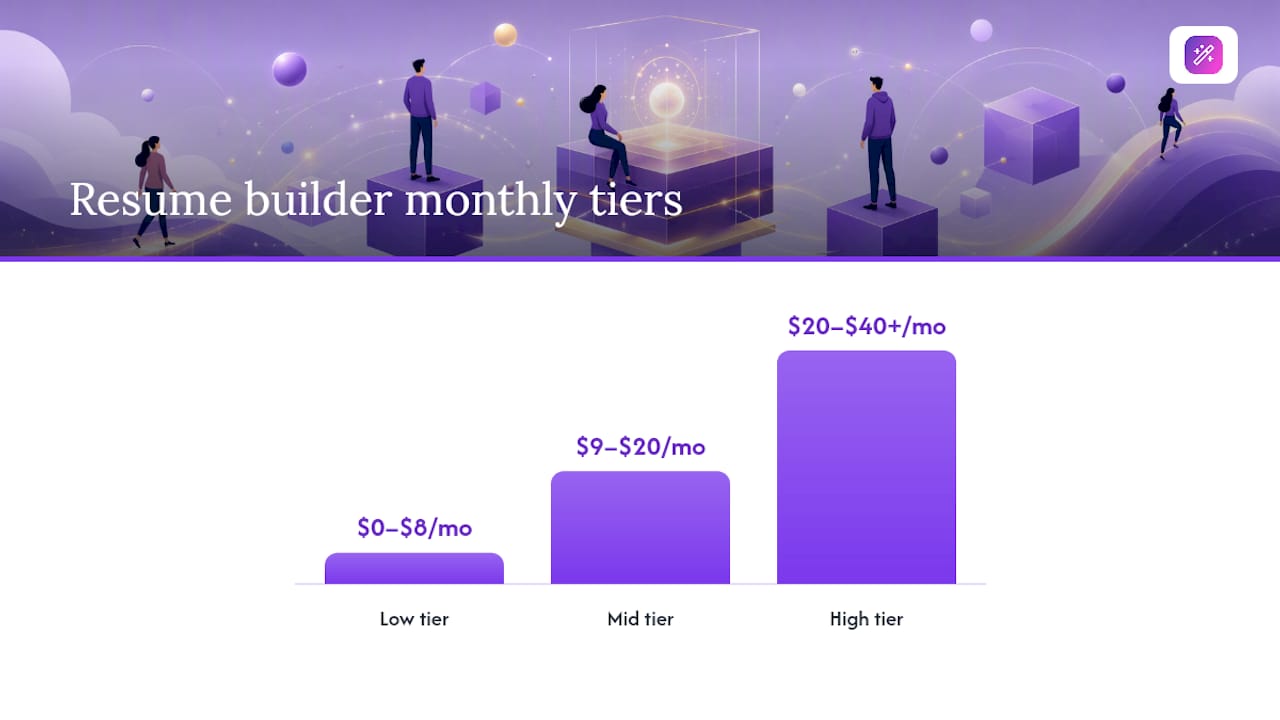
- Low tier ($0 to $8/month): Basic templates, limited or watermarked exports, little to no AI assistance.
- Mid tier ($9 to $20/month): Full template access, unlimited downloads, AI content suggestions, sometimes a cover letter builder bundled in.
- High tier ($20 to $40+/month or $200+ one-time): AI tailoring per application, job matching, professional writing add-ons, headshot or photo tools.
A survey of consumer complaints around subscription software consistently flags one pattern: people sign up for a $1 trial expecting to cancel, forget, and get charged the full monthly rate two weeks later. That’s not a pricing tier problem, it’s a calendar problem, so mark the renewal date the day you subscribe.
Match the tier to your situation. A student sending out five applications a semester rarely needs more than the free tier. An active job seeker applying to ten or more roles a month usually breaks even on a mid-tier annual plan within the first month, since one AI-tailored resume that lands an interview is worth more than the subscription fee. A career changer or executive candidate often needs the top tier, where AI tailoring and a professional review actually change the narrative a resume tells.
Hidden Costs and Red Flags Before You Subscribe
The advertised price rarely tells the whole story. Here’s what to check before entering payment information.
- Export limits. Some “free” plans let you build a full resume, then charge per download or cap you at one file a month.
- Watermarking. A few tools stamp their logo across free exports, which is fine for drafting but unusable for an actual application.
- Per-resume fees. Certain platforms charge a flat rate per document rather than a subscription, which adds up fast if you’re customizing for each job.
- Paywalled cover letters. Resume and cover letter tools are often bundled on paper but split in practice, with the cover letter locked behind a separate upgrade.
- AI quotas. AI writing help sometimes comes with a monthly generation limit, and running out mid application cycle forces an upgrade you didn’t plan for.
On the billing side, three things should make you pause: a trial that demands full card information upfront with no clear end date, a cancellation flow buried three menus deep, and a refund policy that’s simply absent from the terms page. Before you subscribe to anything, open the pricing page and the terms of service in separate tabs and confirm the renewal date, the cancellation method, and whether a refund window exists at all.
How to Pick the Right Plan for Your Job Search
Start with your application frequency, because it’s the single biggest driver of whether a paid plan makes financial sense.
If you’re sending out one or two applications a month, free or freemium tools cover you fine. Once you cross five to ten applications a month, the math flips: a mid-tier monthly plan, and eventually an annual plan, usually costs less than the time you’d burn manually reformatting a resume for each posting. Tailoring a resume per job posting is proven to improve response rates, but doing it by hand for every application is slow work that AI tailoring tools exist specifically to remove.
Run through this checklist before comparing two pricing pages side by side:
- How many applications do I realistically send per month?
- Do I need AI-generated tailoring, or just clean formatting?
- Do I need a matching cover letter, or just the resume?
- Will I need multiple resume versions for different roles or industries?
- Do I want job matching built in, or am I searching manually elsewhere?
- Is annual pricing worth it, or am I likely to stop job hunting within two months?
If the answer to three or more of those points toward “yes, I need more,” a monthly plan is the safer test before committing annually. Once you know the tool works for you, annual billing is where the real savings show up.
Comparing Costs Across Popular Resume Builder Platforms
Pricing structures vary more by what’s included than by the sticker price alone, which is why comparing raw dollar amounts across platforms is misleading on its own.
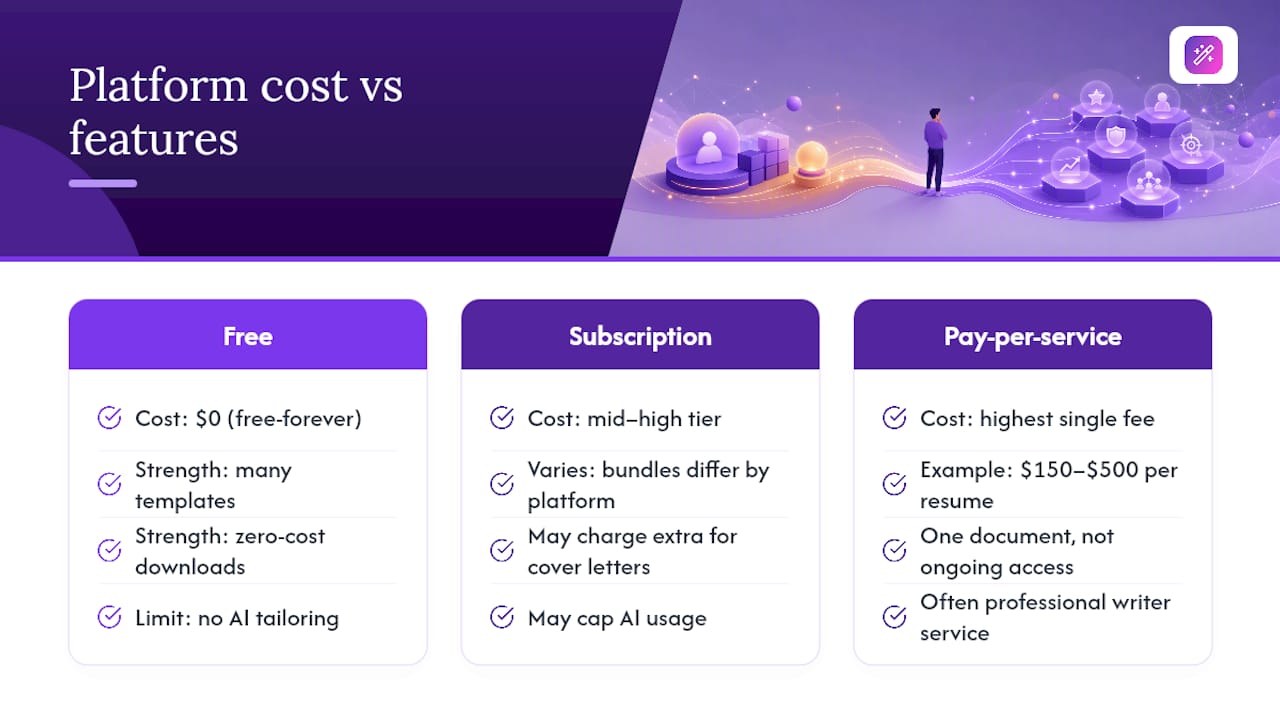
Free-forever platforms like Canva win on template variety and zero-cost downloads, but they weren’t built specifically for job applications, so you won’t find AI tailoring, job matching, or ATS-specific formatting checks. That’s fine for a one-off resume; it’s a limitation if you’re managing dozens of applications.
Subscription-based, job-search-specific platforms sit in the mid-to-high tier and differentiate mainly on what’s bundled: some charge extra for cover letters, some cap AI usage, some skip job matching entirely and expect you to search elsewhere. Easy-cv folds job discovery, AI tailoring, and a swipe-based job matcher into one subscription rather than splitting them into separate purchases, which matters if you’re currently paying for a resume tool and a job board separately.
Pay-per-service platforms and independent writers charge the highest single-transaction cost, often $150 to $500 for a professionally written resume, but that’s for one document, not ongoing access. The real comparison isn’t which platform is cheapest per month. It’s which one gives you the most usable output per dollar for the number of applications you’re actually sending.
The Real Cost of Customization and Premium Templates
Templates look free until you try to use the good one. Most builders offer a handful of basic layouts at no cost, then lock the designer templates, the ones with better visual hierarchy and stronger ATS compatibility, behind a paid tier.
Customization costs stack in less obvious ways too. Changing fonts, colors, or section order is usually free once you’re in the editor, but exporting multiple tailored versions of the same resume (one for a technical role, one for a management role) often runs into the same export caps discussed earlier. Professional templates built for ATS parsing tend to sit in the mid-to-premium tier specifically because they require more design work behind the scenes to remain machine-readable while still looking sharp to a human recruiter.
If your job search spans different industries or seniority levels, factor in that you’ll likely need two or three resume versions, not one. A plan that charges per download turns that need into a recurring cost; a plan with unlimited exports turns it into a one-time subscription decision. That distinction matters more than the base price tag most comparison charts lead with.
What Add-On Services Like Reviews and Writing Help Really Cost
Add-on services sit outside the subscription model entirely, and they can cost more than a year of software if you’re not careful about what you’re buying.
A single professional resume review from an independent writer usually costs a moderate fee, with full rewrites varying more widely depending on career level. Executive-level rewrites, especially those bundled with LinkedIn profile work, can run higher. Writers holding the Certified Professional Resume Writer credential from PARW/CC are worth the premium over an unverified freelancer, since the certification signals actual training in resume strategy rather than just formatting.
AI writing assistance built into a subscription is the cheaper alternative for most people, since it’s included in the monthly fee rather than billed per document. The trade-off is nuance: AI tools are strong at rewriting bullet points and tightening language, but they don’t replace a human reviewer’s judgment on career strategy or narrative gaps. For most active job seekers, the practical move is AI tailoring for volume and a one-time professional review at a career inflection point, like a big promotion push or an industry switch, rather than paying full writer rates for every application.
Why We Priced EasyCV the Way We Did
We built Easy-cv’s freemium model around a simple bet: most job seekers don’t know how many applications they’ll need to send until they’re already sending them, so locking people into a paid tier before they’ve felt the pain of manual tailoring seemed backward. The free tier covers real resume building. Premium unlocks AI tailoring per application, unlimited exports, the swipe-based job matcher, and headshot generation—these tools matter once you’re applying broadly rather than polishing one document.
The time savings compound fast. Manually rewriting a resume for each posting takes twenty to thirty minutes if you’re doing it properly; AI tailoring cuts that to a few minutes of review… The pricing reflects what we think actually earns a subscription fee: fewer hours lost to formatting, more hours spent actually interviewing.
— Andras
Get Started with EasyCV’s Pricing Tiers
If you’ve made it this far, you already know the free tier gets you a working resume and the paid tier gets you everything a real job search actually needs: AI tailoring per application, unlimited exports, and a job matcher that scores openings against your resume before you swipe. For anyone applying to more than a few roles a month, the premium plan is the one that pays for itself fastest.

Getting started takes about five minutes. Sign up free, build your first resume with EasyCV’s ATS-friendly templates, and upgrade only when you hit a feature you actually need, whether that’s the AI writing assistant, the CV translator for applying abroad, or unlimited downloads for tailoring multiple versions. Before you upgrade anywhere, including here, check the cancellation policy and confirm whether the plan renews automatically. Head to Easy-cv to see current pricing and start with the free tier today.