Best EasyCV.ai Alternatives for Job Seekers in 2026
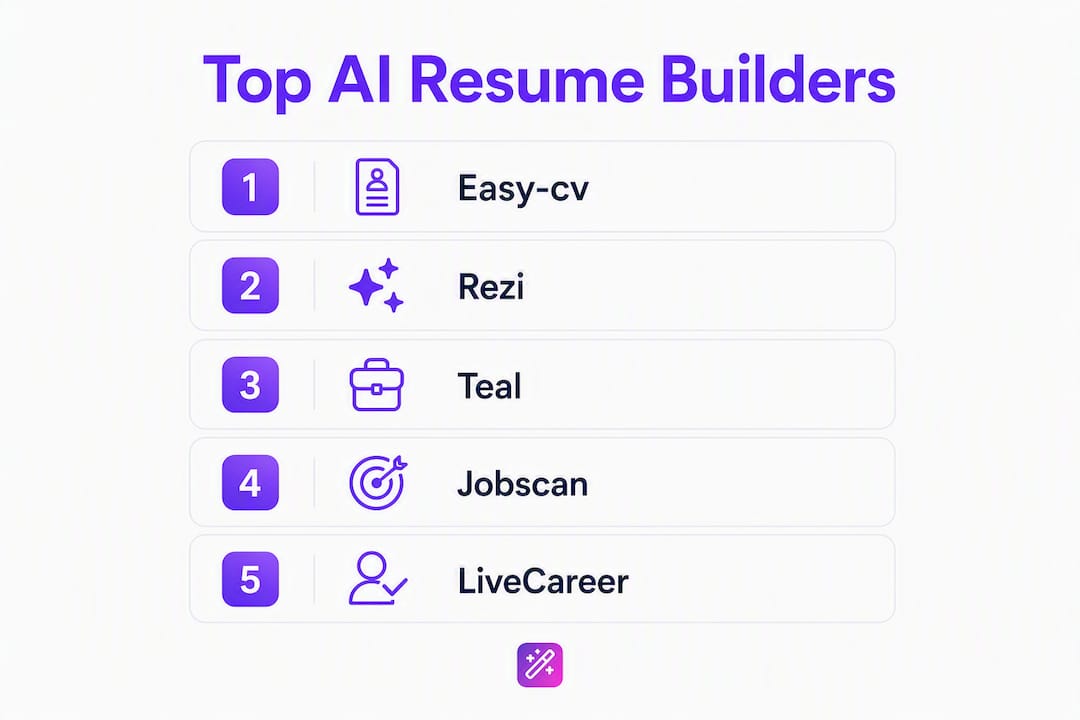
If you want a faster path to a tailored, ATS-ready resume, the top easycv.ai alternatives worth your time are Rezi, Teal, Jobscan, LiveCareer, and ResumeCoach. Each covers a different gap: Rezi for ATS-first drafting, Teal for pipeline management, Jobscan for pure alignment scoring, LiveCareer for template variety, and ResumeCoach for guided step-by-step building. Easy-cv is the recommended full-workflow option on this site, combining job matching, AI tailoring, cover letter generation, and headshot creation in one place. If you need a single tool that handles the entire job search, start there. If you have a specific gap, the alternatives below are vetted by use case.
Quick verdicts:
- Rezi — best for ATS-first resume drafting with real-time scoring
- Teal — best for tracking applications and managing your job-search pipeline
- Jobscan — best for keyword gap analysis and alignment scoring against a specific job description
- LiveCareer — best for template variety and guided resume writing with a fast onboarding flow
- ResumeCoach — best for step-by-step coaching with built-in content suggestions
All five offer a free tier or free trial. PDF and DOCX exports are available across the board, though some lock DOCX behind a paid plan.
Table of Contents
- How do these AI resume builders compare at a glance?
- Detailed profiles: what each tool actually does
- How we evaluated these AI CV builders
- How do you pick the right AI resume builder?
- Why alignment scores actually change your results
- Key Takeaways
- When does AI beat a human resume writer, and when doesn’t it?
- Easy-cv gives you the full workflow, not just a builder
- Research sources and further reading
How do these AI resume builders compare at a glance?
ATS optimization and job-specific tailoring are the primary differentiators in 2026’s resume builder market. The table below stacks the six tools on the dimensions that matter most to U.S. job seekers.

| Tool | Best for | Core AI features | ATS optimization | Free plan | Ease of use | Export formats | Unique features |
|---|---|---|---|---|---|---|---|
| Easy-cv | Full job-search workflow | AI tailoring, cover letters, headshots, job matching | ATS-friendly templates, keyword alignment | Yes (free tier) | Very fast onboarding | PDF, DOCX | Swipe job matcher, 30+ language translation, AI headshots |
| Rezi | ATS-first resume drafting | AI content generation, real-time ATS scoring | Real-time ATS score | Yes (limited) | Moderate | PDF, DOCX | Real-time ATS feedback loop |
| Teal | Pipeline + job tracking | AI tailoring, job match scoring | Keyword match analysis | Yes (generous) | Easy | Chrome extension, job tracker board | |
| Jobscan | Keyword gap analysis | Alignment scoring, keyword suggestions | Deep ATS keyword matching | Yes (limited scans) | Easy | LinkedIn optimization, JD comparison | |
| LiveCareer | Template variety | AI content suggestions, guided builder | ATS-friendly templates | Free trial | Very easy | PDF, DOCX, TXT | 300+ templates, phone support |
| ResumeCoach | Step-by-step guided building | Content suggestions, pre-written phrases | ATS-safe templates | Yes (limited) | Very easy | PDF, DOCX | Built-in coaching tips, phrase library |

Reading the table: “ATS optimization” refers to whether the tool actively checks your resume against a job description and flags keyword gaps, not just whether templates are ATS-safe. “Free plan” means you can produce and download a usable resume at no cost, though some tools cap exports or features. “Alignment score” is a numeric or percentage-based match rating between your resume and a specific job description.
Detailed profiles: what each tool actually does
Easy-cv
At a glance: A full job-search platform with AI resume and cover letter creation, a swipe-based job matcher, and a built-in tracker.
Core AI features:
- AI writing assistant that generates and rewrites resume bullets and cover letters
- Swipe-based job matcher that pre-scores jobs against your CV before you apply
- AI headshot generator that converts a selfie into a professional photo
- CV translation across 30+ languages without breaking formatting
- ATS-friendly templates with full layout and styling control
Pros: Covers the entire workflow in one place. The job matcher alone saves hours of manual board-scrolling. Translation support is rare at this price point.
Cons: The broadest tool here, so if you only need a one-time ATS keyword check, it may be more than you need.
Pricing: Free tier available; premium subscription unlocks AI tailoring, job matching, headshots, and unlimited exports.
Who it’s for: Professionals running an active job search who want to reduce manual work across every step, from discovery to application.
Export formats: PDF and DOCX. ATS-friendly templates are included across plans.
Rezi
At a glance: An ATS-focused resume builder with a real-time scoring system that updates as you edit.
Core AI features:
- Real-time ATS score that adjusts with every edit
- AI-generated bullet points based on your role and experience
- Content analysis that flags weak phrasing and missing keywords
Pros: The live feedback loop is genuinely useful for first-time resume writers. Catches ATS issues before you submit.
Cons: Limited job-search integration. You still need a separate tool to find and track roles.
Pricing: Free plan available with limited AI credits; paid plans start at a monthly subscription.
Who it’s for: Job seekers who want to nail ATS compliance and are comfortable managing their job search elsewhere.
Export formats: PDF and DOCX.
Teal
At a glance: A job-search management tool with resume tailoring built in, organized around a Kanban-style application tracker.
Core AI features:
- AI resume tailoring tied to saved job descriptions
- Keyword match scoring per application
- Chrome extension to save jobs directly from job boards
Pros: The tracker and tailoring work together, so you can see which version of your resume went to which company. The free plan is generous.
Cons: Design customization is limited compared to template-heavy tools. Not ideal if you need a polished, design-forward CV.
Pricing: Free plan covers most core features; paid tier adds AI credits and advanced tailoring.
Who it’s for: Organized job seekers managing multiple applications who want their resume and pipeline in one view.
Export formats: PDF.
Jobscan
At a glance: A dedicated keyword-matching and alignment-scoring tool built specifically to close the gap between your resume and a job description.
Core AI features:
- Side-by-side job description comparison with a match rate percentage
- Keyword gap identification with suggested additions
- LinkedIn profile optimization scanner
Pros: The most granular alignment scoring of any tool here. Useful for roles where keyword matching is critical, such as government or large-enterprise ATS systems.
Cons: Not a resume builder in the traditional sense. You paste in your existing resume and a job description; it does not draft content from scratch.
Pricing: Free plan allows a limited number of scans per month; paid plans unlock unlimited scans.
Who it’s for: Experienced professionals who already have a strong resume and want to tune it precisely for each application.
Export formats: PDF.
LiveCareer
At a glance: A long-established resume builder with over 300 templates, guided content suggestions, and phone-based customer support.
Core AI features:
- AI-assisted content suggestions and pre-written phrases by industry
- Guided step-by-step builder with prompts at each section
- ATS-safe template library
Pros: The template range is the widest of any tool here. Phone support is a real differentiator for users who want human backup.
Cons: The interface feels older than newer AI-native tools. Pricing can be confusing with trial-to-subscription transitions.
Pricing: Free trial available; subscription required for full access and downloads.
Who it’s for: Job seekers who want a familiar, guided experience with lots of design options and the option to call for help.
Export formats: PDF, DOCX, and TXT.
ResumeCoach
At a glance: A guided resume builder with built-in coaching tips and a phrase library that helps users write stronger content section by section.
Core AI features:
- Pre-written phrase suggestions by job title and industry
- Section-by-section coaching prompts
- ATS-safe template designs
Pros: Very low learning curve. Good for first-time resume writers or career changers who need prompting to articulate their experience.
Cons: Less AI-native than Rezi or Teal. The phrase library is helpful but not as dynamic as a full AI writing assistant.
Pricing: Free plan with limited features; paid plan unlocks full template access and downloads.
Who it’s for: Early-career job seekers or career changers who want structured guidance rather than a blank canvas.
Export formats: PDF and DOCX.
Pro Tip: Before committing to any paid plan, run your current resume through the free tier of at least two tools. The difference in alignment scores between tools on the same resume and job description can be significant, and that gap tells you which tool’s scoring model fits your industry.
How we evaluated these AI CV builders
Evaluating resume builders for a U.S. audience in 2026 required more than reading feature lists. The process covered hands-on drafting, ATS testing, and export verification across a range of role types.
- Hands-on drafting: Each tool was used to build or tailor a resume from scratch for three role levels: entry-level coordinator, mid-level marketing manager, and senior product manager.
- ATS alignment testing: Sample job descriptions were pasted into each tool’s alignment or scoring feature. Results were compared for keyword coverage, gap identification, and actionability of suggestions.
- Export and format checks: PDF and DOCX exports were downloaded and opened in Microsoft Word and Google Docs to verify formatting integrity. ATS-safe templates were checked for common parsing errors (text boxes, tables in headers, non-standard fonts).
- LinkedIn import testing: Where available, LinkedIn import was tested for accuracy and completeness of data transfer.
- Timing: Time-to-first-tailored-draft was measured for each tool, from account creation to a downloadable, role-specific resume. Results ranged from under 10 minutes for AI-native tools to 25–30 minutes for guided builders.
- Mobile usability: Each tool’s mobile browser and app experience (where available) was checked for core functionality.
Transparency note: Easy-cv is the platform associated with this site. It is included in this comparison because it is a leading option in this category, not because it is excluded from scrutiny. All tools were evaluated against the same criteria. Affiliate relationships, where they exist, are disclosed; the shortlist reflects genuine feature evaluation.
How do you pick the right AI resume builder?
The wrong tool costs you more than money. A subscription that does not fit your workflow means you either abandon it after one use or keep paying for features you never touch. Here is how to match a tool to your actual needs.
Primary buying criteria:
- ATS alignment: Does the tool compare your resume to a specific job description and return a score or keyword gap list? This is the single most useful feature for active job seekers.
- Tailoring speed: Can you produce a role-specific resume in under 15 minutes? If the workflow takes longer, you will not use it consistently.
- Export formats: DOCX matters. Some ATS systems parse DOCX more reliably than PDF. If a tool only exports PDF on the free plan, factor that in.
- Privacy: Does the tool store your resume data, and can you delete it? Check the privacy policy before uploading sensitive career history.
- Job platform integration: Does the tool connect to job boards, pull in job descriptions automatically, or track your applications?
Questions to ask before subscribing:
- Does it analyze a job description and return an alignment score, or just check for generic keywords?
- Can I export as DOCX without upgrading?
- Is there a free tier that lets me produce at least one complete, downloadable resume?
- How long does it take to tailor a resume to a new job description after the first setup?
Red flags to watch for:
- No free export of any kind (PDF or DOCX) on the free plan
- No ATS guidance beyond “use a clean template”
- No privacy policy or data deletion option
- Subscription auto-renews with no clear cancellation path
A practical AI resume writing workflow typically takes 10–20 minutes per tailored application once your base resume is set up. Tools that require more than that per application will slow you down at volume.
Why alignment scores actually change your results
The most effective resume builders in 2026 function as AI agents: they compare your background to a job description and produce a concrete gap analysis rather than generic advice. Grammarly’s Resume Builder, for example, returns an alignment score with targeted improvements after analyzing your resume against a specific job description. That model, score plus specific fixes, is what separates genuinely useful AI tools from glorified spell-checkers.
Here is what that looks like in practice. A resume bullet that reads “Managed social media accounts and grew engagement” might score poorly against a job description that specifies “Meta Ads, paid social, and ROAS reporting.” An alignment-aware tool flags the gap and suggests rewriting to “Managed paid social campaigns on Meta, optimizing for ROAS across a $50K monthly budget.” The content is the same experience; the language now matches what the ATS is scanning for.
ATS optimization and alignment scoring are consistently the top buyer criteria across 2026 market roundups, and for good reason. Most large employers run applications through an ATS before a human reads anything. A resume that does not match the job description’s keywords often gets filtered before a recruiter sees it.
Pro Tip: When using an alignment tool, prioritize fixes that close the largest keyword gaps first. A single missing hard skill (a specific software name or certification) often drops your match rate more than five missing soft-skill phrases. Fix the hard skills first, then refine the language.
For a practical walkthrough of tailoring your resume to a job description, the process is repeatable once you have a strong base document.
Key Takeaways
The most effective AI resume builders in 2026 combine alignment scoring with fast tailoring, so you can produce a role-specific, ATS-ready resume in under 15 minutes per application.
| Point | Details |
|---|---|
| Alignment scoring is the key feature | Choose a tool that compares your resume to a specific job description and returns a keyword gap list, not just generic tips. |
| DOCX export matters | Some ATS systems parse DOCX more reliably than PDF; confirm your tool exports DOCX before subscribing. |
| Test free tiers first | Every tool on this list has a free tier or trial; use it to produce one complete resume before paying. |
| Match the tool to your workflow | ATS-focused tools (Rezi, Jobscan) suit precise tuning; pipeline tools (Teal) suit high-volume searches; Easy-cv suits the full workflow. |
| Easy-cv covers the full search | Easy-cv combines job matching, AI tailoring, cover letters, headshots, and translation in one free-to-start platform. |
When does AI beat a human resume writer, and when doesn’t it?
The conventional wisdom says AI resume tools are for early-career job seekers and human writers are for executives. That framing is too simple, and it leads people to overpay for services they do not need.
AI is genuinely better than a human writer in one specific scenario: high-volume tailoring across similar roles. If you are applying to 20 marketing manager positions with slightly different requirements, no human writer will re-tailor your resume 20 times at a reasonable cost. An AI tool does it in minutes, and the output is often more keyword-precise than a human’s, because the AI is literally reading the job description rather than approximating it from memory.
Where human writers still have a real edge: unusual career arcs, executive bios, and roles where the narrative matters more than the keywords. A chief operating officer moving from healthcare to fintech has a story that requires judgment, framing, and industry knowledge that a phrase library cannot replicate. A portfolio-heavy creative role, a board-level biography, or a career change that requires explaining away a gap or a pivot, these are cases where a skilled human writer earns their fee. The AI will produce something grammatically correct and keyword-dense, but it will not know which three projects from your last decade actually signal readiness for the next role.
For most job seekers running an active search across standard professional roles, AI tools handle 90% of the work. The remaining 10%, the framing, the narrative arc, the judgment calls about what to include and what to cut, still benefits from a human read. The practical answer is not AI versus human; it is AI for volume and speed, human review for the final version of your most important applications. Tools like Easy-cv that make job applications smarter through automation handle the heavy lifting, but a second set of human eyes before you submit to your top-three target companies is still worth the time.
Easy-cv gives you the full workflow, not just a builder
Most tools on this list solve one piece of the puzzle. Easy-cv solves the whole thing. Where Jobscan gives you a keyword score and Teal gives you a tracker, Easy-cv gives you a job matcher that pre-scores roles to your CV, an AI writing assistant that tailors your resume and cover letter to each application, an AI headshot generator, and a CV translator that works across 30+ languages without breaking your formatting.

The free plan gets you started with core CV building and template access. Premium unlocks unlimited AI tailoring, the swipe-based job matcher, headshot generation, and full export options in PDF and DOCX. For job seekers who want to reduce the manual work at every stage, from finding the right roles to submitting a polished, tailored application, Easy-cv is the place to start. Try Easy-cv free and see how much faster a full-workflow platform moves compared to stitching together three separate tools.
Research sources and further reading
The sources below were used to evaluate tools, verify feature claims, and ground the ATS and alignment-score guidance in this article.
- Easy-cv features page — Primary source for ATS-friendly template claims, export formats, and AI writing assistant capabilities. Start here to verify what the free and paid tiers include.
- Easy-cv job matcher — Documents the swipe-based job-matching feature and pre-scoring methodology. Read this alongside the job-matching guide for workflow context.
- Easy-cv CV Translator — Covers the 30+ language translation feature and formatting preservation. Relevant for multilingual job seekers or those applying to international roles from the U.S.
- Easy-cv AI resume builder guide — Step-by-step workflow for tailoring resumes to job descriptions using AI. Useful for understanding how alignment-score-based editing works in practice.
- Grammarly Resume Builder — Source for the alignment-score model description and the AI-agent framing of effective resume tools. Read for context on how scoring tools evaluate keyword gaps.
- Zapier’s AI resume builder roundup — Broad market overview organized by use case (tracking, job matching, ATS optimization). Useful for cross-checking “best for” categorizations and feature coverage across the market.
- TechTimes 2026 resume builder comparison — Independent review with starting-price data and “best for” tags. Read for a second opinion on pricing and use-case fit.
- Firsto EasyCV alternatives comparison — Feature-by-feature comparison of EasyCV and similar tools. Useful for cross-checking feature overlap and identifying gaps in any single tool’s coverage.