What Are AI Headshots? A 2026 Guide for Professionals
AI headshots are professional portraits generated from your selfies using artificial intelligence models that simulate studio lighting, professional backgrounds, and polished composition. The technology processes your photos in under 30 minutes and costs a fraction of traditional photography, making it one of the most practical tools for job seekers and professionals who need a strong visual presence fast. If you are updating your LinkedIn profile, refreshing a team page, or building a personal brand on a budget, understanding what AI headshots are and how they work will help you use them correctly and avoid costly mistakes.
What are AI headshots and how do they actually work?
AI headshot generation is not a filter or a retouching tool. It is a process that builds an entirely new image from a computational model of your face. A professional-quality AI headshot is generated from a 3D face model and simulated studio lighting, which distinguishes it clearly from photo editing software.
The process works in three core stages.
- Upload your selfies. You submit 5–15 photos of yourself. The AI uses these to learn your unique facial geometry, including your jawline, eye shape, and skin tone.
- The AI trains a personalized model. Platforms use a technique called LoRA fine-tuning, which updates less than 1% of model parameters to capture your specific features. This is what separates AI headshot tools from general image generators like Midjourney, which have no knowledge of your face.
- The platform renders your headshots. The AI applies simulated studio lighting, professional backgrounds, and business-appropriate styling to generate multiple output images. You select the ones that work best.
The entire process typically completes in under 30 minutes. Traditional photography, by contrast, involves scheduling, travel, a shoot session, and editing turnaround that can take 1–3 weeks and cost $200–$1,000 or more. AI headshots typically run $29–$59. That cost difference is significant for anyone applying to multiple roles or refreshing their profile frequently.
Pro Tip: Upload photos taken across different days and lighting conditions. The more variety you give the AI, the more accurately it captures your real face rather than one version of it.
What factors affect the quality of AI-generated headshots?
Output quality depends almost entirely on input quality. Poor AI headshot results most often come from insufficient or low-quality input photos, not from the AI tool itself. This is the single most important thing to understand before you start.
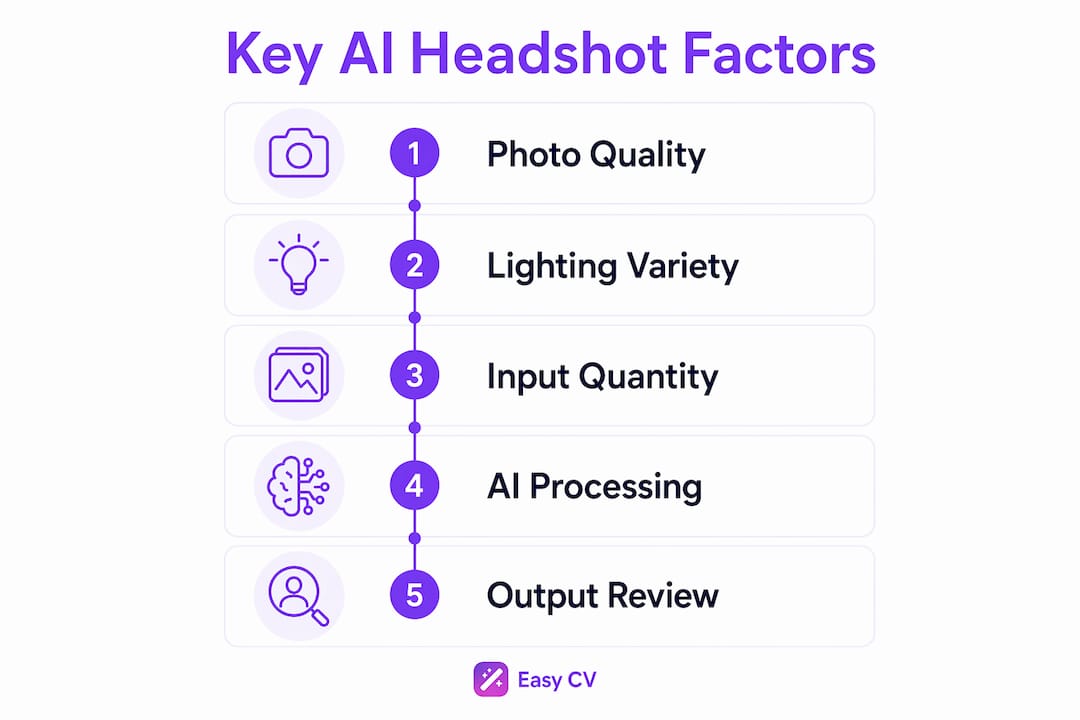
Several specific factors determine whether your output looks polished or artificial.
- Lighting in your selfies. Photos taken in flat or harsh light give the AI incomplete data about your facial contours. Natural window light or soft indoor light produces the best training images.
- Angle variety. Submit photos from slightly different angles, not just straight-on shots. The AI needs enough data to reconstruct your face in three dimensions.
- No filters or heavy editing. Filters alter your skin tone and facial proportions. The AI learns from what it sees, so filtered inputs produce distorted outputs.
- No accessories that obscure your face. Sunglasses, hats, and scarves block facial data. Uploading 5–15 quality selfies without these items gives the AI a complete facial data set to work from.
Common AI artifacts include unnaturally smooth skin, fused jewelry edges, and inconsistent eye geometry. These occur because the AI interpolates details it cannot fully reconstruct from limited data. Professional AI headshot platforms address this through higher-resolution rendering and post-processing steps, but no platform eliminates artifacts entirely. Knowing what to look for lets you reject weak outputs before using them professionally.
Pro Tip: Review your outputs at thumbnail size, not just full resolution. LinkedIn displays profile photos small, and artifacts that look subtle at full size become obvious when cropped and scaled down.
When should you use AI headshots versus traditional photography?
The right choice depends on the stakes of the situation. AI headshots work well for specific use cases and fall short in others. Understanding the difference saves you from a credibility problem.
| Use case | Best approach |
|---|---|
| LinkedIn profile refresh | AI headshots are a practical option, but review carefully for artifacts |
| Internal team directory | AI headshots are well-suited and cost-effective |
| Resume or CV photo | AI headshots work for most professional contexts |
| Client-facing executive profile | Professional photography is the stronger choice |
| Speaker bio or press kit | Professional photography preserves authenticity |
| Frequent profile updates | AI headshots offer the speed and variety needed |
The LinkedIn case deserves special attention. 64% of US adults can detect AI-generated images, and recruiters and hiring managers show even higher detection rates. That detection reduces perceived credibility on high-visibility profiles. LinkedIn’s thumbnail scale also exposes artifacts that look fine at full resolution. Eye asymmetry and fused jewelry become visible at small sizes, which can undermine trust with the exact people you want to impress.
Professional photography remains superior for capturing real skin texture and the natural interaction of light on a human face. AI tools cannot yet fully replicate what a skilled photographer achieves in a controlled studio environment. That gap matters most when your photo is the first thing a client or senior recruiter sees.
The practical solution most professionals use is a hybrid approach. Annual professional photo sessions provide a high-quality baseline, while AI-generated variations handle lower-stakes applications, internal directories, and frequent updates. This balances authenticity with convenience without requiring a studio budget every time you need a new photo.
Pro Tip: Use your professional photo as your LinkedIn primary image and reserve AI-generated headshots for secondary platforms, team pages, and applications where the stakes are lower.
How to get the best results from your AI headshots
Getting strong output requires preparation before you upload a single photo. Treat the input stage as seriously as you would a real photo shoot.
- Gather 10–15 selfies taken across different days. Variety in lighting, background, and expression gives the AI more to work with. Avoid using photos from the same session taken minutes apart.
- Choose photos with clean, neutral backgrounds. Busy backgrounds distract the AI from your face and reduce model accuracy.
- Wear what you would wear to work. The AI generates professional styling, but your input photos should reflect your actual professional appearance. Avoid casual or heavily patterned clothing.
- Select your output style before reviewing. Most platforms let you choose backgrounds, lighting styles, and attire categories. Pick options that match your industry. Finance and law favor dark suits and neutral backgrounds. Creative fields allow more variation.
- Review outputs critically before using them. Check for smooth, waxy skin texture, misaligned eyes, and any jewelry or collar edges that look blurred or fused. Reject any image with visible artifacts.
- Set realistic expectations. AI headshots enhance your appearance within the range of what your input photos show. They do not transform your look or change your features. Professional headshots follow defined standards: framing from the shoulders up, face occupying 60–70% of the frame, professional lighting, and business-appropriate presentation. Your AI outputs should meet these same standards.
The most common mistake professionals make is uploading too few photos or using photos taken in poor light. The AI cannot invent detail it was never given. More varied, higher-quality inputs consistently produce better outputs, regardless of which platform you use.
Key Takeaways
AI headshots deliver real professional value when used correctly, but input quality and appropriate use cases determine whether they help or hurt your credibility.
| Point | Details |
|---|---|
| AI headshots are new images, not edits | They are built from a 3D facial model and simulated lighting, not retouched photos. |
| Input quality drives output quality | Upload 10–15 varied, filter-free selfies to give the AI accurate facial data. |
| LinkedIn requires extra caution | 64% of US adults detect AI images; artifacts at thumbnail scale reduce recruiter trust. |
| Hybrid approach works best | Use professional photos for high-stakes profiles and AI headshots for lower-visibility needs. |
| Cost and speed are the core advantage | AI headshots cost $29–$59 and process in under 30 minutes versus weeks for traditional photography. |
Where AI headshots actually fit in your professional brand
My honest read on AI headshots in 2026 is that they are genuinely useful, but the industry oversells them. The technology has improved dramatically in the past two years. LoRA fine-tuning produces recognizable likenesses that would have been impossible with earlier diffusion models. For a job seeker who needs a clean, professional photo for a resume or a secondary platform, AI headshots are a legitimate tool.
The problem is that most people use them wrong. They upload three selfies taken in bad light, pick the most flattering output, and put it on their LinkedIn primary profile. That is exactly where the technology is weakest and where the credibility risk is highest. Savvy recruiters notice. The waxy skin and slightly off eyes are not subtle to someone who reviews hundreds of profiles a week.
The professionals I respect most treat AI headshots as a supplement, not a replacement. They get a real photo session once a year, use those images for their primary LinkedIn photo and any client-facing materials, and use AI-generated variations for everything else. That approach makes sense. It keeps your most important first impression authentic while still getting value from the speed and cost advantages AI offers.
The deeper shift worth watching is how professional standards are evolving. A photo that would have looked obviously artificial two years ago now passes casual inspection. That bar will keep moving. For now, the safest rule is simple: the higher the stakes, the more you need a real photographer.
— Andras
Easy-cv brings your full professional profile together
Your headshot is one piece of a larger professional picture. A polished photo paired with a weak resume still loses to a candidate with a strong application.

Easy-cv combines an AI headshot generator with a full CV builder, cover letter tools, and a job matcher that scores roles against your profile before you apply. You can build an ATS-friendly resume, generate a tailored cover letter for each application, and keep your entire search organized in one place. Easy-cv aggregates over 10 million job opportunities per month from major job boards, so you spend less time searching and more time applying with materials that actually reflect your value. Start building your profile and put your best professional image forward, headshot and all.
FAQ
What are AI headshots used for?
AI headshots are used for LinkedIn profiles, resumes, team directories, and personal branding materials. They provide a fast, affordable alternative to traditional studio photography for professionals who need a polished image quickly.
How many selfies do I need to create AI headshots?
Most platforms require 5–15 selfies with varied lighting, angles, and expressions. More diverse input photos produce more accurate and realistic outputs.
Can recruiters tell if a headshot is AI-generated?
Yes. 64% of US adults can detect AI-generated images, and recruiters show even higher detection rates. Common tells include unnaturally smooth skin, eye asymmetry, and fused accessory edges.
Are AI headshots appropriate for LinkedIn?
AI headshots carry credibility risks on LinkedIn because artifacts become visible at thumbnail scale. Professional photography is the stronger choice for your primary LinkedIn photo, while AI headshots work better for lower-visibility applications.
How long does it take to generate AI headshots?
Most AI headshot platforms process and deliver results in under 30 minutes. Traditional photography typically takes 1–3 weeks from scheduling to final delivery.