Professional resume templates: your competitive edge in 2026

Tailored resumes get 115% higher interview rates than generic ones, yet most job seekers still submit the same recycled document to every opening they find. That gap between those who optimize and those who don’t is where interviews are won or lost. This guide breaks down exactly why professional, AI-powered resume templates outperform DIY resumes, what makes them work at a technical level, and the specific steps you can take today to start using them effectively. Whether you’re a recent graduate or a seasoned professional, the advantage is real and accessible.
Table of Contents
- How AI-powered resume templates work
- Benefits of choosing professional templates over DIY resumes
- Avoiding the “generic” trap: customizing your AI template
- Quick start: steps to implement an AI-powered template today
- The real advantage: it’s the blend of AI speed and human insight
- Ready to boost your job search with the right template?
- Frequently asked questions
Key Takeaways
| Point | Details |
|---|---|
| Boost interview rates | Professional templates tailored with AI can double your chances of landing interviews. |
| ATS-friendly design | Resume templates optimize formatting and keywords for recruiter tracking systems. |
| Customization is key | Personalizing your template ensures your resume stands out to both recruiters and software. |
| Efficiency and accuracy | AI-powered templates save time and help avoid common formatting or grammar mistakes. |
| Human review matters | A final personal touch keeps your AI-enhanced resume competitive and authentic. |
How AI-powered resume templates work
Once you understand that templates can boost your interview chances, the next logical question is: what exactly makes AI-powered versions so much more effective than a blank Word document or a generic online layout?
At their core, AI resume templates use algorithms to analyze job descriptions and map them against your experience. They suggest the right structure for your industry, flag missing keywords, and recommend formatting that satisfies both human recruiters and automated scanning software. Think of it less like filling in a form and more like having a career coach look over your shoulder in real time.
Here’s what a typical AI-powered template does for you:
- Keyword optimization: It scans the job description and surfaces the exact terms you need to include, so your resume speaks the same language as the employer.
- Structure recommendations: It places your most relevant experience front and center, adjusting section order based on your career stage.
- Grammar and spelling standardization: It catches errors that spell checkers miss, particularly awkward phrasing that sounds unprofessional to a recruiter.
- Rapid customization: You can generate a job-specific version of your resume in minutes instead of hours.
- Consistent formatting: Clean fonts, proper spacing, and standard margins are applied automatically, which is critical for ATS compatibility.
Research confirms this value in practice. AI tools for feedback were found useful by 70.5% of students in a recent study, reflecting how broadly these platforms deliver measurable improvement across different experience levels. That’s not a marginal benefit. That’s nearly three out of four users reporting real gains from AI-assisted resume tools.
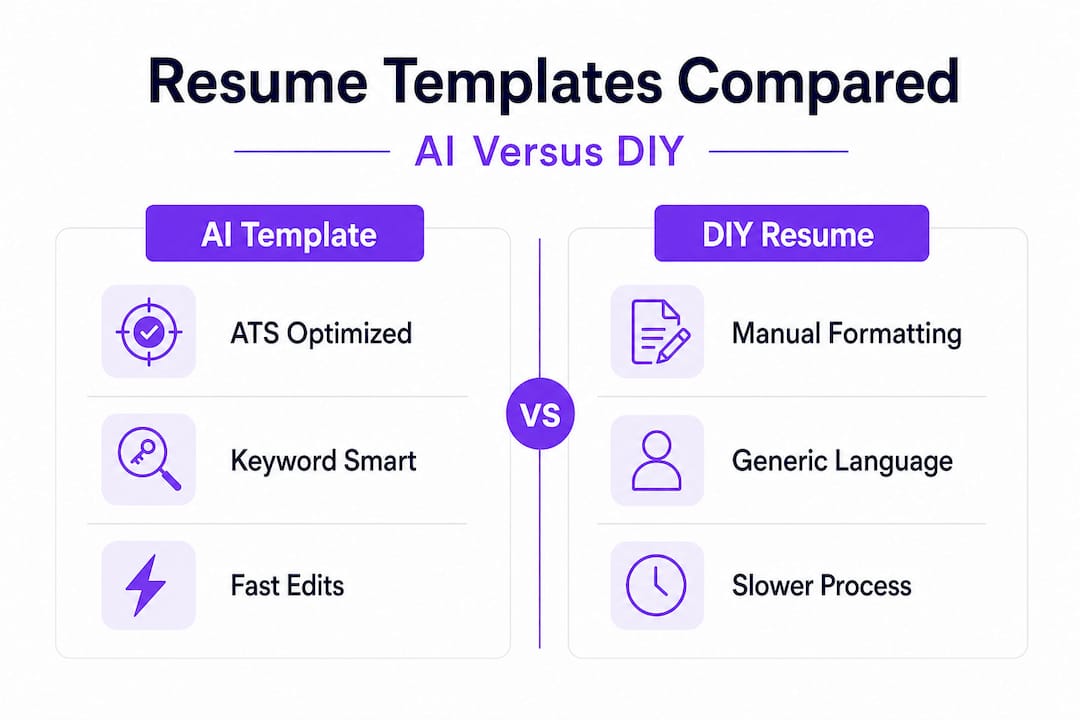
| Feature | AI-powered template | Standard template |
|---|---|---|
| Keyword optimization | Automatic, job-specific | Manual only |
| ATS compatibility check | Built-in | Rarely included |
| Customization speed | Minutes | Hours |
| Grammar and tone review | AI-assisted | Manual |
| Formatting consistency | Standardized automatically | User-dependent |
The practical experience of using AI for resume writing confirms what the data shows: the technology removes the guesswork from formatting and keyword matching, letting you focus your energy on telling your career story accurately and compellingly.
Pro Tip: AI suggestions are a starting point, not a final product. Always read through every recommendation and adjust it to reflect your actual experience and voice.
Understanding the technical side makes it easier to appreciate why these tools outperform DIY efforts consistently, which leads naturally into the broader question of professional templates versus resumes you build entirely on your own.
Benefits of choosing professional templates over DIY resumes
With a foundation in how these templates function, let’s look at why they consistently outshine generic, self-made resumes in real job searches.

The most significant structural advantage is ATS compatibility. An Applicant Tracking System (ATS) is software that employers use to scan and rank resumes before a human ever sees them. It looks for specific keywords, clean formatting, and standardized section headers. If your DIY resume uses a creative font, text boxes, or unusual section names like “Things I’ve Done,” the ATS may reject it automatically. Professional templates are specifically designed to avoid those pitfalls.
DIY resumes have several common failure points:
- Missing power keywords: Without access to industry benchmarks, most job seekers guess at what to include and frequently leave out the exact phrases that trigger ATS matches.
- Inconsistent formatting: A mix of fonts, uneven spacing, and irregular bullet styles signals carelessness to recruiters who review hundreds of documents.
- Unclear hierarchy: Recruiters spend an average of six seconds on a first scan. If your most impressive credentials aren’t visible at a glance, they may never get noticed.
- Lack of quantification: DIY writers often default to vague descriptions rather than measurable achievements, which makes their experience harder to evaluate.
Professional templates, especially those powered by AI, address every one of these issues by design. The AI builder features available on platforms like EasyCV.ai go further by allowing you to tailor your resume to specific job postings, check ATS scores before submitting, and track multiple versions side by side.
| Criteria | Professional AI template | DIY resume |
|---|---|---|
| ATS pass rate | High (optimized by design) | Variable (often low) |
| Time to complete | 15 to 30 minutes | 2 to 4 hours |
| Keyword accuracy | Job-specific, data-driven | Estimated, often incomplete |
| Recruiter impression | Polished, consistent | Inconsistent, varies by skill |
| Customization per job | Fast and structured | Slow and error-prone |
The time savings alone are worth noting. If you’re applying to 20 jobs, the difference between 30 minutes and 4 hours per application adds up to days of reclaimed time. That time is better spent preparing for interviews, networking, or researching target companies. Resume automation platforms make this efficiency possible without sacrificing quality.
Pro Tip: Even the best AI-generated template needs your personal touch. Add specific numbers, named projects, and measurable results to every experience entry. “Increased sales by 34% in Q3 2025” beats “Responsible for sales growth” every single time.
The evidence is clear: professional templates reduce friction, increase visibility, and help you move faster through the application process. But there is a real risk that comes with over-relying on them, and it’s one that too few job seekers think about until it’s too late.
Avoiding the “generic” trap: customizing your AI template
Even with impressive features, templates have a common pitfall. Here’s how to sidestep it and make sure your resume still stands out.
The problem is simple: when thousands of job seekers use the same platform with the same prompts, their resumes can start to look and sound remarkably similar. Recruiters notice this quickly. A resume that reads like it was assembled by a machine rather than written by a person sends a subtle but damaging signal about your engagement and effort.
As one widely cited career perspective notes, templates risk generic content; always customize with quantified achievements and job-specific keywords for an edge over custom resumes. This doesn’t mean you should avoid templates. It means you should treat the AI output as a first draft, not a finished product.
“An AI-generated resume can get you in the door, but a human-refined one gets you the offer. The difference is in the details you add that no algorithm can invent for you.”
Research using benchmarks like ResumeBench confirms that AI tools enhance efficiency for both graduates and professionals, but human refinement is what separates competitive candidates from the rest. The platforms are excellent at structure. You are irreplaceable when it comes to authenticity.
Here is a step-by-step approach to personalizing every major section of your AI-generated template:
-
Headline and summary: Replace the generic objective statement with a specific value proposition. Instead of “Results-driven professional seeking growth opportunities,” write something like “Marketing strategist with 6 years of B2B SaaS experience, specializing in pipeline generation and content-led demand campaigns.”
-
Work experience entries: For every role, apply the formula: action verb + specific task + measurable result. Never let a bullet point end without a number, percentage, or named outcome.
-
Skills section: Cross-reference the job description carefully. If the posting mentions “Salesforce CRM” and you have that experience, make sure those exact words appear in your skills list. ATS systems do exact-string matching in many cases.
-
Keywords throughout: Vary keyword placement so they appear in your summary, your experience bullets, and your skills list. This signals depth of experience rather than keyword stuffing.
-
Human review pass: Read your resume out loud. If any sentence sounds robotic or overly formal, rewrite it in your own voice. Then have one trusted person read it and flag anything that feels off.
Following these steps as part of your review process is part of what the best job application tips consistently recommend, because the details separate good candidates from hired ones. A solid resume checklist can also help you verify that every section meets both ATS and human reviewer standards before you submit.
The goal is efficiency without sterility. AI handles the structure. You handle the story.
Quick start: steps to implement an AI-powered template today
Now that you know how to customize, here’s exactly how to get started from picking a tool to submitting your resume.
The process is simpler than most job seekers expect, and following a clear sequence prevents the most common mistakes.
-
Choose a reputable platform. Look for a tool that offers ATS scoring, job-specific keyword suggestions, and multiple export formats. Free trials are a good way to test the interface before committing. Platforms that also support improving your CV with AI for job boards give you a meaningful edge since formatting requirements vary by platform.
-
Input your existing experience. Paste your current resume or fill in the structured fields. Don’t worry about polish at this stage. Focus on getting all your experience, education, and skills into the system accurately.
-
Paste the job description. Most AI resume builders allow you to paste a specific job posting. The AI then maps your experience against the role’s requirements and highlights gaps or missing keywords. This step alone is what drives the keyword optimization results that students and professionals report finding so useful.
-
Apply AI recommendations selectively. Review every suggestion the tool makes. Accept changes that accurately reflect your skills and experience. Reject or rewrite suggestions that sound generic or don’t match your background.
-
Personalize with achievements. Now is when you add the human layer. Go section by section and inject specific numbers, project names, and outcomes. This is the step most people skip, and it’s the one that matters most.
-
Run a final review. Check for tone, readability, and accuracy. Confirm your contact details are current. Make sure the file name is professional (FirstName_LastName_Resume.pdf is standard).
-
Export in the right format. PDF is the safest choice for most applications because it preserves formatting across devices. Some job boards and company portals require Word format, so keep both versions ready.
-
Track your applications. Use your platform’s tracking tools or a simple spreadsheet to log where you’ve applied, which version of your resume you used, and the current status of each application.
Common mistakes to avoid: submitting the same resume to every job, ignoring the AI’s keyword suggestions, uploading image-based PDFs that ATS systems can’t read, and forgetting to update your LinkedIn profile to match your resume.
Following this workflow consistently turns what feels like an overwhelming process into a repeatable, manageable system.
The real advantage: it’s the blend of AI speed and human insight
Most job seekers frame this as a debate: AI template versus custom-written resume. That framing misses the point entirely.
The data from ResumeBench evaluations is instructive here. AI tools consistently improve efficiency and ATS performance. But the same research flags that recruiter-facing problems emerge when candidates rely entirely on AI output without adding personal refinement. Neither extreme wins. The blend does.
Think about what employers are actually evaluating. They want technical competence (your skills match the role), organizational fit (your communication style fits their culture), and evidence that you invested real effort in this specific application. AI delivers the technical polish. Your personal narrative delivers the rest.
Career coaches who work with both recent graduates and senior professionals consistently report the same pattern: candidates who treat AI as a writing partner, not a ghostwriter, get significantly more callbacks. The ones who submit unedited AI output blend into the noise. The ones who start with a strong AI-generated structure and then personalize every line stand out even in competitive pools.
Here’s the counterintuitive truth: AI actually makes the human element more valuable, not less. When everyone has access to the same formatting tools and keyword optimization, your story becomes the differentiator. The resume builder features available today give you a technical baseline that was previously only accessible to people who could afford professional resume writers. That levels the playing field. What you do with that level field is entirely up to you.
Stop treating AI and personal writing as competing approaches. Treat them as two stages of the same process. The job seekers who internalize this shift are the ones who see consistent results across industries and experience levels.
Ready to boost your job search with the right template?
If the research and strategies in this article resonate with you, the next step is putting them into practice with a tool that’s built to deliver exactly these results.
EasyCV.ai gives you access to AI-powered resume templates that are optimized for ATS, tailored to specific job descriptions, and fast enough to let you apply to multiple roles without burning hours on formatting. With the full range of CV features including cover letter generation, AI headshots, job matching across 10 million listings, and multi-format export, you can manage your entire job search from one place. Whether you’re applying for your first role or your next senior position, EasyCV.ai is built to close the gap between effort and results.
Frequently asked questions
What makes professional resume templates more effective than DIY resumes?
Professional templates are built specifically for applicant tracking systems and come with proven layouts that increase readability and relevance, contributing to the 115% higher interview rates seen with tailored resumes compared to generic ones.
How can I avoid my AI-generated resume looking generic?
Always layer in quantified achievements and role-specific language on top of the AI output, since experts consistently note that generic content risks appearing where customization is skipped.
Are AI resume builders suitable for experienced professionals and recent graduates?
Yes, both groups benefit significantly. User studies and benchmarks like ResumeBench confirm that AI tools streamline customization and improve application outcomes across experience levels.
What is an ATS, and why does it matter?
An ATS (Applicant Tracking System) is software that scans and filters resumes before they reach a recruiter. Templates built with keyword optimization and tailoring are designed to pass these systems where DIY resumes frequently fail.
Should I trust AI tools to format and check my resume automatically?
AI formatting reliably reduces errors and saves time, but the same research that praises these tools also notes that human refinement avoids the generic patterns that recruiters flag in fully automated resumes.