Pass ATS: 3 Quick Tests That Reveal What the System Read
Two changes decide whether your resume survives an applicant tracking system: a machine-readable format (single column, selectable text, no graphics) and job-tailored keywords placed in real context, not stacked in a list. Once you’ve made both changes, verify them: paste your resume into a plain-text editor and run it through a parse-simulation tool before you submit anything. A platform like EasyCV can generate ATS-safe exports and tailor content automatically, but the two rules above matter regardless of what you use to build the file.
TL;DR:
- Ensure your resume is single-column with selectable text, no tables, images, or headers, to prevent formatting issues during ATS parsing.
- Use standard section headings, consistent date formats, and incorporate keywords from the job description naturally within your descriptions.
- Save your resume as a .docx file and verify its readability through plain-text and parse-simulation tools before submitting.
- Place essential contact details in the main body, not in headers or footers, and keep fonts simple with uniform formatting.
- Focus on content accuracy and contextual keyword placement, understanding that parsing is only the first step before a human reviewer looks at your resume.
Table of Contents
- What Should Be On Your ATS Resume Checklist?
- How Should You Format a Resume So ATS Software Reads It Correctly?
- How Do You Find and Place the Right Keywords for ATS?
- Which File Type and Submission Details Actually Matter?
- How Do You Test Whether an ATS Actually Read Your Resume?
- What Are the Most Common ATS Mistakes and Fast Fixes?
- Why Trust This ATS Resume Guidance?
- An Editor’s Take on Chasing ATS Perfection
- Get Your Resume ATS-Ready Without Starting From Scratch
- Where to Verify These ATS Resume Tactics Yourself
- Sources
What Should Be On Your ATS Resume Checklist?
Run through this list before every application. It takes about ten minutes and catches the mistakes that get resumes silently discarded.
- Use a single-column layout with selectable text. No text boxes, no image-based headers, nothing a cursor can’t highlight.
- Stick to standard section headings like “Experience,” “Education,” and “Skills.” Creative labels like “My Journey” confuse parsers that hunt for recognized terms.
- Keep dates consistent across every job entry (e.g., “Jan. 2024” not “1/24” in one spot and “January 2024” in another).
- Save as .docx unless the job posting specifically asks for a PDF.
- Cut headers and footers entirely. Contact information belongs in the body of the document.
- Mirror the job description’s language in your summary, skills section, and bullet points, using the same terms the posting uses.
- Run the plain-text test. Select all, copy into Notepad or TextEdit, and read it top to bottom.
- Use a parse-simulation tool to confirm your skills, dates, and job titles landed in the right fields.
Pro Tip: Do the plain-text test right after you finish editing, not the night before a deadline. If a section got scrambled, you’ll want time to rebuild it rather than submit blind.
How Should You Format a Resume So ATS Software Reads It Correctly?
Parsers read documents the way a screen reader does: top to bottom, left to right, one column at a time. A two-column resume with your skills sidebar on the left and experience on the right looks clean to a human. To an ATS, it often reads as one garbled block where your 2022 job title ends up next to your 2019 employer.
Convert any multi-column design into a single vertical column. Move sidebar content, like skills or certifications, into its own section below your summary rather than beside your experience. University career centers, including MIT’s career resources, consistently recommend this exact adjustment because it’s the single most common cause of scrambled parsing.
Beyond layout, several design elements need to go entirely:
- Tables and grids used for formatting skills or dates
- Text boxes (even invisible ones behind your name)
- Photos, logos, and decorative icons
- Headers and footers of any kind
- Unusual symbols or bullet characters like arrows and stars instead of standard round or square bullets
Nearly 90% of Fortune 500 companies run resumes through an applicant tracking system before a person ever opens the file, and a chunk of qualified applicants get filtered out purely because of formatting the system couldn’t read.
Fonts matter less than people assume, but not zero. Stick to Arial, Calibri, Georgia, or Times New Roman at 10 to 12 point size. Avoid condensed or script fonts entirely. For dates, pick one format and repeat it everywhere. Something like “Jan. 2024, Mar. 2026” on its own line under each job title, separated cleanly from the employer and title lines, gives the parser distinct fields to grab. When employer, title, and dates run together in one sentence, parsers frequently misassign one of them to the wrong field.
Your name, phone number, email, and LinkedIn URL should sit as plain text at the top of the document body, never inside a header. A surprising number of resumes lose contact information entirely because it was typed into a header field that some ATS platforms simply skip during extraction.
How Do You Find and Place the Right Keywords for ATS?
Start with the job description itself, not your memory of what the role probably wants. Paste the full posting into a document and highlight every term that repeats, including tools, certifications, and skill phrases. Then sort those terms into three buckets: hard skills and tools, soft skills or responsibilities, and required qualifications like degrees or licenses.
This step matters because ATS matching, and the human recruiter after it, both look for evidence that your experience overlaps with the posting’s language, not just a list of buzzwords. Coursera’s guide to resume keywords makes the same point: keywords need to appear inside real sentences describing what you actually did, not bolted onto a separate “keywords” line at the bottom of the page.
Once you’ve sorted your terms, build a simple two-column map. Put your existing resume phrases on one side and the job posting’s equivalent language on the other.
| Your Current Phrasing | Job Posting Language | Where to Update |
|---|---|---|
| “Managed client accounts” | “Owned client relationships and retention” | Summary and one experience bullet |
| “Ran social media pages” | “Executed paid social campaigns” | Skills list and relevant bullet |
| “Used Excel for reports” | “Built dashboards in Excel and Tableau” | Skills list, add Tableau if true |
| “Led a small team” | “Managed cross-functional teams of 5+” | Experience bullet, add team size |
Once mapped, place the strongest keywords in three spots: your summary at the top, your skills section, and at least one experience bullet per role. Repeating a keyword two or three times across the document, in different contexts, signals genuine experience rather than a single forced mention. Repeating it ten times reads as stuffing and can hurt you with the human reader who opens the file next.
Acronyms deserve a specific rule: spell out the full term the first time, then use the acronym afterward, and consider using both once in your skills section. “Search Engine Optimization (SEO)” covers a recruiter searching either term and an ATS keyword match on either version. The same logic applies to certifications and licenses. List them by their full official name once (“Project Management Professional (PMP)”), and keep the certifying body’s name accurate since some systems parse license numbers or issuing organizations as separate fields.
Pro Tip: Check the LinkedIn profiles of two or three people who currently hold the job title you want at the company you’re applying to. Their headlines and skills sections often reveal the exact internal terminology the job posting was translated from.
If your resume needs restructuring around this new language rather than just word swaps, a tailored skills section built around the role’s actual requirements tends to outperform a generic list carried over from your last application.
Which File Type and Submission Details Actually Matter?
Most ATS platforms parse .docx files more reliably than PDFs, particularly older or lower-cost systems still common at mid-size companies. PDFs can look identical to a human but embed text in ways that scramble on extraction, especially if the PDF was generated from a designed template rather than a plain document. Use .docx as your default and only switch to PDF when the job posting explicitly requests it.
A few submission habits prevent avoidable errors:
- Name your file professionally:
YourName-JobTitle-Resume.docx, which helps recruiters and internal systems track versions consistently. - Skip headers and footers entirely, since some parsers drop that content and lose your contact information or page numbers mid-document.
- Move anything essential, like a portfolio link or certification number, into the body text where it won’t get dropped.
- After uploading, scroll through the application’s auto-filled fields before hitting submit.
That last step catches more errors than people expect. If the system pulled your most recent job title into the wrong field or missed your graduation year, fix the actual resume file and re-upload rather than manually correcting the form fields. The form correction won’t fix what a recruiter’s internal search sees later. Practical checklists from Indeed’s career guide back this same sequence: format, tailor, upload, then verify the fields before final submission.
How Do You Test Whether an ATS Actually Read Your Resume?
Three checks catch nearly every parsing problem before a recruiter ever sees the damage.
- Run the plain-text test first. Select your entire resume, copy it, and paste it into Notepad, TextEdit, or any bare plain-text editor. Read it top to bottom. If sentences are out of order, dates are missing, or your most recent job appears at the bottom, you’ve found a formatting problem.
- Use a parse-simulation scanner next. Tools like Resume Worded’s scanner show you exactly what a real ATS extracts, including detected skills, job titles, and dates, laid out in the fields the system actually uses.
- Upload to a real application and check the auto-filled fields. This is the closest thing to a live test, since it shows you the employer’s actual system behavior, not a generic simulation.
The value of a parse simulation isn’t the score it gives you. It’s seeing the actual fields the system extracted, so you can tell whether a skill is genuinely missing from your resume or just landed in the wrong place.
When something looks off, the fix depends on what’s actually broken. If a skill never appears in the extracted text at all, that’s a content gap. Add it, if it’s true, in a relevant bullet. If the skill is present but attached to the wrong job or missing its dates, that’s a formatting problem, usually caused by a table, column, or inconsistent line break, not a wording issue. Reword when content is missing. Reformat when content exists but landed in the wrong place. Treat any single scanner’s percentage score as a rough diagnostic, not a verdict. Different tools use different scoring models and none of them perfectly replicates every employer’s actual system.
What Are the Most Common ATS Mistakes and Fast Fixes?
Most parsing failures trace back to five repeat offenders. Here’s how to fix each one quickly.
- Images or charts holding real content: Move any text trapped in a graphic, like a skills chart or a headshot caption listing your title, into plain body text.
- Tables and multi-column layouts: Rebuild them as single-column bullet points under clear, standard section headers.
- Inconsistent dates and job titles: Standardize the format across every entry so a parser can’t mis-assign a start date to the wrong job.
- Hidden text and stray header content: Check for white-on-white text left over from a template, and confirm your contact info sits in the document body, not a header field some systems ignore.
- Chasing a perfect ATS score: A 100% score from one checker means nothing if a human recruiter can’t quickly understand your career story. Optimize for accurate parsing first, then read it yourself as if you were the hiring manager.
If you’re rebuilding from scratch rather than patching an existing file, starting from a proven ATS resume format avoids reintroducing these problems in the first place.
Why Trust This ATS Resume Guidance?
This guide reflects how applicant tracking systems actually behave in the field, not how vendors market their filtering accuracy. The recommendations here track closely with what university career centers, job platforms, and parse-simulation tools independently converge on: machine-readable formatting first, contextual keyword tailoring second, verification always.
Getting past an ATS is a two-stage problem. Stage one is machine readability. Stage two is whether a human recruiter still finds a clear, convincing story once the resume clears the filter. Solving only one stage isn’t enough.
Some template libraries are built around that same two-stage logic: layouts that stay single-column and fully selectable, paired with an AI writing assistant that helps tailor bullet points to a specific job posting rather than leaving you to guess at phrasing. The platform’s export options default to formats that parse cleanly, and its job matcher scores open roles against your existing resume so you’re tailoring toward jobs you’re actually a strong fit for. If you’re troubleshooting a specific resume right now, a step-by-step ATS fix guide walks through the same diagnostic process covered above in more detail.
An Editor’s Take on Chasing ATS Perfection
The conventional advice treats ATS optimization like a puzzle with one correct answer: hit the right score, use the right keywords, win the interview. That framing misses what actually happens inside most hiring pipelines. An ATS is a filter, not a judge. It decides whether your resume reaches a person. It doesn’t decide whether that person calls you back.
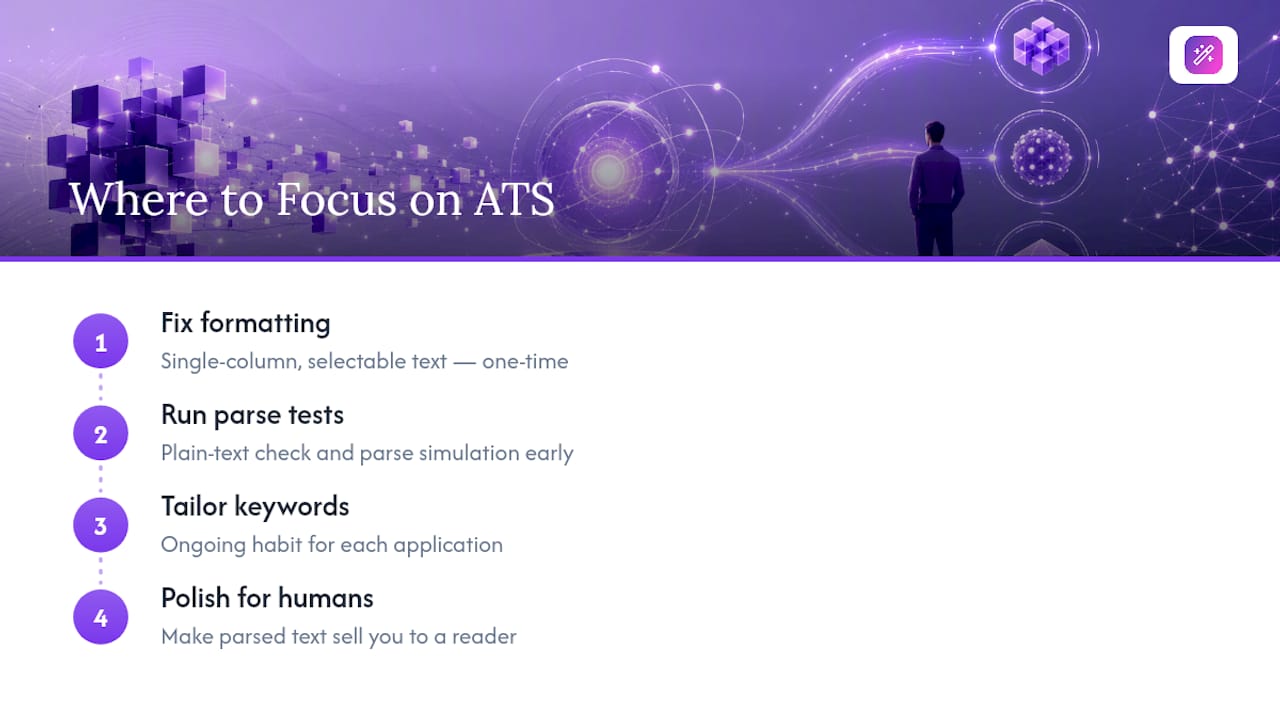
That distinction changes where you should spend your effort. Formatting fixes are mechanical and finite. Once your resume is single-column with selectable text, you’re done with that problem forever. Keyword tailoring is different. It’s not a one-time fix, it’s a habit you repeat for every application, because the job description changes every time.
Where most guides fall short is treating a parse-simulation score as the finish line. It’s a diagnostic, not a verdict. A resume can parse perfectly and still read like a list of duties instead of a case for why you’re the right hire. Prioritize the plain-text test and the parse simulation early, then spend the remaining time making sure a human who reads the parsed version actually wants to meet you.
— Andras
Get Your Resume ATS-Ready Without Starting From Scratch
Building an ATS-safe resume by hand means checking your own formatting, rewriting your own keywords for every job, and re-testing after every edit. Some platforms handle the mechanical part automatically: their template libraries default to single-column, fully selectable layouts, and AI writing assistants rewrite your summary and bullet points to mirror a specific job posting’s language in seconds.

Start on the free plan, pick one job posting you actually want, and let EasyCV’s AI tailor a single resume to it. Export as .docx, run it through your own plain-text check, and see how much less manual reformatting you’re doing compared to editing a Word template from scratch. If you’re applying across multiple countries or languages, the CV translator carries your formatting over cleanly instead of forcing you to rebuild the layout in a second language. Once you’ve got one tailored resume working, browse the full feature set or head to Easy-cv to set up your first draft.
Where to Verify These ATS Resume Tactics Yourself
A few sources back the recommendations above with more detail than fits here:
- Columbia Career Education’s ATS guide covers optimization tactics and the Fortune 500 adoption figures cited earlier.
- MIT’s career resources offer a formatting checklist built for the same single-column, selectable-text standard described here.
- Indeed’s career guide and Coursera’s keyword article both walk through keyword extraction and placement in more depth.
- Total Cyber Academy’s Resume Ready program offers a machine-readability checklist geared toward tech and cybersecurity applicants specifically.
Sources
- Optimizing Your Resume for Applicant Tracking Systems | Columbia Career Education
- Make your resume* ATS-friendly — MIT
- Automated screening and ATS resume tips — Indeed Career Guide