6–11 Seconds: How Recruiters Read Resumes for Job Seekers
Recruiters spend roughly 6 to 11 seconds on that first pass, and nearly all of that time lands on key elements such as your name, titles, companies, dates, and education. Whether a resume earns 90 seconds of real reading or gets closed comes down to whether those five items are instantly obvious. The fix is layout, not more content: bold your current title, left-align your dates, and put one clear result in your top bullet.
TL;DR:
- Most recruiters spend only 6 to 11 seconds on your resume’s first pass, focusing mainly on your name, titles, companies, dates, and education.
- Proper formatting, such as bolding titles, left-aligning dates, and front-loading key achievements, significantly improves quick recognition and ATS parsing.
- ATS software often misreads resumes with tables, graphics, headers, footers, or inconsistent formats, so using a simple, single-column layout is best.
- Highlighting metrics, promotions, and named projects can capture recruiter attention and turn quick skim reads into deeper reviews.
- Customizing your resume to match specific job keywords, and testing it with parser tools, can dramatically increase your chances of passing both ATS and recruiter scans.
Table of Contents
- What Recruiters Look for in the First Few Seconds
- How ATS and AI Affect Resume Triage
- Layout Patterns That Speed Up Recruiter Comprehension
- What Makes a Recruiter Stop Scanning and Read Deeper
- Common Red Flags and Quick Fixes Recruiters Notice Immediately
- How to Test Your Resume the Way a Recruiter Would
- Agencies vs. In-House Recruiters vs. Hiring Managers
- Why Industry Expectations Change What Gets Scanned
- How Recruiters Read Employment Gaps and Frequent Job Changes
- The Role of Cover Letters in Resume Review
- Why Tailoring Beats a One-Size-Fits-All Resume
- Reading This Data as a Job Seeker, Not a Statistic
- Turn This Advice Into a Resume in Minutes, Not Hours
- Sources
- FAQ
What Recruiters Look for in the First Few Seconds
The 6 to 11 second range isn’t a guess. Career-center research from Tufts University confirms recruiters make an initial pass in that window, checking for basic fit before deciding whether to read further. A separate data study from InterviewPal found that better-organized resumes stretch that first glance closer to 11.2 seconds, with attention split heavily between the experience section and the summary or headline area, which receive the most attention.
That first glance isn’t random. Recruiters are running a mental checklist, and they’re running it fast:
- Name and contact info. Is this a real, reachable candidate?
- Current job title and company. Does this person already do something close to the role?
- Previous title and company. Is there a pattern, or a one-off?
- Dates. How recent is the experience, and are there obvious gaps?
- Education. Does it meet a minimum bar, if the role requires one?
Recruiter interviews back this up almost word for word. A survey of 20 recruiters conducted by QuickCV found that most recruiters rely on pattern matching: recognizable job titles and company names signal domain fit faster than any paragraph of prose could. If your title reads “Growth Ninja” instead of “Marketing Manager,” you’re asking a stranger to translate your resume before they’ve decided whether to keep reading it.
Making these fields unmissable is mostly a formatting job, not a writing job:
- Bold your job titles and company names so they pop against the surrounding text.
- Left-align dates in a consistent format (Month Year, not “6/23” one line and “June 2023” the next).
- Standardize your title language to match how the industry actually talks about the role, even if your internal title was different.
- Keep your most recent role at the top, always, with no exceptions for “but this older job was more impressive.”
The original “6 seconds” finding reported by Business Insider is older but still widely cited because the underlying behavior hasn’t changed. What’s changed is who’s doing part of that scanning first.
How ATS and AI Affect Resume Triage
Before a recruiter ever sees your resume, software probably already has. Roughly 90% of Fortune 500 companies use an Applicant Tracking System (ATS) according to Columbia Career Education, which parses your file, extracts fields like work history and skills, and often scores you against the job description before a human opens the document.
That means two audiences read every resume you submit: a parser and a person. Fail the first, and the second never gets the chance.
A few formatting habits routinely wreck ATS parsing:
- Tables, columns, and text boxes that scramble reading order when the system extracts text.
- Headers and footers, which many parsers skip entirely, including contact info stashed there.
- Images, icons, or graphics used to represent skills or ratings, which parsers can’t read at all.
- Unusual file formats. Save as a standard Word document (.docx) unless the job posting specifically requests a PDF.
- Abbreviated dates or inconsistent date formats that confuse date-range parsing.
Keyword strategy matters here too, but not the way most people think. Overloading a skills section with buzzwords from the job description can backfire with both the algorithm and the human reader. The smarter approach, per InterviewPal’s data study, is weaving 15 to 25 targeted keywords naturally through your summary and experience bullets, using each one two or three times in genuine context rather than dumping them in a list.
Pro Tip: Pull the exact phrasing from the job posting. If it says “cross-functional collaboration” and your resume says “worked with other teams,” the parser may not connect the two even though a human would.
Passing the ATS doesn’t guarantee an interview. It just earns you the 6 to 11 second human scan described above. Both hurdles are real, and clearing one without the other still leaves you stuck. If you want a more detailed pass at fixing the formatting side, this breakdown of how to improve your CV for ATS walks through the most common parsing failures.
Layout Patterns That Speed Up Recruiter Comprehension
Recruiters scan resumes in a pattern similar to how people scan web pages, moving fastest across the top third and down the left margin, slowing down only when something catches their eye. That’s why the top third of your first page carries so much weight, and why left-aligned dates and bold titles consistently outperform centered or right-aligned layouts. InterviewPal’s research found that single-column layouts with left-aligned key fields lead to longer reading times and cleaner ATS parsing than multi-column designs.
A layout built for fast scanning generally follows the same rules:
- Use a single column. Multi-column resumes look modern but scramble both eye movement and ATS parsing order.
- Pick a clean, standard font. Calibri, Arial, or Georgia at 10 to 12 points. Save the decorative fonts for your wedding invitations.
- Keep bullets consistent. Same symbol, same indentation, same punctuation style throughout the document.
- Cap bullets at three to five per role. More than that, and the recruiter’s eye starts skipping instead of reading.
- Front-load every bullet. Lead with the action or the result, not the setup. “Reduced onboarding time by 40%” beats “Was responsible for redesigning the onboarding process, which reduced…”
The mistakes that slow a scan down are just as predictable: dense paragraphs instead of bullets, icons standing in for skill levels, photo headshots eating space at the top of the page, and column layouts that force a recruiter’s eye to jump back and forth instead of moving in one direction. None of these are fatal on their own, but stacked together, they burn through your 6 to 11 seconds before the recruiter reaches your actual experience.
What Makes a Recruiter Stop Scanning and Read Deeper
Every resume gets skimmed, but few get read closely. Numbers, promotions, or named projects often act as attention-grabbers that breaks the rhythm of generic bullet points and makes a recruiter pause.
Metrics work because they answer the question a recruiter is already asking silently: “So what?” A bullet that says “managed a team” tells them nothing. A bullet that says “managed a team of 12 and cut turnover by 18% over one year” tells them you understand impact, not just duties.
Promotions do similar work. If you moved from Coordinator to Senior Coordinator to Team Lead at the same company, don’t bury that inside one long block of dates. List each title as its own line under the company, with its own dates. That visual break signals growth in half a second, without the recruiter reading a single word of description.
The InterviewPal data suggests the right structure can turn a 10 second skim into a 30 to 90 second read, simply because the recruiter’s brain registers relevance early and decides to keep going.
A reliable bullet formula, in order:
- Lead with the action verb or the metric, whichever is stronger.
- Follow with the specific result or number.
- Close with the context that makes the number meaningful.
“Cut customer response time from 24 hours to 4 by restructuring the support queue” does more work in one line than three sentences of description ever could.
Common Red Flags and Quick Fixes Recruiters Notice Immediately
A single typo in your top three lines can end the review before it starts. Recruiters read fast, and fast readers are unforgiving about anything that suggests carelessness in a document you had unlimited time to polish.
The red flags that trigger a quick pass tend to repeat across every recruiter’s list:
- Typos or inconsistent capitalization in your name, title, or most recent job.
- Missing or vague employment dates, which read as an attempt to hide a gap.
- Inconsistent formatting between sections (different fonts, bullet styles, or spacing).
- Generic, unclear job titles that don’t map to any recognizable role.
- Overdesigned templates with graphics, color blocks, or icons that bury the actual content.
Most of these are fast to fix. A typo in your header takes two minutes to catch on a careful reread. Standardizing your date format across every role takes maybe ten minutes. Removing a “Hobbies” section or the outdated line “References available upon request” (recruiters know you have references; nobody has needed that sentence since dial-up internet) takes thirty seconds each.
The bigger job is a full layout reformat, swapping a two-column template for a single-column one, which realistically takes 30 to 60 minutes done properly. Do the two-minute fixes first. They cost nothing and remove the fastest way to get rejected before anyone reads your experience.
How to Test Your Resume the Way a Recruiter Would
You don’t need to guess whether your resume works. You can test it the same way a recruiter experiences it, in under ten minutes.
Start with a timed glance test. Hand your resume to a friend, set a timer for 8 seconds, then take it away and ask what they remember. If they can’t tell you your current title, your most recent company, or one concrete accomplishment, your top section isn’t doing its job.
Next, run an ATS parse check. Feeding your resume into a parser preview tool shows exactly which fields the system extracted correctly and which ones got scrambled or missed, a much better indicator than reading the file yourself. Columbia’s career center recommends pairing that with a keyword match check against a specific job posting, since one test shows what got read and the other shows how well it scored.
Practical testing steps:
- Time a friend’s 8 second glance and ask what they remember.
- Run your resume through a parser preview to confirm the ATS reads your dates, titles, and sections correctly.
- Run a keyword match check against a real job posting to see which terms line up and which are missing.
- Repeat after every major edit, since small formatting changes can shift how a parser reads the document.
Pro Tip: Test the same resume against two different job postings in the same field. If your keyword match score swings by more than 20 points, your resume is too generic and needs tailored language for each application.
Templates and built-in parser preview tools that support the loop: draft, preview what the system reads, adjust, and re-test, rather than submitting blind and hoping.
Agencies vs. In-House Recruiters vs. Hiring Managers
Not every reader scans your resume the same way, and knowing who’s likely looking at it changes what to prioritize.
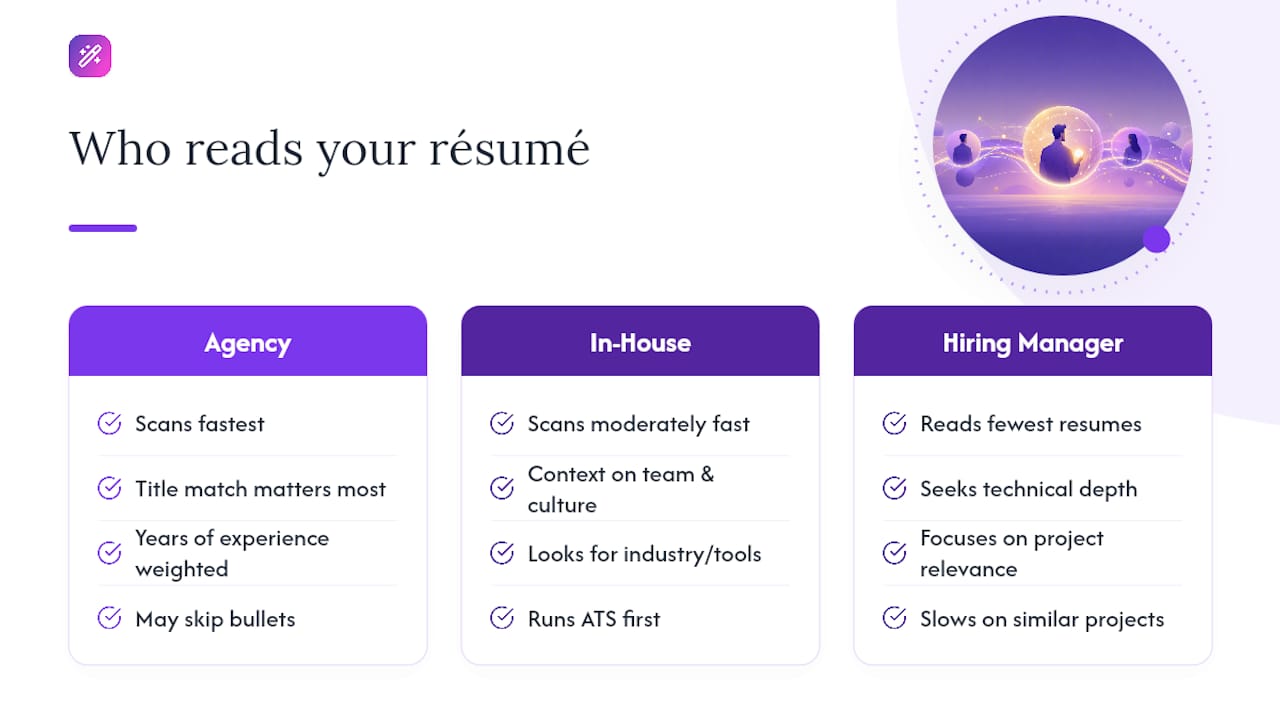
Agency recruiters, who often work multiple open roles across different client companies at once, tend to scan the fastest and the most transactionally. They’re checking for a fit against a specific job order, so title match and years of experience carry outsized weight. If your title doesn’t closely resemble the one they’re staffing, they may move on before reading your bullets at all.
In-house recruiters at a single company usually have more context on team needs and company culture, so they spend a bit more time on fit signals beyond the title, like relevant industry experience or specific tools mentioned in your bullets. They’re also more likely to be the ones running your resume through the company’s ATS first.
Hiring managers read differently from both. They tend to arrive after a recruiter has already filtered candidates, so they’re reading fewer resumes but reading them for technical depth and specific project relevance. A hiring manager is more likely to slow down on a bullet describing a project similar to one their team is currently tackling, even if the formatting around it is imperfect.
The practical takeaway: don’t design your resume purely for the fastest possible skim. Front-load the title and metrics for the recruiter’s quick pass, but keep enough concrete project detail further down for the hiring manager who reads past the first ten seconds.
Why Industry Expectations Change What Gets Scanned
A resume that works for a marketing role will get you nowhere in an engineering search, and not just because of the skills listed. Industries have different scanning conventions built into their hiring culture.
In technical fields like engineering or data science, recruiters and hiring managers often look for specific tools, languages, or certifications by name before they read anything else. A resume that says “built internal tools” without naming the stack (Python, SQL, whatever’s relevant) reads as vague to someone scanning for exact keyword matches.
Creative fields flip that priority. A portfolio link or a named campaign often matters more than a dense list of software proficiencies, and recruiters in these fields tend to tolerate more personality in the writing itself.
Highly regulated industries, like healthcare, finance, or law, lean hard on credentials and dates. A recruiter screening for a compliance role will check your certification dates and licensing status before reading a single accomplishment bullet, because a missing or lapsed credential is an automatic disqualifier regardless of how strong the rest of the resume is.
The fix isn’t a different resume for every field. It’s making sure the specific proof points your industry actually screens for sit in that top-third, easily scanned zone, instead of buried in paragraph four.
How Recruiters Read Employment Gaps and Frequent Job Changes
A gap or a string of short stints doesn’t automatically sink a resume, but it does change how a recruiter reads everything around it.
When a recruiter spots an unexplained gap in your dates, the instinct isn’t necessarily negative. It’s uncertain, and uncertainty slows down a fast scanner in the wrong way. They start looking for context: was this a layoff, a caregiving period, further education, a business that didn’t work out? A one-line note next to the gap (“Career break for full-time caregiving, 2023 to 2024”) answers the question before it becomes a reason to set the resume aside.
Frequent job changes get read differently depending on pattern. Several short stints at similar-level roles across unrelated companies can read as instability. The same short stints tied to a clear thread, contract work, a startup that got acquired, a promotion track, tend to read as adaptability instead. The dates alone don’t tell that story. The titles and a brief clause of context do.
The larger point is that recruiters aren’t hunting for a spotless timeline. They’re checking whether the story adds up quickly enough to justify more reading time. Silence around a gap invites the worst-case assumption; a short, honest explanation usually closes the question and moves the scan forward.
The Role of Cover Letters in Resume Review
Most recruiters open the resume first, not the cover letter, which means the cover letter’s job is different from what most job seekers assume.
A cover letter rarely rescues a resume that fails the initial scan. If the top third doesn’t establish relevance, a recruiter is unlikely to click through to a separate document to find out more. But for candidates who clear that first hurdle, a sharp, specific cover letter can be the deciding factor between two similarly qualified applicants, especially when it names the actual role, company, and a specific reason for the fit rather than a template greeting.
Generic cover letters (“I am writing to express my interest in this position…”) do more harm than good, since they signal a mass application rather than genuine interest. A short, three-paragraph letter that references something concrete about the company or the role, paired with one detail the resume didn’t have room for, tends to earn a longer look.
Supporting documents like portfolios, writing samples, or reference lists work the same way: they add weight after the resume has already earned interest, but they rarely create interest on their own. Treat the resume as the gatekeeper and everything else as reinforcement, not the other way around.
Why Tailoring Beats a One-Size-Fits-All Resume
A resume tailored to a specific job posting doesn’t just score better with an ATS. It changes what a human recruiter notices in that first scan, because the words on the page start echoing the words in the job description they’re holding in their head.
Recruiters read job postings closely before they read applications, whether they wrote the posting themselves or inherited it from a hiring manager. When your top bullet uses the exact terminology from that posting, “supply chain optimization” instead of “logistics improvements”, it registers as relevant faster than a technically accurate but differently worded description ever will.
This doesn’t mean rewriting your entire resume for every application. It means adjusting your summary line, reordering your bullets so the most relevant ones sit first under each role, and swapping in the specific terms the posting uses for skills you genuinely have. A resume tailored this way often takes 15 to 20 minutes per application, a small cost against the difference between clearing the ATS keyword score and getting screened out silently.
Reading This Data as a Job Seeker, Not a Statistic
The uncomfortable truth in all of this research is that recruiters aren’t being lazy when they scan for 6 to 11 seconds. They’re doing triage on a stack of applications with limited time, and triage rewards clarity over cleverness every time.
The job seekers who benefit most from this data aren’t the ones who write the most impressive resume in isolation. They’re the ones who design specifically for the scan: obvious titles, front-loaded metrics, dates a recruiter doesn’t have to hunt for. When I look at resumes that get quick call-backs, the pattern is rarely “better writing.” It’s better triage design.
A useful mental checklist: does the top third answer “who is this person and are they relevant” in under ten seconds? Does the ATS read the dates correctly? Does one bullet per role carry a real number? Resumes aren’t static documents. Treat each version as a draft to test against a real posting, adjust, and test again.
— Andras
Turn This Advice Into a Resume in Minutes, Not Hours
Knowing what recruiters scan for is one thing. Rebuilding your layout, rewording every bullet, and checking ATS compatibility by hand is another, and it’s usually where good advice stalls out. Certain resume builders close that gap by building scan-friendly rules directly into the editor, instead of requiring a complete reformatting from scratch.

Start with an ATS-friendly template built around single-column layouts and left-aligned dates, then let the AI writing assistant restructure your bullets into the action-plus-metric format recruiters scan fastest. Built-in keyword tools can compare a draft against a specific job posting so users can see their match before submitting, not after a rejection. If you’re applying across borders, the CV translator carries that same formatting logic across more than 30 languages instead of breaking it in translation.
A practical way to try it: preview how your current resume parses, apply the fixes this article covers, then time yourself giving it another scan. Better yet, check the job matcher to see which open roles already score close to your profile, so you’re tailoring toward postings worth the fifteen extra minutes. Start with the free plan and run your first parser preview today.
Sources
- How a Recruiter Reviews Your Resume – Career Center | Tufts University
- How Long Recruiters Actually Spend Reading Your Resume (Data Study) | InterviewPal blog
- Optimizing Your Resume for Applicant Tracking Systems | Columbia Career Education
- Here’s what recruiters look at during the 6 seconds they spend on your resume | Business Insider
FAQ
What is the 70/30 rule in hiring?
There’s no single standardized rule with such specific ratios tied to hiring across the industry; the phrase gets used inconsistently for different ratios (skills versus culture fit, or time spent on sourcing versus screening). Treat any specific version you encounter as one recruiter’s or firm’s framework rather than an industry standard.
What is the 7 second rule in resume?
It’s a rounded shorthand for the same finding covered throughout this article: recruiters make an initial relevance judgment in roughly 6 to 11 seconds, scanning your title, company, dates, and education before deciding whether to keep reading.
What are red flags for recruiters?
Typos in the top lines, missing or vague employment dates, inconsistent formatting, generic job titles, and overdesigned templates that bury actual content all tend to trigger a quick pass rather than a closer read.
What are the 5 C’s of recruitment?
Definitions vary across recruiting resources, and no single version appears consistently enough to state as a fixed standard; some lists include credibility, communication, and cultural fit, but the exact five terms differ by source.
Can EasyCV help me pass an ATS scan?
EasyCV’s templates are built for single-column, ATS-friendly formatting, and its parser preview shows which fields the system reads correctly before you submit, which addresses the two biggest ATS failure points covered above.