Cover Letter Format: The Exact Structure That Gets Read
A correct cover letter is split into a few short paragraphs that fit on a single page, set in a professional font size suited for readability with 1-inch margins, with a header that matches your resume. Save it as a PDF and name the file clearly. That’s the whole formula. Here is what to do with it right now:
- Match your resume’s font, size, and header style so the two documents read as one packet.
- Address the hiring manager by name whenever you can find one.
- Keep it to three or four paragraphs, never more than a single page.
- Export as PDF and name the file
FirstName_LastName_CoverLetter.pdf.
Each of those points gets its own section below, with the reasoning and the exceptions that matter.
Key Takeaways
A properly formatted cover letter fits one page, follows the header-greeting-opening-body-closing structure, and matches your resume’s font, size, and spacing exactly.
| Point | Details |
|---|---|
| One page, three to four paragraphs | Header, greeting, opening, one or two body paragraphs, and a closing. |
| Font size 11 to 12 points | Use Calibri, Arial, Georgia, Times New Roman, or Helvetica for readability and ATS compatibility. |
| Margins 1 to 1.25 inches | Keep single line spacing and a blank line between paragraphs instead of indents. |
| Save and name the file correctly | Export as PDF and name it FirstName_LastName_CoverLetter.pdf. |
| Use a tool built for tailoring | Easy CV’s generator matches resume formatting automatically and exports a ready PDF per application. |
Table of Contents
- What Is the Right Cover Letter Structure?
- What Font, Size, and Margins Should a Cover Letter Use?
- How Should You Format the Header and Contact Info?
- How Do You Address the Hiring Manager?
- How Do You Write Body Paragraphs That Actually Land?
- How Should You Close a Cover Letter?
- Should You Paste Your Letter Into an Email or Attach It?
- What Does a Properly Formatted Cover Letter Look Like?
- How Do You Explain Gaps or Career Changes in a Cover Letter?
- How Do You Customize a Cover Letter for Each Job Description?
- Where Should ATS Keywords Go in a Cover Letter?
- Should You Use Bullet Points or Paragraphs in a Cover Letter?
- An Editor’s Take on Cover Letter Formatting
- How Easy CV Speeds Up Cover Letter Formatting
- Sources
What Is the Right Cover Letter Structure?
A proper cover letter format generally includes header, greeting, opening, body, and closing sections, each with concise content to keep the letter on one page.
The header carries your contact information and sits at the top, styled to match your resume. The greeting is one line. The opening is one or two sentences that name the role and hook the reader. The body runs one or two paragraphs, and the closing wraps things up in three or four sentences with a call to action and your name.

If you’re using a formal business-letter layout rather than an email-style letter, add the date and the recipient’s name, title, and company address just below your header, left-aligned, before the greeting. Most digital applications skip this, but it’s still standard for print submissions or conservative industries like law and finance.
Follow this order when you draft:
- Header — your name, phone, email, and any relevant links.
- Greeting — a personalized salutation.
- Opening — the role you want and why you’re a fit, in one or two sentences.
- Body — one or two paragraphs connecting your experience to the job.
- Closing — a short thank-you and next step, then your name.
University career centers, including the University of Michigan’s career center, consistently recommend this five-part shape because it forces brevity. A recruiter skimming 200 applications doesn’t want six paragraphs of backstory.
What Font, Size, and Margins Should a Cover Letter Use?
Stick with fonts built for screens and printers alike: Calibri, Arial, Georgia, Times New Roman, or Helvetica, all recommended by Grammarly’s formatting guide for their readability and clean rendering in applicant tracking systems. Font size should sit at 11 or 12 points for body text.
Beyond the font, a few settings decide whether your letter looks put together or slapped down in ten minutes:
- Margins between 1 and 1.25 inches on all sides.
- Single line spacing within paragraphs, with a blank line between paragraphs instead of indents.
- Left alignment throughout. Never justify a cover letter; it creates awkward gaps between words.
- Total length of 250 to 400 words, which fits comfortably on one page at these settings.
Statistic Callout: University career centers, including Michigan’s, recommend one page made up of 3 to 4 paragraphs, with a font sized 10 to 12 points and margins between 1 and 1.25 inches, and matching your resume’s paper and font choice.
Export the finished letter as a PDF. Word documents can shift fonts and spacing depending on the software that opens them; a PDF locks the layout in place no matter what device or program a recruiter uses.
How Should You Format the Header and Contact Info?
Two header styles work, and which one you pick depends on where the letter is going.
The resume-matched block stacks your name, phone number, email, and city/state at the top, using the identical font and spacing as your resume header. Use this for attached PDF letters, where visual consistency across both documents matters most.
The compact right-aligned block puts a slimmer version of the same information in the upper right corner, which works well for formal business-letter formats with a date and recipient address underneath.
Either style should include:
- Full name, phone number, professional email.
- City and state (skip the full street address; it’s outdated for most industries).
- LinkedIn URL or portfolio link, if relevant to the role.
Pro Tip: Open your resume and cover letter side by side before you submit. If the header fonts, sizes, or spacing don’t match exactly, a recruiter notices, even if they can’t say why something feels off.
How Do You Address the Hiring Manager?
Find the name if you possibly can. Check the job posting, the company’s team page, or LinkedIn. A personalized greeting signals you did real homework, and etiquette guidance on job applications, including Emily Post’s cover letter etiquette, consistently favors addressing someone by name over a generic line.
When you truly can’t find a name, use these fallbacks, ranked by preference:
- “Dear Hiring Manager” — safe, standard, works everywhere.
- “Dear [Department] Team” — good when you know the department but not a person.
- Avoid “To Whom It May Concern” entirely. It reads as outdated and impersonal.
For your opening line, pick one lane.
How Do You Write Body Paragraphs That Actually Land?
Pick one or two achievements from the job description and build the body around them. Don’t try to cover your whole resume; the letter tells one story your resume can’t, according to career-center guidance from Boston College on connecting past work to a specific opening.
- Pick the achievement. Choose the one metric or project that most directly answers what the job posting asks for.
- Compress it into STAR. Situation and task in a half sentence, action and result in the next. “When our team lost its main vendor mid-quarter, I renegotiated three backup contracts in five days, keeping production on schedule.”
- Tie it to the role. Close the paragraph by naming exactly how that experience transfers: “That same vendor-management instinct is what your job posting calls for in the sourcing lead role.”
A single bulleted metric can work in place of a sentence if the number is strong enough to stand alone. Keep the whole body to two paragraphs at most.
Pro Tip: *Never restate a resume bullet word for word.
How Should You Close a Cover Letter?
End with three or four sentences: restate your interest, point to the attached resume, and invite next steps. Something like, “I’d welcome the chance to discuss how my background fits your team’s goals. Thank you for your time and consideration.”
For sign-offs, match the tone to the industry:
- “Sincerely” or “Best regards” for corporate and formal roles.
- “Thank you” or “Warm regards” for smaller companies or creative fields.
- Skip “Cheers” and “Best” alone; both read too casual for a first application.
Printed letters need a signature line with space for a handwritten signature above your typed name. Digital letters just need your typed full name.
Should You Paste Your Letter Into an Email or Attach It?
Check the application instructions first. When a posting requests attachments, send a PDF. When it says to apply by email with no attachment mentioned, the email body itself becomes your cover letter, and it needs the same paragraph breaks and spacing you’d use in a document, according to University of Michigan’s engineering career center.
- Format the subject line clearly: “Application for Senior Analyst, Job ID 4471, [Your Name].”
- Name the attached file
FirstName_LastName_CoverLetter.pdf, matching the same convention for your resume. - Open the exported PDF on both desktop and mobile before sending. A file that looks fine on a laptop can squish or shift on a phone screen.
Including a reference number in the subject line or opening paragraph, when the posting provides one, helps HR match your application correctly, a detail MIT’s career office flags as easy to overlook in high-volume hiring.
What Does a Properly Formatted Cover Letter Look Like?
Here’s a compact version you can adapt. Swap in your own company name, role, achievement, and metric.
“Dear [Hiring Manager Name], I’m writing to apply for the [Job Title] role at [Company]. My background in [relevant field] aligns closely with the requirements you’ve outlined. In my current position, I [achievement with a number], which directly supports the kind of results you’re looking for in this role. I’d welcome the opportunity to bring that same focus to [Company]. Thank you for your time and consideration. Sincerely, [Your Name].”
| Template Line | Function |
|---|---|
| Opening sentence | States the role and creates initial interest |
| First body sentence | Provides evidence through a specific achievement |
| Second body sentence | Ties that achievement directly to the job’s needs |
| Closing sentences | Delivers the call to action and professional sign-off |
How Do You Explain Gaps or Career Changes in a Cover Letter?
A gap or a pivot doesn’t need a confession. It needs one sentence of context and then a fast pivot to what you bring now. Recruiters have seen career breaks for caregiving, layoffs, further education, and health reasons; what stands out isn’t the gap itself but how directly you address it.
For an employment gap, name the timeframe briefly and connect it to something concrete: “After taking two years to complete a data analytics certification, I’m ready to apply those skills directly to a role like this one.” That’s it. No apology, no lengthy justification.
For a career change, the format shifts slightly. Open by naming the transferable skill before the job titles, since your resume alone won’t make that connection obvious. “My background in high school teaching built the presentation and stakeholder-communication skills your customer success role requires” does more work than listing five years of teaching titles and hoping the recruiter draws the connection themselves.
Keep this content in your body paragraph, not a separate section. A dedicated “gap explanation” paragraph draws more attention to the gap than folding it into your broader narrative. One sentence of context, one sentence of forward motion, then move on to your actual qualifications for the role.
If the gap or change is recent and directly relevant to the job (leaving a field to retrain for this exact one, for instance), it can become your strongest opening line rather than something buried mid-letter. Frame it as intentional, because in most cases, it was.
How Do You Customize a Cover Letter for Each Job Description?
Personalization goes beyond swapping the company name. Career centers, including Oregon State’s, repeatedly stress tailoring each letter to the specific posting rather than reusing one generic version across applications.
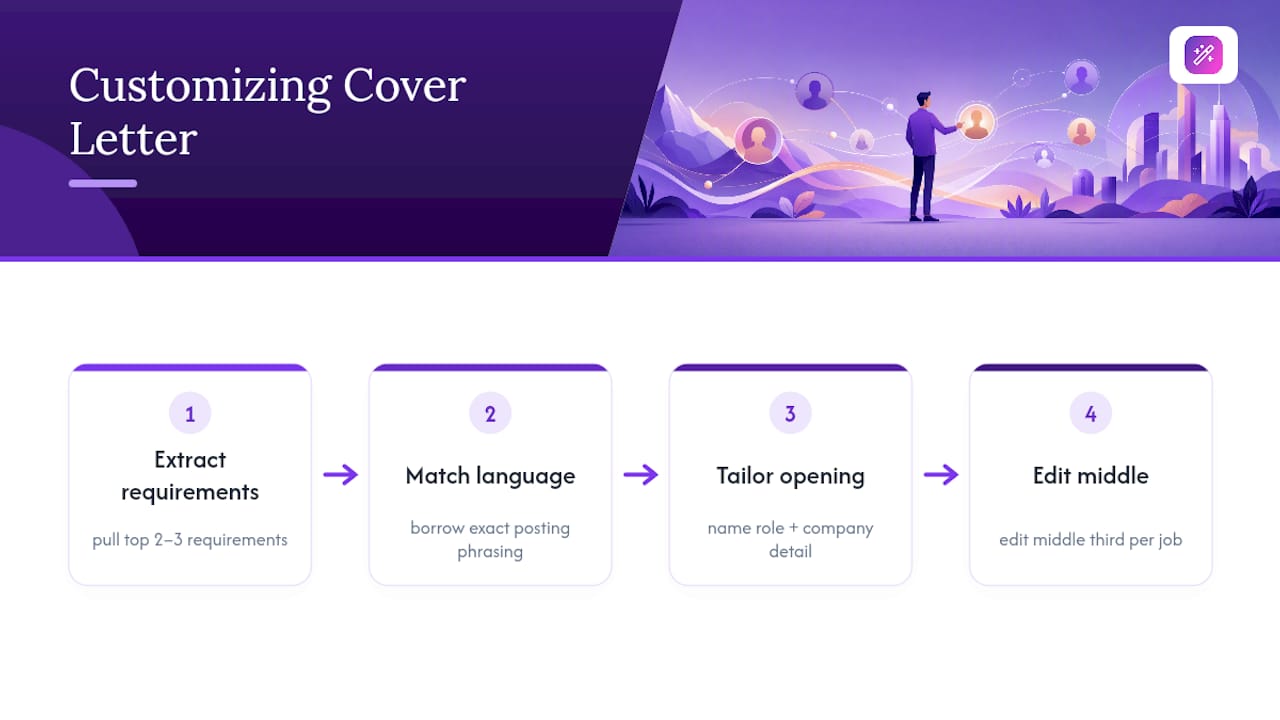
Start with the job description itself. Pull out the two or three requirements listed first, since postings usually rank priorities near the top. Those become your body paragraph’s focus, not whatever achievement happens to be easiest to write about.
Match language where it’s natural. If a posting says “cross-functional collaboration” and your resume says “worked with multiple departments,” borrow the posting’s exact phrase in your letter. This isn’t about disguising your experience; it’s about speaking the same language the hiring manager and any screening software already use.
Adjust your opening line per posting too. A generic opening like “I’m excited to apply for this position” wastes the most valuable line in the letter. Naming the specific role, and ideally referencing something particular about the company (a recent product launch, a stated value, a specific team), signals you didn’t mass-apply.
Keep a master version of your letter with your core achievements written out, then edit the middle third for each application rather than rewriting from scratch. This is exactly the kind of repetitive editing work that AI tools handle well: a cover letter generator built for tailoring can restructure your master content around a new job description in minutes instead of the twenty or thirty it takes by hand.
Where Should ATS Keywords Go in a Cover Letter?
Applicant tracking systems scan cover letters the same way they scan resumes, looking for keyword matches against the job posting. Placement matters as much as inclusion.
Put your strongest keyword matches in the first paragraph. Systems often weight early content more heavily, and a recruiter skimming manually reads the opening first anyway. If the posting lists “Salesforce,” “budget forecasting,” or a specific certification, work the exact phrase into your opening or first body sentence rather than saving it for the closing.
Avoid keyword lists disguised as sentences. “I have experience in project management, budgeting, forecasting, and stakeholder communication” reads as a scan job, not a cover letter. Instead, embed the same terms inside a real sentence about what you did: “I managed a $2 million project budget across four departments, forecasting spend against quarterly targets.”
Skip synonyms when the posting uses a specific term. If the job description says “SQL,” don’t write “database query languages.” ATS matching is often literal, so the exact term outperforms a paraphrase every time.
Keep formatting simple around keyword-heavy sentences. No tables, text boxes, or graphics inside the letter body. Plain paragraphs parse cleanly through every major ATS platform, while formatting elements can get garbled or skipped entirely during parsing.
Should You Use Bullet Points or Paragraphs in a Cover Letter?
Paragraphs remain the default for a reason: cover letters are meant to tell a short narrative, and bullets break that narrative into fragments. Use paragraphs for your opening, your STAR-style achievement story, and your closing.
Bullets earn their place in one specific spot: when you have a metric so strong it deserves to stand alone rather than get buried mid-sentence.
Limit yourself to one, maybe two bullets total, if you use them at all. A cover letter that’s mostly bullets starts looking like a second resume, which defeats its purpose. The letter’s job is connective tissue between your resume and the role. Paragraphs do that; lists don’t.
An Editor’s Take on Cover Letter Formatting
Most formatting advice treats structure like a rigid legal document, when really it’s closer to a proof of attention. A recruiter scanning applications can tell within seconds whether someone matched their resume font to their cover letter, and that small detail says more about diligence than any adjective in the opening paragraph.
The workflow tip I’d pass on: keep one master cover letter with your best two or three achievement stories fully written out, then export a fresh, tailored PDF for each application rather than editing the same file repeatedly. A cover letter generator built for that kind of repeated tailoring saves the fifteen minutes most people spend reformatting margins and headers every time they apply.
— Andras
How Easy CV Speeds Up Cover Letter Formatting
Once you know the format, the slow part is repeating it correctly for every single application. Easy CV builds the structure covered here directly into its cover letter generator, matching fonts and headers to your resume automatically and exporting a clean PDF every time.

The platform pairs that with ATS-friendly templates, a job matcher that scores openings against your profile before you apply, and translation into 30-plus languages if you’re applying across borders. For anyone customizing letters for a dozen postings a week, that consistency matters more than starting from a blank page each time.
A free tier lets you test the generator and templates before committing to a premium plan for unlimited exports and advanced AI tools. Head to Easy-cv to build a tailored letter for your next application in the format recruiters actually expect.
Sources
- Cover Letter Resources - University Career Center
- How to Format a Cover Letter: A Step-by-Step Guide for Job Seekers | Grammarly